
Switch tennis players
You want to check that a controller works with your Switch model, tennis game and play mode before buying anything extra. Nintendo’s UK site describes controller support for Nintendo Switch Sports and Mario Tennis Aces.


Start with the game and console you already have: Nintendo Switch Sports supports Joy-Con and Joy-Con 2, while Mario Tennis Aces offers motion controls with Joy-Con in Dynamic Duel mode. If you have limited room to swing, button controls are an option if your chosen game and mode support them. VR tennis also requires the right headset, console and a play mode that fits safely in your room.
You want to check that a controller works with your Switch model, tennis game and play mode before buying anything extra. Nintendo’s UK site describes controller support for Nintendo Switch Sports and Mario Tennis Aces.
You share a small room with furniture and want to choose between moving safely and playing with buttons. With VR, the space you need also depends on the play mode. Meta and the PlayStation Store UK outline space requirements for specific VR modes.
You want to play locally with someone else and check how many compatible controllers you need for your chosen game and play mode. Check the requirements for the specific game. Nintendo lists the controllers included in a Nintendo Switch 2 bundle.
| What to consider | What should you check? | Who is this important for? |
|---|---|---|
| Compatibility | Check your console model, game title and play mode. Nintendo Switch Sports does not support the Switch Pro Controller; motion controls in Mario Tennis Aces are available in Dynamic Duel mode. | If I’m buying a controller for a console I already own, I want to be sure it works with my game and preferred play mode. Around 33% of consumers prioritise compatibility. |
| Room to move | Make sure you have room to move your arms and, when playing wirelessly, attach the correct wrist strap. Meta recommends at least 2 by 2 metres of clear space for Quest room-scale play; the PlayStation Store UK specifies the same space for Tennis On-Court’s room-scale mode. | In a small, furnished room, I want to be able to move without hitting furniture or housemates. Around 27% of consumers prioritise a safe play area. |
| Playing together | Count the compatible controllers you already own and check how many players and controllers your chosen play mode requires. | If I want to play with a housemate, I want to know whether we already have enough suitable controllers. Around 20% of consumers prioritise local multiplayer. |
| Everything you need | Check whether you also need the right console, game or VR headset, as well as the controller. An active Nintendo Switch Online membership is required for the global online feature mentioned for Nintendo Switch Sports. | I want to know in advance which devices and services I need for my chosen way to play, rather than focusing only on the controller. Around 13% of consumers want to keep additional requirements to a minimum. |
| VR tennis | Check the headset, controllers, game title, supported modes and available clear space as one complete setup. According to the PlayStation Store UK, Tennis On-Court on PS5 requires PlayStation VR2 and VR2 Sense. | If I want to play tennis in VR rather than on a regular screen, I want to check first that the complete setup will work in my room. Around 7% of consumers prioritise VR tennis. |
Not every motion controller works with every game or play mode. Nintendo Switch Sports does not support the Switch Pro Controller; Mario Tennis Aces offers motion controls with Joy-Con in Dynamic Duel mode.
Before buying, check the exact game title, console and play mode you want to use.
A holder does not replace the supported Joy-Con in the Nintendo motion-control modes covered here.
Check that the package actually includes the controller and that it works with your console.
Meta recommends at least 2 by 2 metres of clear space for Quest room-scale play. The PlayStation Store UK specifies the same minimum space for Tennis On-Court’s room-scale mode.
Measure your clear play area and check whether the game supports a suitable seated or stationary mode before choosing a VR setup.
Joy-Con for Switch and Joy-Con 2 for Switch 2 are relevant options for the Nintendo tennis games covered here.
PlayStation VR2 with VR2 Sense controllers is a VR option for Tennis On-Court on PS5.
Meta Quest is another VR option; Meta’s Dutch store lists Tennis On-Court.
This selection includes Joy-Con for Nintendo Switch and Joy-Con 2 for Nintendo Switch 2, for games and play modes that support these controllers.
 No image available
A pair of Joy-Con for supported Nintendo Switch tennis games and motion-control modes. Nintendo lists Joy-Con support for Nintendo Switch Sports and motion controls in Dynamic Duel mode in Mario Tennis Aces.
The product description lists motion sensors, wireless use and wrist straps. When playing wirelessly, attach the correct wrist strap and make sure you have room to move your arms.
 No image available
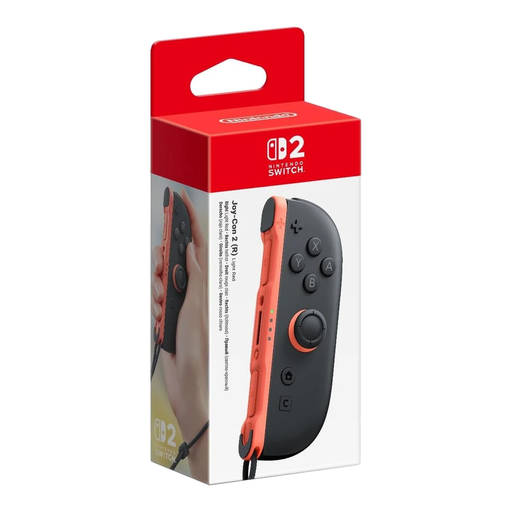
This right Joy-Con 2 is designed for a supported Switch 2 game or play mode. Nintendo lists Joy-Con 2 as supported for Nintendo Switch Sports.
The product title specifies one right Joy-Con 2 for Nintendo Switch 2. When playing wirelessly with motion controls, use the correct Joy-Con 2 wrist strap; it does not fit original Joy-Con controllers.
 No image available
A pair of Joy-Con 2 for supported Nintendo Switch 2 games and play modes. Nintendo lists Joy-Con 2 as supported for Nintendo Switch Sports.
The product description lists motion controls and two wrist straps. Joy-Con 2 is designed for Nintendo Switch 2; the wrist straps do not fit original Joy-Con controllers.
No. Nintendo’s UK site states that Nintendo Switch Sports does not support the Pro Controller or handheld mode. For other tennis games, check separately which controllers and play modes are supported.
Nintendo says to attach and secure the correct wrist strap to the Joy-Con when using it wirelessly. Make sure you also have enough room to move your arm; a Joy-Con 2 wrist strap does not fit an original Joy-Con.
Not for every VR mode. Meta recommends at least 2 by 2 metres of clear space for Quest room-scale play and suggests stationary play as an alternative when space is limited. The PlayStation Store UK specifies at least 2 by 2 metres for Tennis On-Court’s room-scale mode and also lists seated and standing modes. Check that your chosen game and the movements involved will fit in the space you have available.
Not automatically. Nintendo states that an active Nintendo Switch Online membership is required for the global online feature mentioned for Nintendo Switch Sports. A standard Nintendo Switch 2 bundle includes left and right Joy-Con 2 controllers; check what comes with your own bundle and what your chosen play mode requires before buying anything else.
For many distance purchases from a business, the Dutch government says you have a 14-day cooling-off period, although exceptions may apply. You are also entitled to a product that is of satisfactory quality; according to the Dutch government, there is no fixed statutory warranty period of exactly two years in the Netherlands. If there’s a problem, contact the seller and check the terms that apply to your purchase.