
Players who want to swing
If you want to play tennis in Nintendo Switch Sports using arm movements, check that the controller suits both your console and chosen play style. When using individual Joy-Con controllers, use the matching wrist strap.


Choose your tennis game and console first. For Nintendo Switch Sports, Joy-Con or Joy-Con 2 controllers are the right choice, while TopSpin 2K25 on PS5 and Xbox is played with a standard gamepad. Then decide how you’ll connect your headphones. Nintendo says that using Bluetooth audio on Switch and Switch 2 limits the number of wireless controllers that can be connected at the same time.
If you want to play tennis in Nintendo Switch Sports using arm movements, check that the controller suits both your console and chosen play style. When using individual Joy-Con controllers, use the matching wrist strap.
If you want to connect your audio through a socket on the controller, choose your console and tennis game first. For example, the socket on a Switch 2 Pro Controller doesn’t make it compatible with Nintendo Switch Sports.
If you’re playing with others on one system, check how many controllers your game mode needs and whether Bluetooth audio will affect your controller setup.
Start with the tennis game and console, then check controller compatibility, how you’ll connect your headphones and how many controllers you need to play together.
| What to consider | What to look for | Who is this important for? |
|---|---|---|
| Motion controls | Check whether your exact tennis game supports Joy-Con or Joy-Con 2. Nintendo Netherlands says the Pro Controller families aren’t compatible with Nintendo Switch Sports. | If I want to play tennis using arm movements, I need to know the game supports my controller; around 33% of consumers cite motion controls as their main reason. |
| Connecting headphones | Decide whether you want to use a wired connection on the controller or Bluetooth audio on the system. Nintendo Netherlands says Bluetooth audio on Switch and Switch 2 allows a maximum of two wireless controllers. | I want to connect my headphones without disrupting my controller setup; around 27% of consumers prioritise audio connectivity. |
| Button controls | First choose a game and platform that support gamepad controls, then check that the controller is compatible with your console version. | I prefer sitting down and using buttons rather than swinging my arms; around 20% of consumers cite standard gamepad controls as their main reason. |
| Playing together locally | Check how many controllers your chosen game mode needs. With Bluetooth audio, a maximum of two wireless controllers can be connected to Switch and Switch 2, according to Nintendo Netherlands. | If I’m playing locally with others, I want to make sure there are enough controllers when my headphones are connected; around 20% of consumers prioritise playing together. |
A motion sensor doesn’t automatically mean the tennis game supports that controller. Nintendo says the Switch Pro Controller and Switch 2 Pro Controller aren’t compatible with Nintendo Switch Sports.
Check compatibility with the exact game and console before choosing a controller.
When using Bluetooth audio on Nintendo Switch and Nintendo Switch 2, you can connect a maximum of two wireless controllers. A pair of Joy-Con controllers already uses both connections.
Count how many controllers your game mode needs, then decide how you’ll connect your headphones.
Joy-Con 2 is designed for Switch 2, and Joy-Con 2 wrist straps don’t fit the original Joy-Con controllers.
Check your console and controller versions, and use a wrist strap that matches your controller, especially if you’re playing with swinging movements.
Relevant for motion-controlled tennis in Nintendo Switch Sports and for controllers on Nintendo Switch systems.
Relevant for playing TopSpin 2K25 on PS5 with a DualSense gamepad.
Relevant for playing TopSpin 2K25 on Xbox Series X|S with an Xbox Wireless Controller.
This selection includes Joy-Con options for motion-controlled tennis on Switch 2, as well as gamepad options for other compatible tennis games. Check that your chosen controller is supported by your game and console.
 No image available
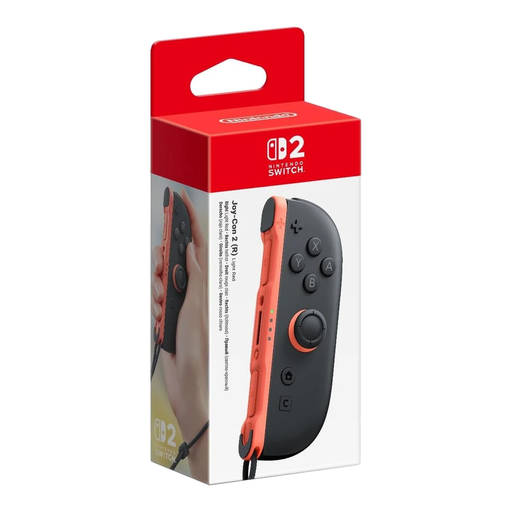
A single right Joy-Con 2 for motion-controlled play; this isn’t a pair. Nintendo lists Joy-Con 2 as a supported controller option for Nintendo Switch Sports.
The product description mentions motion controls and an included wrist strap. Use a wrist strap that matches your controller version.
 No image available
A gamepad option for tennis games that support this controller. It isn’t compatible with Nintendo Switch Sports; check compatibility for any other game.
The product description mentions gamepad controls, motion controls and HD Rumble.
 No image available
A pair of Joy-Con 2 controllers for motion-controlled tennis on Switch 2. Nintendo lists Joy-Con 2 as a supported controller option for Nintendo Switch Sports.
The pair includes two controllers. A maximum of two wireless controllers can be connected to Switch 2 when using Bluetooth audio, according to Nintendo Netherlands.
 No image available
A DualSense option for gamepad play on PS5. The Dutch PlayStation Store lists DualSense support for TopSpin 2K25.
The product description mentions a 3.5mm socket for a wired headset.
 No image available
This controller isn’t compatible with Nintendo Switch Sports. For any other tennis game, check whether it supports the Nintendo Switch Pro Controller.
The product description mentions wireless connectivity, motion controls and HD Rumble.
No. Nintendo Netherlands says that neither the Nintendo Switch Pro Controller nor the Nintendo Switch 2 Pro Controller is compatible with Nintendo Switch Sports. Check support for the exact game, not just the console.
Yes, but bear the number of controllers in mind: Nintendo says a maximum of two wireless controllers can be connected when using Bluetooth audio on Switch and Switch 2. A pair of Joy-Con controllers counts as two. Nintendo doesn’t support microphones through this Bluetooth audio connection and warns that there may be audio delay.
Use the wrist strap that matches your Joy-Con version, attach it and tighten the lock without making it uncomfortably tight. Nintendo says Joy-Con 2 wrist straps don’t fit the original Joy-Con controllers.
It depends on the game and console. Nintendo says you need an active Nintendo Switch Online membership to play Nintendo Switch Sports online with players around the world. The Dutch PlayStation Store lists PlayStation Plus as a requirement for playing TopSpin 2K25 online on PS5; the Xbox game page lists a separate Game Pass subscription for online multiplayer on console. Check the current terms for your chosen game mode.
According to the Dutch Government, when you buy from a business online, you’ll often have a 14-day cooling-off period, although exceptions depend on the type of purchase. You’re also entitled to a product that meets legal requirements under the statutory guarantee. If there’s a problem, contact the seller to find a solution.