Start by checking the exact game, system and game mode you want to play. A button-based gamepad means you won’t need to swing your arm next to your desk, while motion controls are only suitable if the tennis mode supports them and you have enough clear space. Nintendo Switch Sports supports Joy-Con and, depending on the sport, Joy-Con 2; Nintendo Switch and Switch 2 Pro Controllers are not compatible with the game. For TopSpin 2K25 on PC, 2K recommends a gamepad with two analogue sticks.
Which controller is right for you?
Desk gamer with no room to swing
If you want to play next to a monitor or other items without swinging your arm, start by checking what your game and system support. Nintendo describes motion controls for specific Switch games and modes; for TopSpin 2K25 on PC, 2K recommends a gamepad with two analogue sticks.
Switch player who wants to swing
If you want to feel like you’re making a tennis shot, check whether your chosen game mode supports motion controls and clear some space before you play. Nintendo describes Joy-Con motion controls for Swing Mode in Mario Tennis Aces and recommends wearing the appropriate wrist strap when playing wirelessly.
PC player looking for a simple connection
For a supported Windows tennis game, consider a wired or wireless gamepad. Check that your game and PC support the controller and connection. Microsoft describes Bluetooth and USB-C support for Windows 10/11 with the Xbox Wireless Controller version that includes a USB-C cable, while 8BitDo lists Windows compatibility for the Ultimate 2C Wired Controller.
What should you consider when choosing?
Button-based gamepad
Choose this option: if you’re playing at a small desk, don’t want to swing your arm and your game supports a gamepad. For TopSpin 2K25 on PC, 2K recommends two analogue sticks.
Bear in mind: check support for your specific game and model. A wired controller needs room for its cable, while a wireless controller needs a suitable connection and power source.
Joy-Con with motion controls
Choose this option: if you want to swing your arm, your chosen game mode supports it and you can clear enough space around your desk. Nintendo lists Joy-Con support for Swing Mode in Mario Tennis Aces and Joy-Con support for Nintendo Switch Sports; Joy-Con 2 is supported in that game depending on the sport.
Bear in mind: Nintendo Switch Sports does not support the Pro Controller. When playing wirelessly, wear the wrist strap made for the relevant Joy-Con generation, and don’t play somewhere you can’t safely make enough room.
| Buying concern |
What to look for |
Who should consider this? |
| Moving safely in a small space |
Check the game mode, clear some space and use the appropriate wrist strap when playing wirelessly with Joy-Con. |
If I want to play next to my screen or other items, I need to know whether it’s safe to swing my arm there; around 31% of consumers put safe controls in a limited space first. |
| Compatibility with the game and system |
Check the exact game title, system, game mode and supported controller. |
I want to avoid buying a controller that doesn’t work with my game or system; around 31% of consumers make compatibility their main buying concern. |
| Making a swinging motion |
Check whether the specific tennis mode you want to play supports motion controls, and which type of controller it requires. |
If I want to play tennis by swinging my arm, I need a supported motion-control mode; around 23% of consumers make this style of play their top priority. |
| Connecting at your desk |
Check whether your device supports USB or Bluetooth and how the specific controller is powered. |
I want to know whether a cable will get in the way and how to keep the controller connected; around 15% of consumers give the most weight to connectivity and everyday convenience. |
Common buying mistakes
-
Buying a Pro Controller for Nintendo Switch Sports
Nintendo states that neither the Nintendo Switch Pro Controller nor the Nintendo Switch 2 Pro Controller is compatible with Nintendo Switch Sports. An unsupported controller won’t work for the game mode you want to play.
Check the game’s requirements and the sport you’ve chosen before buying. For this game, look for Joy-Con support.
-
Assuming a motion sensor or mouse feature controls every tennis game
A controller feature doesn’t prove that a specific tennis game or mode uses it. Nintendo describes Joy-Con 2 mouse controls only for software that supports mouse controls.
Check the controls for your exact game and mode before choosing a controller.
-
Swinging between your screen and items on your desk
A motion-control mode needs space around your playing area. Nintendo recommends leaving enough clear space and using the appropriate wrist strap when playing wirelessly with Joy-Con.
Clear the area first. If you can’t do so safely, choose a game or mode that you can control with buttons.
-
Choosing based on the controller alone
The game mode, connection and power source can all affect whether your setup works as you want it to. Nintendo also lists a Nintendo Switch Online membership as a requirement for playing Nintendo Switch Sports online.
Check what your game requires, and for the exact controller, check whether the version you’re considering includes a cable, batteries or a way to recharge it.
Brands to consider
Nintendo
Worth considering for Switch games where Joy-Con motion controls are suitable for your chosen game and mode.
- Nintendo describes Joy-Con support for Swing Mode in Mario Tennis Aces and Joy-Con support for Nintendo Switch Sports; Joy-Con 2 is supported in that game depending on the sport.
- Nintendo Switch Sports does not support the Switch or Switch 2 Pro Controller. Joy-Con and Joy-Con 2 wrist straps are not interchangeable. Joy-Con 2 mouse controls only work with software that supports mouse controls.
Xbox
A gamepad option for supported Windows and Xbox games when you want to play with buttons.
- Microsoft describes Bluetooth and USB-C support for Windows 10/11 with the Xbox Wireless Controller version that includes a USB-C cable.
- Connecting to Windows doesn’t confirm that a specific tennis game supports the controller. Check the version, connection and power source.
8BitDo
A wired option for a supported Windows game if a USB cable is practical for your desk.
- 8BitDo lists Windows compatibility, two sticks and an included USB cable for the Ultimate 2C Wired Controller.
- The cable will run across or along your desk, and you’ll still need to check separately whether the specific tennis game supports the controller.
PlayStation
Worth considering for supported tennis games on PS5 and compatible games on PC.
- PlayStation describes USB and Bluetooth connections with supported devices and games.
- Connecting to a PC doesn’t mean every DualSense feature will work in a specific tennis game.
Joybuy products
This selection includes gamepads for button-based controls on PC and Xbox, as well as Joy-Con 2 for motion controls on Switch 2. Check which controllers are supported by your game and chosen mode.
 No image available
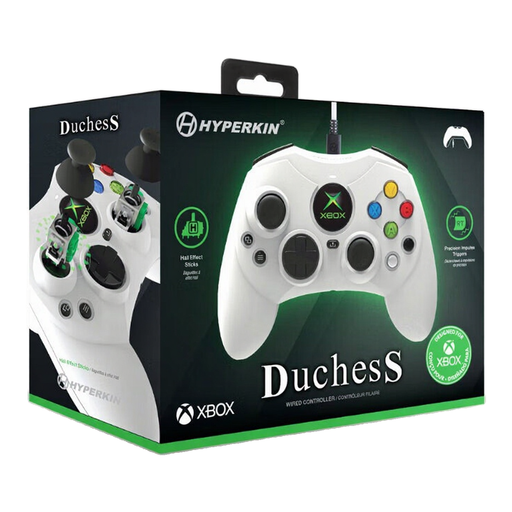
Hyperkin DuchesS wired controller for Xbox Series X|S, Xbox One and Windows 11/10 (white)
A good fit for button-based play on a Windows PC, if the tennis game supports this controller.
The product description lists Windows 10/11 and Xbox compatibility, Hall Effect sticks, impulse triggers and a detachable 3-metre USB-C cable.
View at Joybuy
 No image available
Xbox Wireless Controller (Robot White)
A wireless gamepad option for a supported PC or Xbox tennis game if you’d rather not have a cable across your desk.
The product description lists Bluetooth, Xbox Wireless, USB-C, a hybrid D-pad and AA batteries for power.
View at Joybuy
 No image available
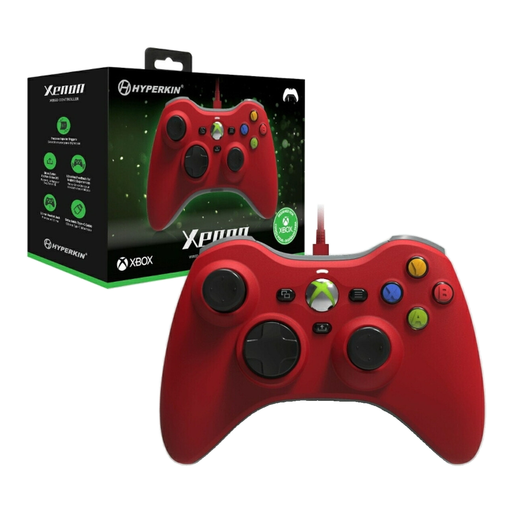
Hyperkin Xenon wired controller for Xbox Series X|S, Xbox 1 and Windows 11/10 (red)
Worth considering for button-based play on a supported Windows game, if a cable works for your desk.
The product description lists Windows 10/11 and Xbox compatibility, impulse triggers, vibration feedback and a detachable Type-C cable.
View at Joybuy
 No image available
GameSir Cyclone 2 Multiplatform Controller (White-Bundle Edition)
An option to consider for a supported PC game if you want a choice of wired and wireless connections.
The product description lists TMR sticks, a gyroscope, and wired, Bluetooth and dongle connections. The title also mentions a charging station and support for PC and Switch; this doesn’t confirm compatibility with a specific tennis game.
View at Joybuy
 No image available
Nintendo Switch 2 Official Joy-Con 2 Pair (Light Blue/Light Red)
A good fit for a Switch 2 game mode with motion controls, if the game and chosen sport support these Joy-Con 2 controllers.
The product description lists two Joy-Con 2 controllers and two matching wrist straps. Clear some space for motion-controlled play and use the wrist straps for this generation.
View at Joybuy
Frequently asked questions
Can I use a Switch Pro Controller to play tennis in Nintendo Switch Sports?
No. Nintendo states that neither the Nintendo Switch Pro Controller nor the Nintendo Switch 2 Pro Controller is compatible with Nintendo Switch Sports. For this game, check which Joy-Con controllers the sport you’ve chosen supports.
Can I play Mario Tennis Aces at my desk without swinging my arm?
Nintendo describes traditional tennis in multiplayer mode, as well as the motion-controlled Swing Mode. First choose the mode you want to play, then check which controllers your setup supports for it.
Can I use Joy-Con 2 as a mouse to play a tennis game?
Only if the software in question supports mouse controls. Nintendo describes Joy-Con 2 mouse controls for use on a flat surface, but this feature doesn’t confirm that it will work with a specific tennis game. The mouse feature may not work well on some surfaces, such as glass.
Which wrist strap should I use with motion controls?
Use the wrist strap made for your Joy-Con generation. Nintendo recommends attaching it for wireless play; Joy-Con and Joy-Con 2 wrist straps are not interchangeable. Make sure there’s enough clear space around your playing area, too.
Do I need an extra subscription or batteries?
That depends on your game and controller. Nintendo lists an active Nintendo Switch Online membership as a requirement for playing Nintendo Switch Sports online. If you’re using a wireless controller, check how the specific version is powered and whether the power source is included.


