Start by choosing your tennis game and console: Nintendo Switch Sports uses a Joy-Con or Joy-Con 2 for tennis, while the PS5 version of TopSpin 2K25 supports DualSense. Swinging is only suitable if you have enough space and wear the correct wrist strap; otherwise, choose a game that supports standard button controls.
Who plays tennis in a shared bedroom?
Player who can swing in a clear space
Wants to make tennis movements on a Switch and can clear space around their arms, furniture and housemates beforehand. Nintendo Netherlands advises Joy-Con players to be aware of their surroundings and leave plenty of room.
Seated player in a crowded room
Wants to play tennis without making big arm movements, so chooses a game and platform with standard controller controls. PlayStation lists DualSense support for the PS5 version of TopSpin 2K25.
Player who wants to play with a housemate
Wants to play locally and checks how many controllers the chosen game and mode require. Nintendo describes tennis in Nintendo Switch Sports as doubles played with Joy-Con controls.
What should you consider when choosing?
Joy-Con or Joy-Con 2 for swing tennis
Choose this option: if you’re playing Nintendo Switch Sports on a supported system and can safely clear enough space.
Bear in mind: swinging requires space; use the wrist strap designed for your controller model.
Standard gamepad for seated tennis
Choose this option: if you prefer playing with buttons, for example with DualSense and TopSpin 2K25 on PS5.
Bear in mind: these controls don’t replace the Joy-Con controls required by Nintendo Switch Sports; according to PlayStation, online play in TopSpin 2K25 requires PS Plus.
Alternative Switch gamepad
Choose this option: if your chosen tennis game and mode support a standard controller.
Bear in mind: motion controls on a gamepad don’t, by themselves, prove that it works as a tennis controller in Nintendo Switch Sports.
| What to consider |
What should you check? |
Who is this important for? |
| Being able to move safely |
Can you clear space around the bed, furniture and housemates? Use the correct wrist strap and make sure it’s fastened. |
If I want to swing, I need to make sure I won’t hit anyone or anything first; around 36% of consumers put being able to move safely first. |
| Game and console compatibility |
Check the exact game, mode and console, then make sure that combination supports the controller. |
I don’t want a controller that works with my console but not my tennis game; around 29% of consumers put compatibility first. |
| Minimising disruption to housemates |
Choose a tennis game with suitable button controls and check how you can connect headphones. |
If you share a room, playing seated may suit you better than swinging; around 21% of consumers prioritise minimising disruption to housemates. |
| Playing together |
Check how many controllers you need, what’s included with the console and whether you want to play locally or online. |
I want to play on the same system as my housemate and only buy what we need; around 14% of consumers put local multiplayer first. |
Common buying mistakes
-
Confusing motion controls with game support
Nintendo does not support Pro Controllers with Nintendo Switch Sports. So another gamepad with motion controls won’t automatically work with the game.
Check the requirements for the exact tennis game and mode, not just the sensors listed for the controller.
-
Assuming the original Joy-Con and Joy-Con 2 are interchangeable
Nintendo says the original Joy-Con can sync wirelessly with Switch 2, but can’t be attached to or charged by the console. A Joy-Con 2 wrist strap won’t fit the original Joy-Con.
Check the controller model, charging options and matching wrist strap separately.
You’ll need other suitable equipment to charge the original Joy-Con with Switch 2.
-
Buying an extra set before checking what’s included with the console
Nintendo says a Switch 2 comes with one left and one right Joy-Con 2, plus two wrist straps.
First, count the controllers you already have, then check what your chosen game and local mode require.
An extra set could go unused if you already have the controllers you need.
-
Assuming local and online play have the same subscription requirements
Nintendo lists Switch Online as a requirement for online play in Nintendo Switch Sports; PlayStation lists PS Plus for online play in TopSpin 2K25.
First decide whether you want to play on the same system or over the internet, then check the requirements for your chosen game.
Brands to compare
Nintendo
For motion-controlled tennis in Nintendo Switch Sports on a supported system.
- Nintendo explains how to use a Joy-Con as a racket in tennis; Joy-Con 2 is also supported, depending on the sport.
- Pro Controllers aren’t compatible with Nintendo Switch Sports. The original Joy-Con can’t be attached to or charged by Switch 2.
Sony
A PS5 option for players who want to play TopSpin 2K25 with a standard controller.
- PlayStation lists DualSense vibration support for the PS5 version of TopSpin 2K25.
- This doesn’t confirm compatibility with Nintendo Switch Sports. PlayStation lists PS Plus as a requirement for online play in TopSpin 2K25.
PowerA
An alternative Switch gamepad for games that support the model.
- PowerA lists motion controls and a rechargeable battery for the Enhanced Wireless Controller Rechargeable.
- The listed specifications don’t confirm that it works as a tennis controller in Nintendo Switch Sports. PowerA says this model doesn’t support HD rumble, IR or amiibo NFC.
8BitDo
A configurable gamepad for supported Switch and Windows games.
- 8BitDo lists Switch and Windows compatibility and configurable buttons for the Ultimate 2 Bluetooth Controller.
- This doesn’t confirm that the model is suitable for tennis in Nintendo Switch Sports. The manual says NFC, an IR camera and HD rumble aren’t supported.
Joybuy picks for Switch 2
These product picks are Joy-Con 2 controllers for motion-controlled tennis on Switch 2. Choose this option only if you can clear enough space and follow the Joy-Con 2 safety instructions.
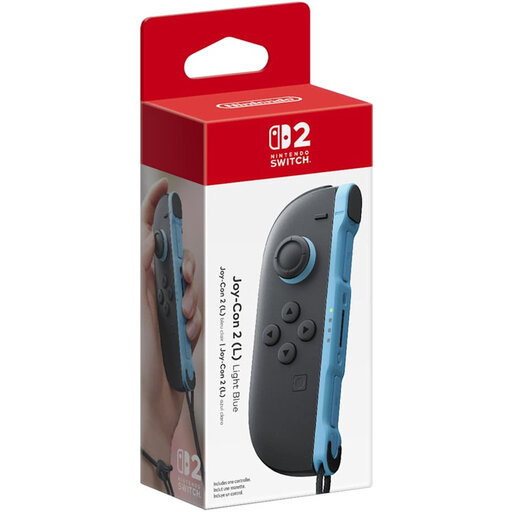 Image unavailable
Nintendo Switch 2 Official Joy-Con 2 (L) Light Blue
For anyone looking for the left Joy-Con 2 option for motion-controlled tennis on Switch 2.
Leave plenty of room when using swing controls and use the wrist strap designed for your controller model.
View at Joybuy
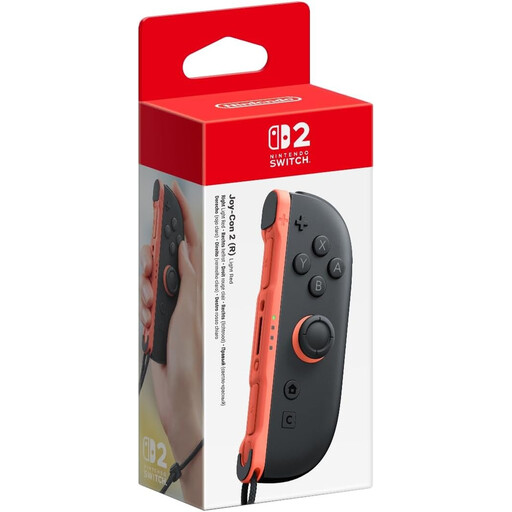 Image unavailable
Nintendo Switch 2 Official Joy-Con 2 (R) Light Red
For anyone looking for the right Joy-Con 2 option for motion-controlled tennis on Switch 2.
Leave plenty of room when using swing controls and check which wrist strap is supplied with the controller.
View at Joybuy
 Image unavailable
Nintendo Switch 2 Official Joy-Con 2 Pair Light Blue/Light Red
For anyone looking for a left and right Joy-Con 2 for motion-controlled tennis on Switch 2.
Check the included accessories and leave plenty of room when using swing controls; Nintendo recommends using the Joy-Con 2 wrist strap.
View at Joybuy
Frequently asked questions
Can I play tennis in Nintendo Switch Sports with a Pro Controller?
No. Nintendo Netherlands says that neither the original Switch Pro Controller nor the Switch 2 Pro Controller is compatible with Nintendo Switch Sports.
How do I play with a single Joy-Con in a shared bedroom?
First, clear enough space and be aware of your surroundings. When playing wirelessly, attach and wear the wrist strap supplied for your Joy-Con or Joy-Con 2; Nintendo provides separate instructions for this.
What can I check if my swing isn’t being recognised properly?
Check whether the game uses motion controls and whether the feature is enabled. Nintendo also recommends checking for updates, syncing again and calibrating the Joy-Con.
Do I need an online subscription to play tennis with someone next to me?
Not just to play locally. Nintendo lists Switch Online for online play in Nintendo Switch Sports, and PlayStation lists PS Plus for online play in TopSpin 2K25. For local play, also check how many controllers your chosen game and mode require.
What rights do I have when buying a controller online in the Netherlands?
For eligible distance purchases from a business, you generally have 14 days to change your mind, according to the Dutch government. Products must also meet the standards you’re entitled to expect; if a product is faulty, contact the seller. These statutory rights don’t confirm that a controller works with a specific game.


