For a team gathered around one table, choose a speakerphone based on the distance between the device and the furthest speaker. For meetings in different locations, connectivity and portability matter more. If participants often speak at the same time, compare full-duplex audio and echo cancellation, and check the connectivity and compatibility of the exact model. The microphone ranges and participant numbers quoted by Jabra, HP, EPOS and AnkerWork are manufacturer specifications, not a guarantee of performance in every room or table layout.
Who is a team-meeting speakerphone for?
A team around one meeting table
Several people in the room need to be heard through one device by colleagues joining remotely. The table dimensions and the distance to the furthest speaker are key starting points; Jabra, HP and EPOS provide range or room-size figures for specific models.
A team with lots of people speaking at once
If participants often respond over one another, check the exact model for full-duplex audio and echo cancellation. Jabra lists full-duplex audio for the Speak2 55; check the features of each model.
Colleagues working from different locations
If you join meetings from different rooms, you’ll benefit from a connection that works with your computer and a device that’s practical to carry around. Check which connection is intended for a computer on each model.
What should you look for when choosing one?
| What to consider |
What should you check? |
Who is this important for? |
| Range around the table |
Measure the distance to the furthest speaker and compare it with the stated range of the exact model. |
If I want colleagues at the far end of the table to be heard too, I’ll start by checking the distance; around 36% of consumers prioritise range for every seat at the table. |
| How the conversation flows |
Check the exact model for full-duplex audio and echo cancellation; test the setup with speakers on both sides. |
If I don’t want replies and interruptions to cut each other off, I’ll look for features that support simultaneous speech; around 29% of consumers give a smooth group conversation top priority. |
| Connectivity |
Check your computer’s port, any adapters you may need and compatibility with your meeting software. |
If I want to use the speakerphone with my own computer and meeting software, I’ll check the connection first; around 21% of consumers prioritise hassle-free connectivity. |
| Power and portability |
Check the power source, weight and stated battery life of the exact model. |
For meetings in different locations, I want to know whether I can carry and use the device easily; around 14% of consumers give portability top priority. |
Pitfalls to avoid
-
Assuming Bluetooth means a wireless connection to your PC
For the Jabra Speak2 55, Jabra lists Bluetooth for a smartphone or tablet and USB for a computer. Check how your computer connects to each model and what’s included with the device.
A PC adapter for a wireless connection is sold separately for the HP Sync 60, so factor in the cost of the adapter if you need that connection.
-
Taking a stated participant number as a guaranteed range
AnkerWork quotes up to 20 participants for two linked PowerConf S500 devices, not for a single device. Compare the setup with your table and check whether you’ll need a second unit.
A larger setup may mean you need a second device.
-
Assuming every speakerphone runs on a battery
HP lists mains power for the Sync 60. Check the power source of the exact model before deciding where to place it on the table.
If it runs on mains power, you’ll need a suitable socket nearby, which may limit where you can place it.
Brands to compare
Jabra
The Speak2 55 is a portable option for a compact setup; the Speak2 75 is another model in the range.
- Jabra gives the Speak2 55 a microphone range of up to 2.3 metres and lists USB for a computer and Bluetooth for a smartphone or tablet.
- Don’t assume the range and connections are the same for other Speak2 models; check the specifications for the exact model.
HP Poly
The Sync series includes different models for a desk, a small room or a small-to-medium meeting room.
- HP lists a microphone range of up to 3 metres and six built-in microphones for the Sync 60.
- The Sync 60 runs on mains power; don’t assume the Sync 40 offers the same room coverage.
EPOS
EPOS positions the EXPAND 40 as a portable model and the EXPAND 80 for larger groups.
- EPOS specifies up to 16 people in the room and six beamforming microphones for the EXPAND 80.
- The stated participant number is a manufacturer specification, not a guarantee for every table layout.
AnkerWork
According to AnkerWork, the PowerConf S500 can be used on its own or as part of a pair of linked devices.
- AnkerWork quotes up to 12 participants for one S500 and up to 20 for two linked units.
- The larger setup requires two devices; the participant numbers quoted are manufacturer claims.
Speakerphones at Joybuy
This selection includes portable speakerphones for people working in different locations, as well as an option for a larger group setup. Check each model’s connectivity and whether it’s suitable for your meeting room.
 No image available
Insta360 Wave AI Conference Speakerphone, Bluetooth, White
This model is suited to a setup with several participants gathered around one device.
Bluetooth is listed in the product name; check that the connection works with your computer and meeting software.
View at Joybuy
 No image available
Jabra Speak2 55 MS Teams, Dark Grey
This model is a good fit if you’re looking for a portable speakerphone for meetings in different locations.
Jabra lists full-duplex audio and a microphone range of up to 2.3 metres for the Speak2 55. For this model, Jabra lists USB for a computer and Bluetooth for a smartphone or tablet; check the distance to the furthest speaker.
View at Joybuy
 No image available
Jabra Speak 510 MS, USB-A, USB 2.0, Bluetooth, Black
The product name lists USB-A and Bluetooth for this conference-call speakerphone.
According to the product information, a Jabra Link 370 adapter may be needed for a wireless connection to a PC; check this before relying on that connection.
View at Joybuy
 No image available
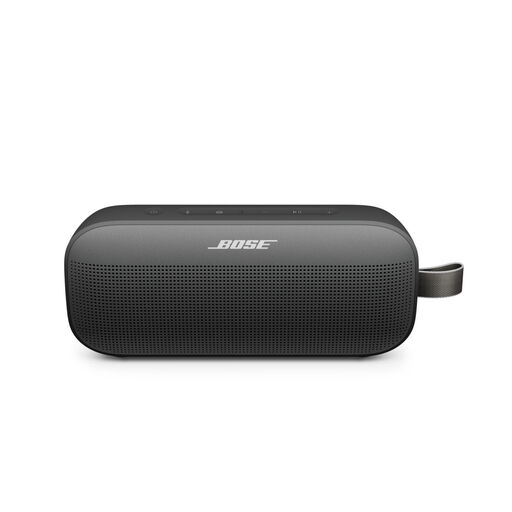
Bose SoundLink Flex Portable Speaker (2nd Gen), Black
The product information describes a built-in microphone and speakerphone function for portable use.
Check that your meeting software can use the microphone as an input device and that the connection works with your computer.
View at Joybuy
Frequently asked questions
How can you tell whether one speakerphone will cover the whole table?
Measure the distance from the device to the furthest speaker and compare it with the stated microphone range for that exact model. Jabra quotes up to 2.3 metres for the Speak2 55 and HP up to 3 metres for the Sync 60; test your actual table layout too.
Why can’t the meeting hear my new speakerphone?
Check the connection and select the speakerphone as both the input and output device on your computer and in your meeting software. The AnkerWork PowerConf S500 manual lists this as a possible step.
Can I count on exactly two years of statutory warranty?
No. There is no fixed statutory warranty period in the Netherlands. According to the Dutch government, you’re entitled to a product that works properly, and the retailer is your point of contact if it doesn’t; a manufacturer’s warranty is an additional benefit.
Can I record a team meeting with my equipment without taking any further steps?
A speakerphone alone does not determine whether recording is permitted. If an organisation collects and uses personal data, the Dutch Data Protection Authority says a lawful basis under the GDPR is required. The appropriate basis depends on the circumstances of the meeting.


