
Workshop facilitator sharing a screen
Helps participants view steps and images together at a worktable, and needs enough room on screen to read them comfortably.


For instructions that participants view together around a table, having enough screen space is a sensible starting point. A tablet of around 11 inches gives you more room than a compact 8.7-inch model. If the device will mainly be passed from person to person, a smaller size may be more practical. If participants will use the tablet themselves, also test whether the app restriction works with all the instructions and links they need.
Helps participants view steps and images together at a worktable, and needs enough room on screen to read them comfortably.
Provides a tablet for instructions and wants to prevent participants from switching to other apps without realising. Apple explains how Guided Access can temporarily restrict an iPad to one app; Google explains how to pin an app on Android.
Moves the tablet around during workshops and needs to consider how easy it is to handle and how to power the set-up.
Start by checking how easy it is to read the actual instructions from the intended viewing distance. Then decide how participants will use the tablet and what set-up, power supply and service arrangements will suit your needs.
When choosing a tablet for library workshops, the main considerations are readability, managing public use, portability and the overall set-up.
| Consideration | What should you check? | Who is this most relevant to? |
|---|---|---|
| Readability | Open the actual instruction file and check the text, images and reflections from where participants will be viewing it. Screen size and stated brightness do not measure how readable it will be in the library. | If I want several participants to view instructions and images together around a table, I want them to be able to read without constantly passing the screen around. Around 33% of consumers say readability is their main concern when buying. |
| Managing public use | Test whether all the necessary steps and links remain accessible within the chosen app, and whether a staff member can disable the restriction on the specific device. | If participants will use the tablet themselves, I want to limit accidental use of other apps without making the instructions inaccessible. Around 27% of consumers give managing public use their highest priority. |
| Moving and charging | Decide whether participants will hold the tablet or whether it will stay in one place. Check where it will be charged and which charger is supplied with the version you choose. | If the tablet will be moved around during a workshop, I want a device that is easy to handle and a practical charging solution. Around 20% of consumers prioritise portability and power supply. |
| Overall set-up and service | Check which accessories you need and what terms apply when the library buys the tablet as an organisation. | If I’m arranging the purchase and set-up for the library, I want to know in advance which components and services come with the version I choose. Around 20% of consumers focus mainly on overall costs and service. |
The Samsung Galaxy Tab A11 has a 90Hz screen, but its 8.7-inch display gives you less room for a full page of instructions than a model of around 11 inches. A high refresh rate does not make up for the lack of screen space.
Check your own text and images on the device, from the viewing distance in the workshop room.
Probiblio reports that library tablets have also been used for purposes other than those intended. Restricting a tablet to one app can also make necessary links outside that app inaccessible.
Go through the instructions as a participant would, then test how a staff member can disable the app restriction.
Setting up and checking the device in advance takes staff time and may require supervision while it is in use.
The consumer rights described by ACM ConsuWijzer do not necessarily apply when a library buys a tablet as an organisation.
Before ordering, ask which warranty and service terms apply to the buyer and the exact tablet version.
The Dutch iPad (A16) has a screen in the 11-inch class. Apple describes Guided Access as a way to temporarily restrict an iPad to one app.
The Galaxy Tab A11 is a compact 8.7-inch tablet, while the Galaxy Tab A11+ has an 11-inch screen.
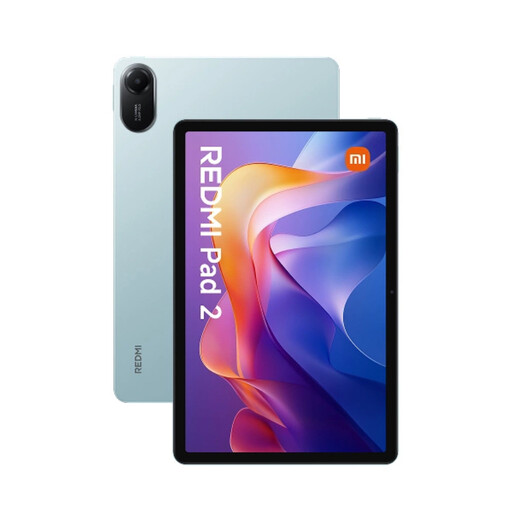
The Redmi Pad 2 is an Android tablet with an 11-inch screen, for anyone comparing screen space and stated display specifications.
The Idea Tab range includes tablets with an 11-inch screen. When buying, check the exact version and whether it comes with a pen.
These Joybuy product picks are tablets for displaying workshop instructions digitally. Check that the screen size and features of the version you choose suit the room and the way participants will use the device.
 No image available
A tablet for displaying workshop instructions digitally; check that the version and included pen suit the way you intend to use it.
11.1-inch touchscreen; 3200 × 2000 pixels; 144 Hz; Snapdragon 8 Gen 3; 12 GB LPDDR5X; 256 GB UFS 4.0; Wi-Fi 7; Android 15.
 No image available
The 11-inch version is worth considering if participants will be reading instructions together on one screen.
11-inch screen; 2560 × 1600 pixels; 4 GB RAM; 128 GB storage; Wi-Fi.
Xiaomi specifies standard brightness of 500 nits and 600 nits in outdoor mode for the Redmi Pad 2; test readability in your own space.
 No image available
A tablet for displaying workshop instructions digitally; before buying, check that the screen and controls are suitable for the instructions.
5G; 8 GB RAM; 256 GB ROM.
You can use app restriction features, but test whether they work with the tablet you choose. Apple explains how Guided Access can temporarily restrict an iPad to one app. Google explains how to pin an app on Android; settings may vary by device. Also check that all the necessary instructions and links remain accessible, and that a staff member can disable the restriction.
Open the actual instructions on the tablet you’ve chosen in advance and check the text and images from the intended viewing position. If needed, set up the app restriction, test how a staff member can disable it, and check that the device can be powered during the workshop.
Don’t automatically assume that consumer protection rules apply when the library buys a tablet as an organisation. ACM ConsuWijzer explains that consumers can expect a product to do what they would reasonably expect when used normally. For a business purchase, ask which agreement and service terms apply.
According to the Dutch Data Protection Authority, an organisation needs a lawful basis under the GDPR to take and publish images in which people can be identified. Displaying workshop instructions does not in itself require taking photos or videos.
The European Commission states that energy labelling and ecodesign requirements have applied since 20 June 2025 to slate tablets that fall within the scope of the rules. There are exceptions, including tablet computers with a physically attached keyboard; check whether the rules apply to the specific product.