
PDF reader who needs to follow footnotes
If you read essays with a fixed page layout, you’ll want to follow the text and footnotes without constantly zooming in. The Consumers’ Association recommends a tablet for anyone who reads a lot of PDFs.


The Consumers’ Association recommends a tablet if you read a lot of PDFs. For essays with a fixed page layout, choose a screen that lets you follow the text and footnotes, and try it with one of your own files. A compact device is easier to hold, but may mean you need to zoom in more often. If you mainly read flowing text, you could also consider e-ink, as long as it supports your files and the annotations you want to make.
If you read essays with a fixed page layout, you’ll want to follow the text and footnotes without constantly zooming in. The Consumers’ Association recommends a tablet for anyone who reads a lot of PDFs.
If you read without a stand during your train journey, you may prioritise a compact device. Try reading your own essays on the smaller screen to check they’re still easy to read. Apple lists an 8.3-inch screen for the iPad mini; Samsung gives the Galaxy Tab A11 a screen size of 8.7 inches.
If you want to highlight passages or jot down your thoughts on an essay, check that the file format, reading app and stylus model suit the way you work. Samsung says the Galaxy Tab S10 Lite comes with an S Pen; BOOX lists PDF annotation support for the Go 10.3 (Gen II) series.
Choose this option if: you often read while holding your device and find your own essays comfortable to read on a smaller screen. Samsung gives the Galaxy Tab A11 a screen size of 8.7 inches; Apple lists an 8.3-inch screen for the iPad mini.
Bear in mind: you may need to zoom in more often to read a PDF with a fixed page layout. Try your own file before choosing.
Choose this option if: fixed-layout PDF pages, footnotes and annotations matter more to you than reading one-handed. Apple lists Pencil support for the 11-inch iPad (A16); Samsung says the 10.9-inch Galaxy Tab S10 Lite comes with an S Pen.
Bear in mind: a larger device takes up more space and is harder to hold during your journey. Also check whether your chosen reading app saves or exports notes.
Choose this option if: you mainly read flowing text and don’t need the features of a standard tablet. Kobo supports formats including EPUB and PDF; BOOX lists PDF annotation support for the Go 10.3 (Gen II) series.
Bear in mind: the Consumers’ Association says small e-readers are often less suitable for A4 PDFs. According to BOOX, the standard BOOX Go 10.3 (Gen II) has no front light, while the separate Lumi model does.
The Consumers’ Association recommends a tablet if you read a lot of PDFs. Then focus on screen size, how your files are displayed and how you want to save your annotations.
| What to consider | What to look for when buying | Which shoppers this suits |
|---|---|---|
| PDF pages and footnotes | Open one of your own PDFs with a fixed page layout; check the footnotes and try zooming and turning pages. | If I read formatted essays, I want to follow the text and footnotes without constantly zooming in. Around 36% of shoppers prioritise enough screen space for PDFs. |
| Portability | Compare the size and weight of the exact model, including any case, and try reading in your usual position. | If I often read while holding my device on the train, I value ease of handling more than seeing a whole PDF page at once. Around 29% of shoppers prioritise portability. |
| Highlights and notes | Check that your stylus and reading app work with your file format, and that you can save and find your notes. | If I want to highlight passages and save my thoughts alongside the text, I check how the app handles notes. Around 21% of shoppers prioritise useful annotation features. |
| Files and comfortable reading | Check whether your essays are in EPUB or PDF format, whether they’re DRM-protected, and whether the device and transfer method support them. | If I mainly read flowing text, I look for a text-focused device that supports my files. Around 14% of shoppers prioritise comfortable reading and compatible file formats. |
File support doesn’t tell you whether small text and footnotes will be readable on the screen you choose.
Try one of your own essays with a fixed page layout, including footnotes.
If the page isn’t comfortable to read, you may need a different file format or a larger device.
Stylus compatibility and what’s in the box are two different things.
Check which stylus model comes with the exact version you’re buying, and whether your reading app saves annotations.
If it doesn’t come with a suitable stylus, you may need to buy a compatible one separately.
According to BOOX, the standard BOOX Go 10.3 (Gen II) has no front light, while the separate Lumi model does.
Think about the lighting conditions you usually read in before choosing between these models.
In low ambient light, you may need a model with a front light or a separate light source.
The Joybuy listing we reviewed for the Galaxy Tab A11 gave a speaker count that differed from Samsung Netherlands’ specifications.
Compare the full model code and key features with the manufacturer’s information. Conflicting details in a retailer’s listing don’t confirm the product’s identity.
These brands offer different types of devices for PDFs, note-taking or text-focused reading. Compare the models and versions listed against your own files and how you plan to use them.
Apple offers a compact iPad mini and an 11-inch iPad (A16) with more screen space.
The Galaxy Tab A11 is a compact option, while the Galaxy Tab S10 Lite has a larger screen and an S Pen.
BOOX describes the Go 10.3 (Gen II) series as e-ink devices that support formats including EPUB and PDF.
Kobo e-readers are a text-focused alternative if you don’t need a full tablet.
The Joybuy products below are larger tablets with stylus support, suited to anyone who wants more screen space for reading essays and making notes. Their size is worth considering if you plan to hold the device for long periods.
 No image available
The 11.45-inch screen and included Wacom Pro Pen 3 make this a good fit for reading and taking notes on one device.
11.45-inch IPS screen; 8 GB RAM; 128 GB storage; Android 14; Wacom Pro Pen 3. The product description says a stylus is included.
 No image available
The 12.1-inch screen gives you more space to read, and the product description says a Lenovo Pen is included for annotations.
12.1-inch screen; 2.5K; 8 GB RAM; 256 GB storage; colour: Rose. Pen included, according to the product description.
 No image available
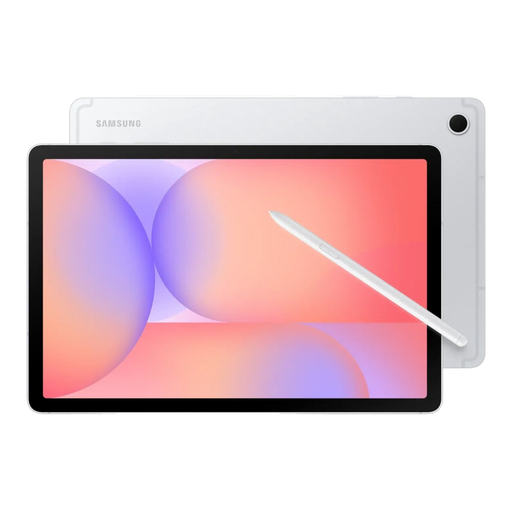
The 10.9-inch screen suits anyone who wants more space to read essays, and the product description says an S Pen is included.
10.9-inch screen; 6 GB RAM; 128 GB storage; colour: Silver. S Pen included, according to the product description.
 No image available
The 11-inch screen is designed for anyone who wants more room to read. The product description says a Tab Pen is included.
11-inch IPS screen; 8 GB RAM; 128 GB storage; Android 15; 90 Hz; 500 nits; 2560 × 1600 resolution. According to the product description, a charger isn’t included as standard.
 No image available
The 12.7-inch screen and included stylus suit anyone who wants to view and annotate essay pages.
12.7-inch 2K screen; 20 GB RAM (8 GB + 12 GB virtual); 256 GB storage; stylus included, according to the product name.
A compact screen may be enough for reflowable text, but that’s not necessarily the case with a fixed-layout A4 PDF or small footnotes. Before buying, try a representative file of your own on the screen size you’re considering.
Kobo explains how to transfer PDF and EPUB files that aren’t DRM-protected using a computer. DRM-protected files require different steps, so check the file and the relevant instructions before relying on this method.
It depends on the exact version. Samsung says the Galaxy Tab S10 Lite comes with an S Pen. Apple lists Pencil models supported by the 11-inch iPad (A16), but that doesn’t mean a stylus is included in the box. Also check whether your reading app saves and exports notes.
According to the Dutch government, many distance purchases come with a 14-day cooling-off period, subject to conditions and exceptions. If a product is faulty, you have statutory rights against the seller; in the Netherlands, there is no fixed statutory guarantee period that applies equally to every product.