What to look for in a tabletop charger for a shared desk
First, check your tablet’s connector and charging requirements. Then compare the number of ports and how power is distributed when they’re used at the same time. Finally, check the cable, safety information and terms.
| What to consider |
What should you check? |
Who is this important for? |
| Charging two devices at once |
Check the number of ports and the power available from each port when both devices are connected. |
If I want to charge a tablet and a second device from the same socket, I want to know how much power each device actually receives. Around 36% of consumers give simultaneous charging top priority. |
| Charging speed for your tablet model |
Compare the requirements of your exact tablet model with the output of the port and the cable you’ll use. |
For a short charging break, I want the adapter and cable to suit my tablet model. Around 29% of consumers prioritise a charging speed suited to their model. |
| Connector and cable |
Check your tablet’s connector, the ends of your existing cable and what’s included in the box. |
If I want to reuse a cable, I want to know in advance whether it will work with both my tablet and the charger. Around 21% of consumers give the connector and cable top priority. |
| Safety and additional items you may need |
Check the relevant product information and markings, what’s included in the box and the terms that apply in the event of a fault. |
I want to choose a suitable power adapter and know whether I’ll need an additional cable. Around 14% of consumers prioritise safety and any extra items they may need to buy. |
Tablet-charging products for a shared desk
This selection includes USB power adapters whose product information mentions tablet use, including models for charging multiple devices at once, as well as a clamp-mounted desk socket unit. Check each product’s port output, cable and connector to make sure they suit your needs.
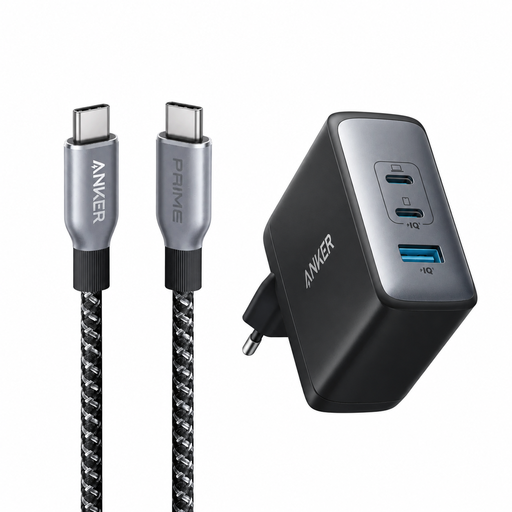 Image unavailable
Anker 736 Nano II 100W Charger with Prime USB-C to USB-C cable, 240W, 90cm
The product information lists tablets as a suitable use and says that a USB-C to USB-C cable is included.
The product name specifies a 100W charger and a 240W, 90cm cable.
View at Joybuy
 Image unavailable
OnePlus 80W Dual Ports SUPERVOOC Adapter, Type A + Type C, white
The product information mentions tablets and simultaneous charging for up to two devices.
The product name specifies 80W, a Type A and a Type C port, and a white finish.
View at Joybuy
 Image unavailable
Lenovo Dual USB-C 65W GaN Charger
The product information mentions tablet use and simultaneous charging of two devices via USB-C.
When both ports are in use, the product information specifies up to 45 W via USB-C1 and 18 W via USB-C2. A 1.5 m USB-C cable is also listed.
View at Joybuy
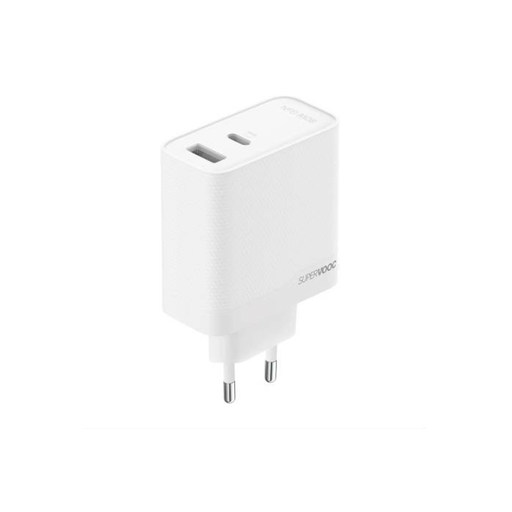 Image unavailable
SUPERVOOC 80W Dual Ports GaN Power Adapter
The product information lists tablets as a suitable use and describes simultaneous charging for two devices.
The product name specifies 80W and two ports. According to the product information, a USB-C to USB-C cable is included.
View at Joybuy
 Image unavailable
Neomounts DS22-840BL6 clamp-mounted desk socket
The product information mentions tablet use and a clamp mount for a fixed desk setup.
It lists two 20 W USB-C ports, one 18 W USB-A port and a 1.4 m mains cable. Bear in mind that it needs to be fitted with a clamp.
View at Joybuy
Frequently asked questions
Does every tablet have USB-C?
No. Check the connector on your own tablet. The EU rules for certain new tablets sold in the EU have applied since 28 December 2024; this doesn’t mean a device bought earlier has USB-C.
Will my tablet get the full power output if someone uses the second port?
Not necessarily; the power distribution depends on the model and how many ports are in use. For the SJÖSS 805.744.38, IKEA lists up to 45 W when one port is in use and 22 W per port when two ports are in use. For the WCH013, Belkin lists up to 65 W from one port and up to 45 W plus 20 W when both ports are in use.
What wattage do I need to charge my tablet quickly?
It depends on the charging requirements of your exact tablet model and the cable you use. Apple Support specifies a USB-C-compatible adapter rated at 60 W or higher for fast charging the iPad Pro (M5); don’t automatically apply this model-specific requirement to other tablets.
What requirements apply to a power adapter in the Netherlands?
According to the Netherlands Food and Consumer Product Safety Authority, a power adapter covered by the Commodities Act Decree on Electrical Equipment must meet the relevant safety requirements and carry a CE mark. This applies to the power adapter, not automatically to every USB cable or other power source; a CE mark on its own is not an independent test report.
What can I do if a new charger breaks too soon during normal use?
Contact the seller. According to ACM ConsuWijzer, your statutory guarantee applies alongside any manufacturer’s or seller’s warranty. The remedy will depend on the terms that apply and the fault.


