
Screenwriter who does a lot of typing
Wants to write and revise longer dialogue while travelling. A suitable keyboard, document app and comfortable working position matter more than pen features.


Start with the scriptwriting app and keyboard that suit your files and workflow, then compare the size and weight of the complete set-up. A compact tablet is easier to carry, while a larger screen gives you more room to view your script and notes side by side. Make your files available offline before you set off. For longer writing sessions or software that requires a desktop, a Windows 2-in-1 may be a better fit.
Wants to write and revise longer dialogue while travelling. A suitable keyboard, document app and comfortable working position matter more than pen features.
Wants to open and edit a script quickly, using a set-up that fits easily into a bag.
Reads scenes, adds comments to the text and wants to switch between typing and handwritten notes.
First, check that your scriptwriting app and files work on the tablet you’re considering. Then compare the keyboard, the weight and size of the complete set-up, offline use and how you share revisions.
| What to consider | What should you check? | Who is this important for? |
|---|---|---|
| Typing long scenes | Check that the keyboard fits the exact tablet model, what layout it has and whether your app can edit the script file. | If I’m writing long dialogue while travelling, I want to type and revise comfortably. Around 36% of consumers prioritise typing above all else. |
| Portability and screen space | Compare the dimensions and weight of the tablet and keyboard, and consider how much space the set-up takes up on a train table. | If I want to carry my things easily but still read my script comfortably, I weigh up size against working space. Around 29% of consumers prioritise portability. |
| Carrying on writing offline | Download and open the script before you leave, then check that you can edit it without an internet connection. Later, check that your changes have synced. NS says that Wi-Fi is available on almost all Intercity trains, but not every train. | If I want to work on my script even without train Wi-Fi, I test the offline feature in advance. Around 21% of consumers prioritise being able to carry on working. |
| Sharing files and revisions | Test with a sample scene to make sure you can open, edit and export it, then reopen the file on a colleague’s device. | If my script needs to meet specific software or file requirements, I want to avoid revisions that can’t be shared. Around 14% of consumers prioritise this workflow. |
A keyboard cover adds weight and bulk. So a lightweight tablet on its own may be less convenient to carry as a complete typing set-up.
Compare the tablet with the keyboard cover you actually plan to use, and check that it’s compatible with your model and has the right keyboard layout.
A compatible keyboard may be sold separately and will make the complete set-up heavier.
If your connection drops and the file isn’t available locally, your work could be interrupted.
Download the script in advance and test that you can open and edit it without an internet connection. After your journey, check that your changes have synced.
More working space can be handy for viewing your script and notes side by side, but larger tablets are harder to carry. The Dutch Consumers’ Association highlights this difference when discussing tablet portability.
Start with your software and where you’ll be working, then compare complete compact and larger set-ups.
Apple says the iPad Air (M4) is available with an 11- or 13-inch screen and runs iPadOS. Your chosen writing app will need to be available for it.
According to Samsung, the Galaxy Tab S10 FE combines a 10.9-inch screen with an included S Pen. Samsung lists a compatible QWERTY cover for typing.
The Tab P12 with a matte screen is a larger Android option for viewing scripts and notes. Lenovo describes features for using split windows.
A Surface Pro is a Windows 2-in-1 option if the writing software you need isn’t available on iPadOS or Android.
For the Pad 7 and Pad 7 Pro, Xiaomi lists a compatible Focus Keyboard. This is an Android option for anyone who values typing on a physical keyboard.
This selection includes compact tablets with keyboard options, larger models for text and notes, and a Windows 2-in-1 for software that requires Windows.
 No image available
A compact option if you want to edit your script on iPadOS and prefer a handy size for travelling.
The product description lists support for Magic Keyboard and Apple Pencil Pro. Check whether a compatible keyboard is included with this model and whether your writing app works with your script files.
 No image available
The listed set includes a Bluetooth keyboard and stylus pen for anyone who wants to type and make notes as well.
The product name describes a 10.1-inch Android tablet with 64 GB of storage and 9 GB of RAM (3 GB + 6 GB virtual expansion). The product listing says the keyboard has an English-language layout; check that it’s right for you.
 No image available
A larger Android option if you want to view your script alongside handwritten notes.
The product specifications list a 12.7-inch 3K screen, 144 Hz, an MDT 8300 processor, 8 GB of RAM, 256 GB of storage and Wi-Fi 6E. The description says a Lenovo Tab Pen Plus is included; check separately whether a compatible keyboard is also included.
 No image available
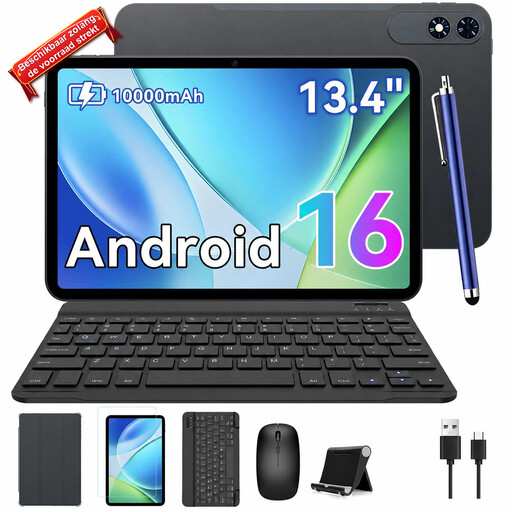
The listed keyboard set-up may suit anyone who wants to type directly on the screen. Bear in mind its larger size when carrying it and using it on a train table.
The product name lists Android 16, a 13.4-inch screen, 24 GB of RAM (8 GB + 16 GB) and 256 GB of storage. The product listing also mentions a keyboard, mouse and case.
 No image available
A Windows option if you need playwriting software that isn’t available on a mobile tablet.
The product specifications list Windows 11, a 14-inch 2K touchscreen, 8 GB of RAM, a 512 GB SSD and a QWERTY keyboard. The description gives the weight as approximately 1.60 kg and says a compatible USB-C charger is required separately.
Yes, if your app and file are set up for it. Google describes how to edit documents offline on Android; Microsoft recommends downloading and opening Word documents before a period without internet access. Test this with your own script before you set off.
Don’t assume it does. Lenovo describes the keyboard for the Tab P12 as optional, and Microsoft lists an optional keyboard for the Surface Pro. Check what’s included with the exact model and which layout you’re ordering.
A larger screen gives you more room to view text and notes, but it’s harder to carry. Choose based on where you’ll be working and compare the size of the complete set-up, not just the screen.
No. NS lists free Wi-Fi on almost all Intercity trains, but not every train. Make your script available offline in advance and charge your tablet before you leave.
According to ACM ConsuWijzer, online purchases generally come with a 14-day cooling-off period from the date of delivery; exceptions may apply. You also have a legal guarantee: the seller must provide a product that meets the standards you’re entitled to expect. Check the terms that apply to your purchase.