
Traveller typing a complete speech
Wants to write and edit continuously during longer journeys. The Consumers' Association points out that a physical keyboard may be more suitable than an on-screen keyboard for extended typing.


For writing a complete speech, a tablet with a suitable physical keyboard is a practical choice. A more compact model may be more convenient for quick edits and notes. A larger screen gives you more room to view text and notes side by side, but is less easy to carry around. Download and open your document before setting off, as Wi-Fi and power sockets aren’t available on every train journey.
Wants to write and edit continuously during longer journeys. The Consumers' Association points out that a physical keyboard may be more suitable than an on-screen keyboard for extended typing.
Wants to be able to open an existing speech or notes even when the train’s Wi-Fi is unavailable or drops out. Microsoft Support recommends downloading and opening documents in advance so you can work offline.
Reads, cuts or jots down short ideas on the go and wants a tablet that’s easy to take out and put away. The Consumers' Association notes that smaller tablets are more convenient when travelling.
Choose this if: you want to type most of your speech during the journey. Check that the keyboard fits your exact tablet model.
Bear in mind: the extra weight and the space the combined set-up takes up.
Choose this if: you mainly read, edit short passages or jot down ideas on the go, and often take the device out of your bag.
Bear in mind: for extended typing, the Consumers' Association suggests a separate keyboard or laptop as an alternative to the on-screen keyboard.
Choose this if: you want more screen space for text, source material or handwritten annotations.
Bear in mind: a larger model takes up more space in your bag and on your lap.
| What to consider | What to look for | Who is this most important for? |
|---|---|---|
| Typing longer texts | Check that the keyboard fits the exact tablet model, what layout it has and whether it’s included. | If I want to type a complete speech during the journey, a practical physical keyboard is important to me. Around 33% of consumers say typing is their top purchase priority. |
| Working offline | Download and open the document in your chosen app beforehand; test whether you can edit it without an internet connection. | If I want to open and edit my existing text even when the Wi-Fi drops out, I check how offline working functions in advance. Around 27% of consumers give working offline their top priority. |
| Screen space and portability | Compare the dimensions and weight of the complete set-up, and consider whether it sits comfortably on your lap. | If I want to take the tablet out, hold it and put it away often, ease of handling matters more than extra screen space. Around 20% of consumers prioritise portability. |
| Complete writing set-up | Compare what’s included with your chosen version against the accessories you need; check the keyboard layout too. | If I need a complete set-up, I want to know whether a pen or keyboard is included and whether those accessories fit the model. Around 20% of consumers focus mainly on having a complete set-up. |
A keyboard isn’t included as standard with every tablet. An accessory made for a different model may not fit either.
Compare the complete set-up and check model compatibility, weight and keyboard layout before you choose.
Microsoft says you need to download and open an existing document on your device in advance to work on it offline.
Open the document before you set off and test whether you can edit it with your connection switched off.
Extra screen space can help when reviewing your work, but the Consumers' Association notes that larger tablets can be less practical to hold for long periods while travelling.
Weigh up how much room you need for text and notes against the convenience of carrying and using the tablet on the train.
The 11-inch iPad (A16) is an option if you’re looking for an iPad with a separate keyboard; Apple lists the Magic Keyboard Folio as an accessory.
The Galaxy Tab S10 FE series includes a 10.9-inch FE and a 13.1-inch FE+ for those weighing up screen space against portability.
The Idea Tab is an 11-inch option; a listed Idea Tab Pro bundle with a pen and keyboard is a different model.
The Xiaomi Pad 8 is an 11.2-inch option, with model-specific keyboards sold separately.
These Joybuy products suit different writing needs, from quick edits on a more compact tablet to typing with a keyboard or annotating on a larger screen. For each version, check that the accessories and layout suit the way you work.
 Image unavailable
A more compact option for quick edits and writing on the go; the product description lists a case with a stand.
10.1-inch screen; 425 g according to the product description; 4 GB RAM; 128 GB storage; Wi-Fi 5 (802.11ac); Android 14.
 Image unavailable
The larger screen and included pen are well suited to reviewing text and making notes; bear the size in mind when travelling.
12.1-inch screen; 2.5K; 8 GB RAM; 256 GB storage; pen included.
 Image unavailable
The bundle lists an included Bluetooth keyboard for longer texts. Check that the English layout suits you.
10.1-inch screen; 64 GB storage; 9 GB RAM listed as 3 GB + 6 GB virtual expansion; English Bluetooth keyboard.
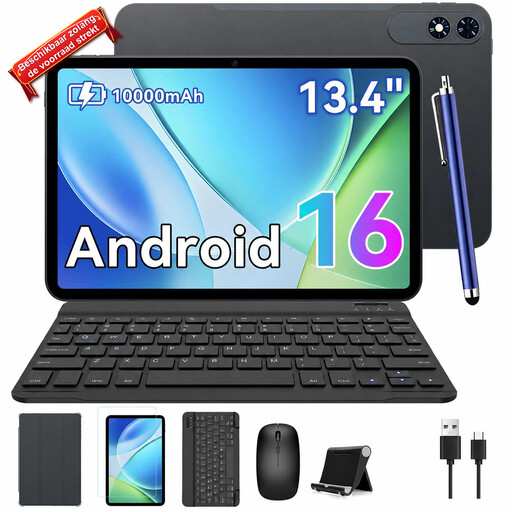 Image unavailable
The bundle lists a keyboard for those who want to type longer texts; the 13.4-inch screen takes up more space when travelling.
13.4-inch screen; Android 16; 256 GB storage; 24 GB RAM listed as 8 GB + 16 GB; keyboard, case and mouse included according to the product title.
Yes, if you download and open the file on your device beforehand, as Microsoft Support describes for Word on mobile devices. Test this before you set off; changes to a OneDrive file will sync once your connection is restored.
No, it varies by train type and route. NS says that Wi-Fi and power sockets are available on many Sprinter trains, but check the facilities for your specific journey.
Check the exact tablet model, the keyboard layout and whether the keyboard is included. For example, Samsung lists the Book Cover Keyboard Slim, model EF-DX620UBEGWW, as compatible with the Galaxy Tab S10 FE+.
For online purchases in the Netherlands, you’re generally entitled to a 14-day cooling-off period after delivery. If a product isn’t fit for purpose under normal use, the retailer is responsible under the statutory guarantee; ACM ConsuWijzer explains that there is no fixed general two-year time limit.