For workshop instructions with diagrams or several steps to follow at once, a screen of around 11 inches is worth considering. A more compact tablet takes up less space on the table, but shows less content at a time. If the tablet will be near drinks or cleaning water, check the water-resistance rating for the exact model: Samsung, for example, lists an IP68 rating for the Galaxy Tab S10 FE under specific laboratory conditions, but this does not apply to all tablets. Before buying, also check which app you need, whether you’ll need any accessories, and that the wireless tablet carries the CE marking. The Dutch Authority for Digital Infrastructure describes this marking as a requirement for equipment covered by European regulations.
Who is this relevant for?
For following diagrams at the table
You want to view steps and illustrations without having to pick up the tablet repeatedly. Screen size and a practical setup are important considerations. The Dutch Consumers’ Association, Apple Netherlands and Samsung Netherlands outline relevant differences between screens and models.
For working where spills are possible
If you’re working near drinks, paint or cleaning water, it’s best to check what protection applies to the exact model first. Samsung describes the Galaxy Tab S10 FE’s IP68 rating under specific test conditions.
For limited table space
You may need to move the tablet around between materials, so a compact size could be a priority, as long as your instructions remain easy to read. The Dutch Consumers’ Association and Samsung Netherlands offer examples of different screen sizes.
What should you look for when buying?
Start by considering how much screen space your instructions need. Then compare your workspace, the risk of spills, and the app or files you want to use during the workshop.
| What to consider |
What to check when buying |
Who is this important for? |
| Room to read instructions |
Open a representative file on the screen size you’re considering and check the text, diagrams and viewing angle in your planned setup. |
I want to read steps and diagrams at the table without constantly zooming in. Around 36% of consumers prioritise having enough room to read instructions. |
| Spills and cleaning |
Check the water-resistance claim and cleaning instructions for the exact model, and keep the device out of the immediate spill zone. |
If there are drinks or cleaning water nearby, I want to know what protection applies to my model. Around 29% of consumers put the risk of spills first when choosing. |
| Available table space |
Measure the space available and try the screen in your preferred orientation. Also check that a case or stand sits securely. |
I want room to place materials beside the tablet and to move it easily. Around 21% of consumers give available workspace the highest priority. |
| Access during the session |
Check that the app and files you need work, that files are available locally, and which charging accessories are included. |
I want to be able to access my instructions throughout the session, even when I’m working somewhere without a power socket. Around 14% of consumers prioritise access to the app and files. |
Common buying mistakes
-
Assuming brightness means your screen will be easy to read in your setup
A stated brightness level applies to a specific model and may depend on the screen mode. That figure doesn’t tell you how your diagrams will look from your planned viewing angle.
Open one of your own instruction pages in your preferred orientation and view it in the lighting conditions in which you plan to use the tablet.
-
Assuming an IP68 rating means you can use the tablet when it’s wet
Samsung applies the IP68 rating to specific Galaxy Tab S10 FE models and defined laboratory conditions. The rating does not automatically apply to other tablets or every type of liquid.
Check the claim for the exact model, and keep the tablet out of the immediate spill zone even if it has a rating.
Using the tablet outside the stated conditions could result in damage and the need for a replacement.
-
Assuming a stand, stylus or adapter is included
What’s in the box varies by model and bundle. Stylus support doesn’t necessarily mean that the compatible stylus is included.
Check the box contents and the compatibility of your chosen case, stand, stylus and adapter.
You may need to buy a compatible accessory separately.
-
Taking a product title as proof that it’s an exact model match
The model name, version and key specifications must match before you treat two listings as the same product.
Compare the full model number and version before assuming that a deal is for a particular tablet model.
Brands to consider
Samsung
The Galaxy Tab A11 is a compact option, while the A11+ has a larger screen. Samsung lists a model-specific IP68 rating for the Galaxy Tab S10 FE.
- The different models give you options to compare screen size with the space available on your table.
- Samsung bases the S10 FE’s IP68 rating on a laboratory test with fresh water: up to 1.5 metres for a maximum of 30 minutes. This is not a guarantee against all spilled liquids and does not apply to the entire Galaxy Tab range.
Apple
The 11-inch iPad (A16) is worth considering if the instruction app you need runs on iPadOS, or if you already use this system.
- Apple lists a brightness of 500 nits for this model and support for certain Apple Pencils.
- Check which stylus is compatible with the version you’ve chosen and whether it’s included. The screen specification does not indicate protection against spills.
Xiaomi
The Redmi Pad 2 is an Android option of around 11 inches for those comparing screen specifications and storage versions.
- Xiaomi lists a resolution of 2560 × 1600 pixels and a nominal battery capacity of 9000 mAh for this model.
- These manufacturer specifications are not an independent measure of readability or workshop battery life. Also check the storage version you’re choosing.
Lenovo
The Tab M11 is an example of an 11-inch tablet for which a stylus or folio version may be worth considering.
- A specific model version may suit you if you want to use a stylus with your instructions.
- Don’t assume a stylus or stand is included just because the tablet supports a stylus. Check what comes with the bundle you’ve chosen.
Joybuy product picks
These product picks include compact tablets and models of around 11 inches for viewing workshop instructions at the table. Check whether each model’s screen size, app and required accessories suit your workspace.
 No image available
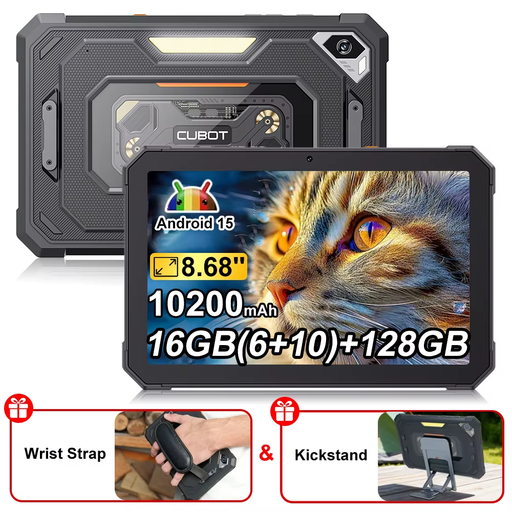
CUBOT Tab KingKong Mini, Android 15, 128 GB
The 8.68-inch screen could suit you if you have limited table space. Check that your instructions remain easy to read on it.
The product name lists Android 15 and 128 GB of storage.
View on Joybuy
 No image available
Lenovo Tab K11 Gen 2, 11 inch, 2.5K, ZAFS0069CZ
The 11-inch size could suit you if you want more screen space for your instructions. According to the product information, keep the tablet away from liquids.
The product name lists a 2.5K screen and a MediaTek Dimensity 6300 processor.
View on Joybuy
 No image available
Apple 11-inch iPad Air (M4), Wi-Fi, 256 GB
This 11-inch model could suit you if you want to view workshop instructions on a larger screen. Check that the app you need works on iPadOS.
The product name lists Wi-Fi and 256 GB of storage. The product information advises avoiding exposure to moisture.
View on Joybuy
 No image available
Samsung Galaxy Tab A11 X135, 8.7 inch, LTE, 64 GB
The compact screen could suit you if workspace is limited. Check your own instructions to see whether the content remains easy to read.
The product name lists LTE, 4 GB RAM and 64 GB of storage.
View on Joybuy
 No image available
Samsung Galaxy Tab A11 Plus, 11 inch, Wi-Fi, 128 GB
The 11-inch size could suit you if you want more screen space for your instructions. Bear in mind how much room the tablet will take up on the table.
The product name lists Wi-Fi and 128 GB of storage.
View on Joybuy
Frequently asked questions
Do I need mobile internet to follow workshop instructions at the table?
Not if the app and files you need work over Wi-Fi or have been saved locally in advance. Check whether your workshop app lets you access the instructions without a mobile connection. The Dutch Consumers’ Association treats mobile internet as a separate choice when buying a tablet.
How should I clean a tablet after a workshop?
Follow the instructions for your specific model. For its products, Apple recommends, among other things, disconnecting cables, using a soft, lint-free cloth and keeping moisture out of openings. Don’t spray cleaner directly onto the device.
Is the manufacturer’s warranty the limit of my rights in the Netherlands?
No. According to ACM ConsuWijzer, your statutory rights depend on what you could reasonably expect from the product under normal use. If a product is faulty, the seller is responsible for providing a solution; how a particular fault is assessed depends on the circumstances.
Does a wireless tablet sold in the Netherlands need a CE marking?
Yes. The Dutch Authority for Digital Infrastructure states that equipment covered by European requirements for radio equipment must carry the required CE marking to be placed on the market. Check the marking and accompanying information on the device you receive.


