
Vandaag of morgen in huis

Kwaliteit gegarandeerd
Download de app
Categorieën

A laptop offers power but lacks on-the-go convenience. A tablet is portable, but typing emails or reports can be impractical. The perfect compromise is a tablet with keyboard. The challenge, however, lies in finding a truly all-inclusive package, avoiding unexpected costs for a case, stylus, or the keyboard itself. A misstep can easily lead to a total cost far exceeding your initial budget.
This guide will help you make an informed decision. We'll cover the key specifications to consider and spotlight several models that come as an all-in-one budget tablet package. This ensures you know exactly what you're getting for your investment.
Before making your selection, it's essential to understand the key specifications. We'll focus on the facts, enabling you to determine what's most relevant for your specific needs.
The display is your primary interface for work and entertainment. Size is measured diagonally in inches. A larger screen (11 inches or more) is ideal for productivity and media consumption, while a more compact display (around 10 inches) offers superior portability. Resolution determines the clarity and sharpness of the image.
All tablets come equipped with Wi-Fi. If you need to stay connected without a Wi-Fi network, you'll require a tablet with SIM card. This enables internet access anywhere via a 4G or 5G cellular network, making it perfect for students working from various locations or for frequent travellers.
Battery capacity, measured in milliampere-hours (mAh), indicates how long the tablet can operate on a single charge. A capacity of 7000 mAh or more is recommended to last a full workday or study session.
The core value of a tablet with keyboard is the complete package. Always verify which accessories are included by default. An ideal all-in-one bundle should contain:
Below is a selection of models that offer a compelling combination of productivity and a complete package. These recommendations are based on product specifications.
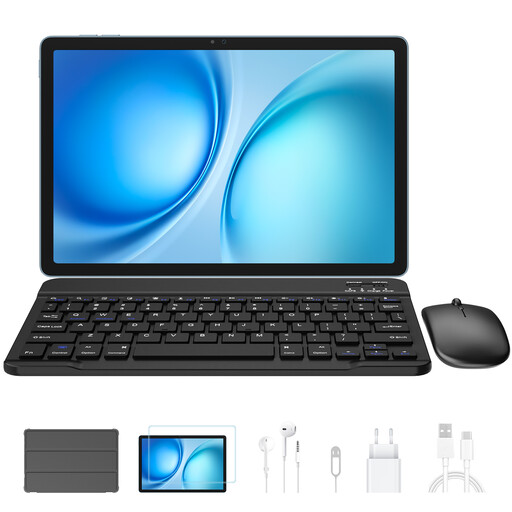
Why We Chose It The Blackview Zeno 10 targets users seeking a laptop replacement tablet for both work and entertainment. Its combination of a large 11-inch 2K display and a 90Hz refresh rate delivers an exceptionally smooth visual experience. The integrated PC Mode transforms the Android interface into a desktop-like environment, simplifying multitasking with the included keyboard.
Key Benefits (Based on Specs)
Who Is It For? For students and remote workers who need a powerful Android tablet with keyboard for intensive multitasking, media consumption, and on-the-go productivity, thanks to its 4G capability.
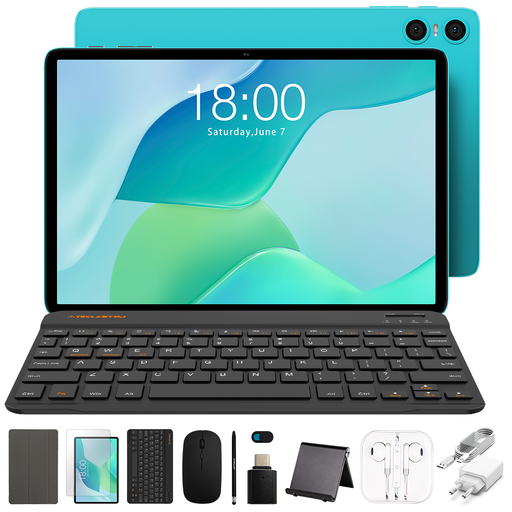
Why We Chose It The Teclast P33 is a prime example of an all-in-one budget tablet. This model is designed for users who want a complete, ready-to-use solution right out of the box. The package includes not just a keyboard and stylus, but also a mouse, case, earphones, and even a camera cover, making it an exceptionally accessible option.
Key Benefits (Based on Specs)
Who Is It For? Ideal for beginners, younger students, or as an affordable tablet with stylus for basic tasks like note-taking, emailing, and web browsing. Its primary value lies in the comprehensive set of included accessories.
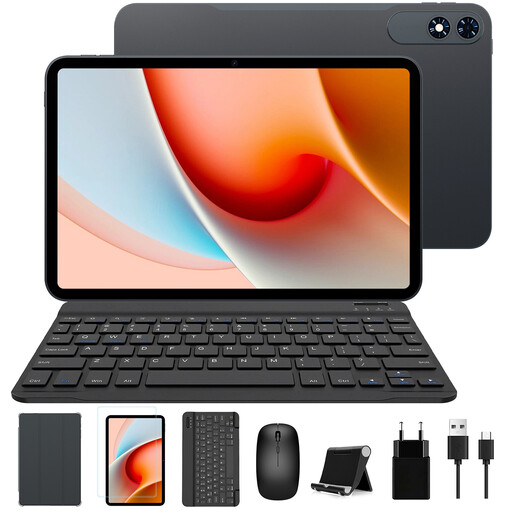
Why We Chose It The TABWEE T60Pro stands out with its very large 13.4-inch 2K+ screen and an impressive 120Hz refresh rate. This, combined with a massive 10000 mAh battery, positions it as a powerhouse for those who prioritise screen real estate and endurance.
Key Benefits (Based on Specs)
Who Is It For? For users who primarily use their tablet for entertainment, graphic design, or as their main work-from-home device. The large screen offers comfort comparable to a small laptop, making it a serious contender as a laptop replacement tablet.
The models above each provide a unique combination of features tailored to different user profiles. If your perfect match isn't listed, or if you're seeking a different screen size, a specific brand, or a different balance of price and performance, a broader assortment is available.
View our full range and compare different models based on your personal requirements.
View all computers and tablets
1. Can a tablet with a keyboard completely replace a laptop? For many daily tasks like email, word processing, browsing, and media viewing, a tablet with keyboard can easily replace a laptop. Portability and flexibility are major advantages. For very demanding software (like professional video editing or complex programming), a traditional laptop with a more powerful processor and better cooling often remains the superior choice.
2. What is the advantage of an Android tablet with a keyboard? An Android tablet with keyboard offers tremendous flexibility thanks to access to millions of apps on the Google Play Store. The operating system is open and easy to customise. Additionally, Android tablets are often more affordably priced than alternatives with other operating systems, offering excellent value for money.
3. Is a tablet with a stylus useful for studying? Absolutely. A tablet for studying with a stylus is a powerful tool. You can use it to annotate PDF documents directly, digitise handwritten notes, draw diagrams, or work out mathematical formulas. This makes it a sustainable and organised alternative to loose paper and notebooks.