First, choose the reading app or provider that has your book club title, and check that you can open the book before you set off. A compact tablet is a good choice if you also want to use other apps, colour pages or PDFs on the go. If you mainly read long texts, an e-reader is a serious alternative, especially if glare and extended reading are important considerations for you.
Who is this guide for?
Readers on long bus journeys
If you’ll be holding your book as you travel, consider its size and weight. Changing light, glare and battery life are also worth weighing up. The Consumers’ Association points out that glare can make reading on a tablet screen difficult.
Readers of borrowed e-books
Check that your chosen title is available from your provider and opens on the device you plan to use. The online Library notes that availability can vary by title, and device compatibility can vary too.
Readers who want to discuss passages
If you want to revisit quotes or thoughts for your book club, check what you can do in the reading app that contains your book. Features vary between apps.
What should you consider when choosing?
Compact tablet
A good fit if: your book is available in a compatible tablet app and you also want to use other apps, colour pages or PDFs while travelling.
The trade-off: a tablet may be larger and heavier than an e-reader, and more susceptible to glare. The Consumers’ Association also highlights battery life as something to consider.
E-reader
A good fit if: you mainly read long books that are mostly text, and prefer a screen that’s easy on the eyes or longer battery life to versatile apps.
The trade-off: check that your book club title is available for your chosen e-reader. Books with lots of images and A4 PDFs may not be as well suited to this type of device.
For a book club read on the bus, first check that you can access the title in the right app. Then consider portability, readability, notes and charging.
| What to consider |
What should you check? |
Who is this most important for? |
| Comfortable to hold |
Compare the dimensions and weight of the exact model, and try out your preferred text size. |
If I mainly want something comfortable to hold during the bus journey, compactness matters a lot. Portability is the top priority for around 28% of consumers in this context. |
| Access to the title |
Search for the exact book with your provider and check that it opens on your device. Open it before you set off. |
I want to make sure my chosen book is in my reading app before I get on the bus. Access to the title is the main concern for around 22% of consumers. |
| Readability in changing light |
Try the brightness, reading view and text size, and assess glare in the conditions you usually travel in. |
When the light changes through the bus window, I want to be able to keep reading comfortably. Screen readability is the top priority for around 22% of consumers. |
| Finding passages again |
Check whether you can highlight passages in the app that contains your title and find your notes again later. |
I want to have quotes and thoughts ready for the book discussion. Taking notes is the main priority for around 17% of consumers. |
| Reading without recharging |
Charge the device beforehand, and compare battery life claims only if the test conditions are relevant to your reading app and screen settings. |
If I don’t want to rely on a power socket during the journey, having enough charge matters. Battery life is the main buying concern for around 11% of consumers. |
The online Library specifies Android 10 or iOS 16 as the minimum for its app. This requirement applies to that app, not automatically to other reading services. Kobo sets out its own conditions for offline reading with Kobo Plus. So check the app and offline-use requirements of the service you use.
Common buying mistakes
-
Choosing a tablet before checking that your title is available
Not every e-book is available from the online Library or compatible with every type of reader.
Search for the exact title and check which devices it works with before choosing a tablet or reading service.
-
Confusing brightness with glare-free reading
Even a bright tablet screen can reflect light from a bus window. The Consumers’ Association identifies glare as a potential problem when reading.
Assess glare and reading settings separately. Consider an e-reader if you mainly read long texts.
-
Assuming models with the same product name are identical
The Lenovo Tab One ZAF00255SE has 64 GB of storage; another version, ZAF00221GR, has 128 GB.
Check the full model code, storage capacity and connectivity type before choosing a version.
-
Assuming the stated battery life is reading time
Lenovo’s stated streaming time is not a measure of e-book reading in your app at your chosen screen brightness.
Check the test conditions and charge the tablet before you set off. Don’t assume every reading setting will give you the same battery life.
Brands to consider
Lenovo
The Tab One is a compact Android tablet. The specifications given depend on the version: according to Lenovo, the ZAF00255SE has an 8.7-inch screen, 4 GB of RAM and 64 GB of storage.
- Lenovo lists the ZAF00255SE as weighing approximately 320 g, with a 5100 mAh battery.
- The stated YouTube streaming time is not an independently tested reading time. Check the model code and storage: the ZAF00221GR with 128 GB is a different version.
Samsung
The Galaxy Tab A11 is available as a compact Android tablet. The version listed here, SM-X130NZAAEUB, is grey, has Wi-Fi and comes with 64 GB of storage.
- Samsung lists an 8.7-inch screen and a socket for wired headphones for this version.
- Features of versions with different storage capacities do not automatically apply to the 64 GB model. Check the full model code and configuration.
Xiaomi
The REDMI Pad SE 8.7 is a compact tablet worth considering if you want to compare a reading mode with other screen settings.
- Xiaomi lists a reading mode, an 8.7-inch screen and a 6650 mAh battery.
- Screen and battery details are manufacturer specifications, not independent measurements of readability or reading time. Check the storage version for each offer and whether an adapter is included.
Apple
The iPad mini could be a good fit if your reading app requires iPadOS. For the 2024 Wi-Fi model with A17 Pro, Apple specifies an 8.3-inch screen and a weight of 293 g.
- These details give you a clear basis for comparing the size and weight with other versions.
- Apple describes the announced new generation as having a different, 8.5-inch OLED screen. Don’t confuse this information with the specifications of the iPad mini with A17 Pro.
Tablets at Joybuy
This selection includes tablets for reading on the go, from compact models to tablets with larger screens. A larger size gives you more room, but may be less comfortable to hold on a bus journey.
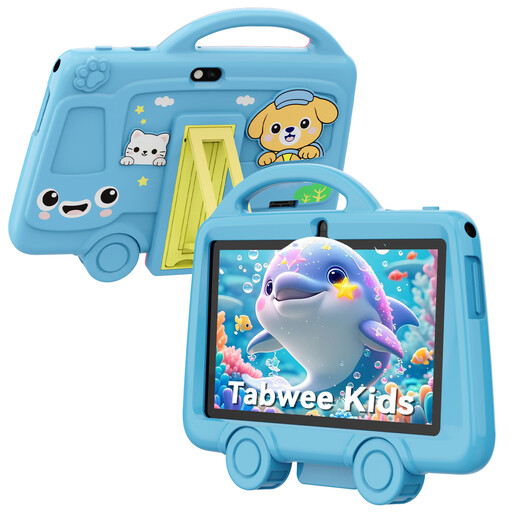 Image unavailable
TABWEE K8 kids’ tablet, 7-inch, 2 GB RAM, 32 GB
The stated size and weight are worth considering if you want a compact tablet to hold. The product name describes this model as a children’s tablet, so check that it supports the reading app you need.
The product name lists a weight of 285 g, a 3000 mAh battery, 2.4 GHz Wi-Fi, Bluetooth 4.2 and a 3.5 mm headphone socket.
View at Joybuy
 Image unavailable
Lenovo Tab One 8.7-inch Wi-Fi, 4 GB RAM, 128 GB, ZAF00221GR
The screen size makes this model worth considering if you’re looking for a compact tablet for travelling. Check in advance that your book and reading app work on the version you choose.
The product name lists 4 GB of RAM, 128 GB of storage and the colour Luna Grey. This is the ZAF00221GR, not the Tab One ZAF00255SE with 64 GB of storage.
View at Joybuy
 Image unavailable
Samsung Galaxy Tab A11 X135 LTE, 8.7-inch, 4 GB RAM, 64 GB
The 8.7-inch screen is a good fit if you’re looking for a tablet with a compact screen for travelling. Check that your reading app and chosen book title work on this version.
The product name lists LTE, 4 GB of RAM, 64 GB of storage and the colour grey.
View at Joybuy
 Image unavailable
Lenovo Tab MediaTek, 10.1-inch, 4 GB RAM, 128 GB
The 10.1-inch screen is worth considering if you’d like more space for text or PDF pages. A larger screen may be less comfortable to hold on a bus journey.
The product name lists 4 GB of RAM, 128 GB of storage, Wi-Fi 5 (802.11ac), Android 14 and the colour grey.
View at Joybuy
 Image unavailable
Samsung Galaxy Tab A11 Plus, 11-inch, 128 GB Wi-Fi
This larger screen is an option if you’d like more room for text or other reading materials. Bear in mind the trade-off between screen space and portability when you’re travelling.
The product name lists 128 GB of storage, Wi-Fi and the colour grey.
View at Joybuy
Frequently asked questions
Can I read any book club book on a tablet using the online Library?
No, not every book is in the online Library’s collection. Search for the exact title and check which devices it works with. You’ll need a suitable membership to borrow books.
What software does my tablet need to run the online Library app?
The online Library lists Android 10 or iOS 16 as the minimum for its app. This applies to that app and isn’t a general minimum requirement for tablets or other reading services.
Can I read my book without an internet connection on the bus?
That depends on the provider and the book. Download and open the title before you set off. Rakuten Kobo states that offline use of Kobo Plus may require you to sync again after opening fifteen books or when the offline trial period ends. This condition doesn’t automatically apply to other services.
How can I save passages for my book club?
Check the features in the app that contains your title. Rakuten Kobo explains how to add notes to highlighted sentences in the Kobo Books app on iOS and Android. This doesn’t mean that other apps have the same feature.
Am I automatically entitled to exactly two years’ statutory warranty on a tablet in the Netherlands?
No. ACM ConsuWijzer distinguishes between statutory warranty and a warranty period chosen by a manufacturer or seller. According to ACM, if a product is faulty despite being used normally, the seller must offer an appropriate solution free of charge. What you could reasonably expect in terms of the product’s lifespan is taken into account when assessing the situation.


