First, check your tablet’s exact model, connector and supported charging standard. Then choose a mains charger with enough power for that combination. A single port keeps things simple, while multiple ports can be useful for charging a phone and tablet at the same time, provided there’s enough power per port when both are in use.
Who is this tablet charger for?
A tablet at a dedicated workstation
You want one suitable charger for your desk and don’t need any extra ports. First, check your tablet’s connector and charging requirements; Apple Support in the Netherlands describes various USB-C adapters for iPads.
Charging a tablet and phone at the same time
You want fewer separate adapters on your desk, so check the number of ports and the power available when both devices are connected. Apple Support in the Netherlands explains how power is shared by a specific 35 W adapter with two ports.
Quick top-ups between tasks
You have short charging breaks and want to know whether your tablet, adapter and cable support the charging mode you need. Apple Support in the Netherlands and Samsung Netherlands explain the model-specific requirements for fast charging.
What should you consider when choosing one?
First, look up the charging information for your exact tablet model. Then compare its connector and supported power with the charger. Only after that, consider whether extra ports would be useful at your desk.
| What to consider |
What to look for |
Who is this important for? |
| Connector and compatibility |
Check your tablet’s charging port and whether your cable fits it. Also check which charging standard the model supports. |
If I want to make sure the charger and cable connect to my tablet, I start by checking the exact model. Around 33% of consumers prioritise compatibility. |
| Power for quick top-ups |
Compare the adapter’s power and charging protocol with your tablet’s charging specifications. Also check which cable you need. |
If you want to top up during short work breaks, check whether the entire combination supports the charging mode you need. Around 27% of consumers prioritise this charging requirement. |
| Two devices on one adapter |
Check the power available per port, as well as how it is shared when both devices are connected. |
If I want to charge my phone and tablet at the same time, I check how much power each device can actually receive. Around 20% of consumers prioritise charging two devices from one adapter. |
| Safe purchase and cable |
Check the CE mark and product information for the exact charger, and see which accessories are included in the box. |
If product safety and possible extra purchases matter to you, check the mark and the contents of the box. Around 20% of consumers make these points a priority. |
Common pitfalls when choosing a tablet charger
-
Confusing total power with power per port
When charging multiple devices at once, a tablet may receive less power than the charger’s total wattage suggests. Belkin states that the WCB006 delivers up to 20 W per port, with 40 W in total.
Compare the figures for each port and check how power is shared when two devices are connected.
-
Choosing a more powerful charger without checking your tablet model
The charging mode depends on the combination of tablet, adapter and cable. For the fast-charging feature described specifically for the iPad Pro (M5), Apple recommends a USB-C adapter of 60 W or more.
First, check the charging specifications for your exact tablet, then choose an adapter and cable to match.
-
Assuming a cable is included
What’s included varies by version. Samsung lists a 1.8-metre cable with the 45W Power Adapter; check exactly what comes with the charger you choose.
Read the box contents for the exact product and check that the cable is suitable for your tablet.
If a suitable cable isn’t included, you may need to buy one separately.
-
Relying only on the USB-C connector or wattage
A connector or high power rating alone doesn’t prove that a mains charger meets the applicable product requirements. The Netherlands Food and Consumer Product Safety Authority and the Dutch government explain the requirements and CE marking for electrical products.
Check the CE mark and product information for the exact version. The mark is not proof of an independent assessment.
Brands to consider as a reference
Apple
Apple offers USB-C power adapters for iPads, including 20 W versions and 35 W versions with two ports, according to Apple Support in the Netherlands.
- Apple also explains how to use suitable third-party adapters.
- For the fast-charging feature described specifically for the iPad Pro (M5), Apple recommends a USB-C adapter of at least 60 W. So check your exact iPad model and charging feature.
Samsung
The Samsung 45W Power Adapter EP-T4511XBEGEU is a USB-C option supplied with a 5A cable, according to Samsung Netherlands.
- Samsung lists PD 3.0 with PPS and a 1.8-metre cable for this version.
- The available charging mode depends on the Galaxy Tab model, so don’t judge it by the adapter’s maximum wattage alone.
Belkin
The Belkin WCB006 has two USB-C ports, making it an option if you want to charge two devices at one desk.
- Belkin lists up to 20 W per port, with 40 W in total.
- Belkin’s stated iPad charging time is a manufacturer claim based on the test conditions given. A cable is not listed among the stated box contents.
UGREEN
UGREEN describes the Nexode 30W GaN II as a compact, single-port USB-C charger.
- UGREEN lists up to 30 W, PD 3.0 and PPS for this version.
- Check the exact version and tablet model before expecting a particular charging speed; the stated compatibility comes from the manufacturer.
USB chargers and charging stations at Joybuy
This selection includes USB-C adapters and charging stations with one or more ports for a tablet at a home-working desk. Check that the connector and charging options on the exact version suit your tablet, and review the CE mark and product information before ordering.
 No image available
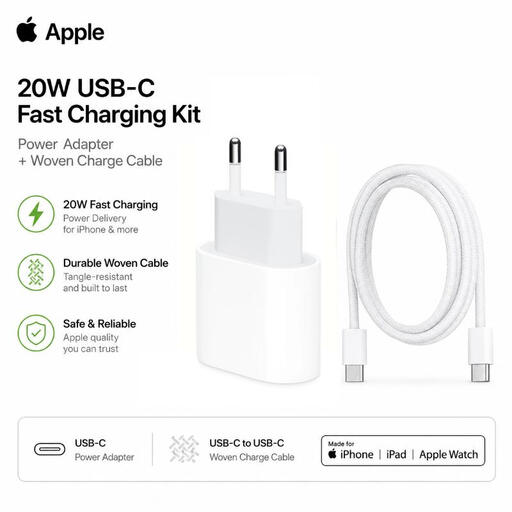
Apple 20W USB-C Fast Charging Kit, adapter and cable, white
An option if you want to charge a tablet with a compatible USB-C connector; check whether 20 W suits your model’s charging requirements.
The product name lists a 20 W adapter and an included USB-C cable.
View at Joybuy
 No image available
Lenovo Dual USB-C 65W GaN Charger, 2 ports, EU plug
Suitable for a desk where you want to connect two USB-C devices; check how power is shared when you charge them at the same time.
The product name lists 65 W, two USB-C ports and an included 1.5-metre USB-C cable.
View at Joybuy
 No image available
65W multi-port wall charger, 2 USB-C ports and a USB-A port
A multi-port option for a workstation with several devices; check the power available per port when charging multiple devices at once.
The product name lists 65 W, two USB-C ports and one USB-A port.
View at Joybuy
 No image available
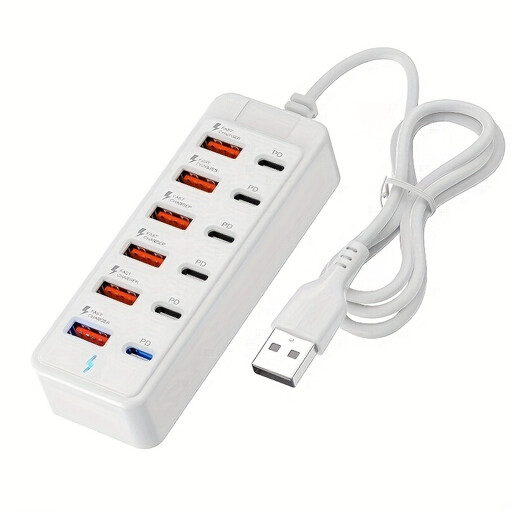
12-port USB charging station, 6×Type-C PD and 6×USB-A
A charging station for connecting several devices at one workstation; check that the ports and charging options suit your devices.
The product name lists up to 25 W per port.
View at Joybuy
 No image available
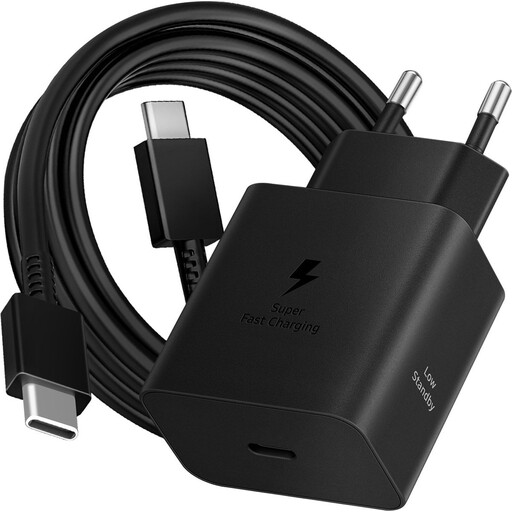
Samsung 45W Efficiency Adapter with 1.8 m USB-C cable, black
An option for a tablet whose charging specifications are compatible with this adapter; check your exact model and the charging mode you need.
The product name lists 45 W and a 1.8-metre USB-C cable.
View at Joybuy
Frequently asked questions about tablet chargers
Does my older tablet need to have USB-C too?
No. The connector on a tablet you already own isn’t automatically determined by the EU rules for new devices. The European Commission states that the USB-C rule has applied since 28 December 2024 to tablets placed on the EU market from that date; check the connector on your own tablet.
Why does my tablet charge more slowly when my phone is also connected?
A multi-port charger may share its power between connected devices. Apple Support in the Netherlands states that, with the specific 35 W adapter with two USB-C ports, a connected iPhone and iPad each receive up to 17.5 W; check how the power is shared by your own charger.
Do I need to buy the cable separately?
That depends on the exact version. Samsung Netherlands lists an included 5A USB-C-to-USB-C cable with the EP-T4511XBEGEU; Belkin doesn’t list a cable among the stated box contents for the WCB006. Also check that the cable fits your tablet.
What rules apply to a mains charger sold in the Netherlands?
Electrical devices placed on the Dutch market must meet the applicable European product requirements and carry a CE mark, as explained by the Netherlands Food and Consumer Product Safety Authority and the Dutch government. The CE mark is the manufacturer’s declaration of conformity; it does not, in itself, mean that every charger has been independently assessed.


