Choose a tablet based on what you need to do during the outdoor survey. For taking notes at wet locations, pen support and the limits of the stated water-resistance rating matter. If you’ll be working with maps without reliable internet access, it’s important to test your offline workflow in advance. If you’ll mainly be working indoors, weigh screen space against portability and check whether the pen you need is sold separately. Manufacturer specifications don’t measure real-world readability in sunlight or battery life during your workshop.
Who is this tablet for?
Field note-taker in changeable weather
You take notes at rainwater sites and want a manageable tablet with a pen suited to your intended outdoor use. Samsung lists pen support and an IP68 rating for the Galaxy Tab S10 FE series; the limits of use are important in wet weather.
Map-maker without a reliable connection
You want to be able to open and edit map layers or observations when the internet drops out. If the workshop uses QField, check in advance that the project files and edits work offline. QField Ecosystem Documentation describes a workflow using project files prepared in advance.
Plan reader in the classroom
You mainly view maps and course documents at a desk, and weigh the benefits of extra screen space against carrying and holding the tablet during an outdoor survey. Consumentenbond notes that larger tablets are less convenient to carry.
What should you look for when choosing?
First decide whether you’ll mainly take notes outdoors, work with map layers offline or read documents indoors. The percentages below reflect consumers choosing a tablet for this weekend workshop.
| What to consider |
What to look for |
Who should prioritise this? |
| Taking notes outdoors in wet conditions |
Check the water-resistance claim for the exact model, its usage limits and whether the pen is included. |
If I take notes outdoors at rainwater sites, I want to know whether the tablet and pen are suitable for those conditions. Around 36% of consumers put note-taking in wet weather first. |
| Offline maps and observations |
Ask which app and project files the workshop uses; load them onto the device in advance and test opening, editing and syncing without a connection. |
If I need to open map layers in the field without signal, I want to test the project offline in advance. Around 29% of consumers give offline mapping top priority. |
| Screen space and portability |
Compare the screen size, weight and any stated brightness figures for the same model. |
If I want to read map details and take the tablet outdoors, I weigh screen space against ease of carrying. Around 21% of consumers prioritise readability and portability. |
| Everything you need in the box |
Check what’s in the box and the compatibility of the pen, case and charger for the exact model. |
If I want to write with a pen, I want to know in advance what’s included and what else I’ll need. Around 14% of consumers give having all the necessary equipment top priority. |
Pitfalls when buying a tablet for a workshop
-
Assuming IP68 means you can use it in any wet conditions
Samsung’s IP68 rating for the Galaxy Tab S10 FE series and the included S Pen is based on laboratory conditions using fresh water. That doesn’t mean every real-world wet situation has been tested.
Read the limitations for the exact model and follow the usage instructions. If you’ll be doing intensive fieldwork, don’t choose a tablet based on its IP rating alone.
-
Assuming a tablet with pen support also includes a pen
Apple lists compatible Pencil models for the iPad (A16), but the pen isn’t included in the listed box contents. Lenovo lists the Tab Pen Plus as an optional accessory for the Idea Tab Pro model ZAE40105SE.
Before buying, check pen compatibility and what’s included with the exact model.
-
Confusing mobile data with a prepared offline map project
For offline fieldwork with QField, project files and map layers need to be available in advance. A mobile data plan alone won’t make an unprepared project usable offline.
If the workshop uses QField, have the project prepared in advance and test the files and edits without a connection.
Brands and models to consider
Samsung
The Galaxy Tab S10 FE is an option for note-taking and outdoor use with a pen. The business-focused Tab Active5 Pro is a separate choice for more intensive fieldwork.
- Samsung lists pen support, a 10.9-inch screen and up to 800 nits in a specific brightness mode for the Galaxy Tab S10 FE series.
- The IP68 rating is based on laboratory conditions using fresh water, and isn’t a general guarantee for every kind of wet use. Samsung describes the Tab Active5 Pro as having a replaceable battery.
Apple
The 11-inch iPad (A16) is an option for reading course documents and annotating them with a compatible Apple Pencil.
- Apple UK specifies support for Apple Pencil (USB-C) and the first-generation Apple Pencil. According to Apple, the Wi-Fi model weighs 477 grams.
- The Pencil isn’t included in Apple’s listed box contents. Check separately which pen is compatible with your chosen model and whether it’s included.
Lenovo
The Idea Tab Pro model ZAE40105SE may suit anyone who views larger maps and documents at a desk.
- Lenovo specifies a 12.7-inch screen with a brightness of 400 nits for this exact model.
- Lenovo lists the Tab Pen Plus as an optional accessory. Consumentenbond notes that larger tablets are less convenient to carry.
Xiaomi
The Dutch Redmi Pad 2 Wi-Fi model is an option for reading material and lighter tablet use.
- Xiaomi Netherlands lists an 11-inch screen and a typical battery capacity of 9,000 mAh for the Redmi Pad 2.
- Battery capacity isn’t the same as measured battery life during a workshop. Check which pen works with each model and what protection is specified for your intended outdoor use.
Joybuy tablets for maps and field notes
The products below are suited to outdoor use and field notes, as well as reading or annotating maps and documents. Before buying, check that the workshop software and files you need will work on your chosen device.
 No image available
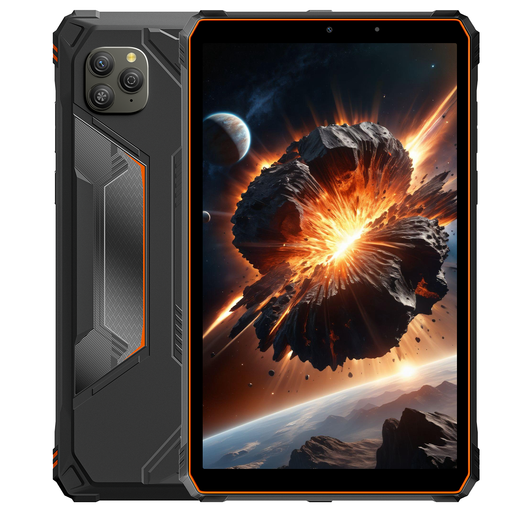
Blackview Active 5, 8.68-inch, 128 GB, orange
The stated screen size may be useful if you want to take notes on a tablet during the workshop. Check that its protection suits your outdoor use.
The product name lists an 8.68-inch IPS screen with a 90 Hz refresh rate, Android 15, 128 GB of storage and 22 GB of RAM, comprising 6 GB plus 18 GB of virtual RAM. It also lists a 6,600 mAh battery, NFC, fingerprint unlocking and a waterproof design. Check the applicable protection conditions before using it outdoors.
View at Joybuy
 No image available
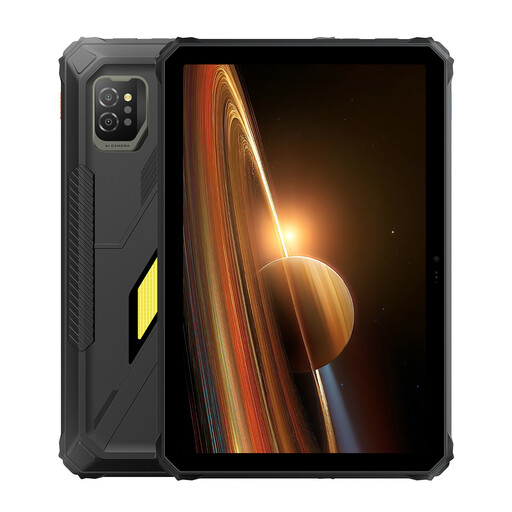
Blackview Active 7, 11-inch, 128 GB
The 11-inch screen is one factor to consider when deciding whether this model is right for viewing maps. Check separately that its protection meets your needs outdoors.
The product name lists an 11-inch IPS screen, Android 15, 128 GB of storage, 24 GB of RAM (8 GB plus 16 GB) and a 10,000 mAh battery with 45 W charging. It also lists a night-vision camera and NFC.
View at Joybuy
 No image available
Lenovo Yoga Tab ZAG60028PL, 11.1-inch 3.2K, 256 GB, with Tab Pen Pro
The product name lists a Tab Pen Pro as included, which may be useful if you want to annotate maps or documents during the workshop.
According to the product name, this model has an 11.1-inch 3.2K screen, a 144 Hz refresh rate, 8 GB of RAM, 256 GB of storage, Wi-Fi 7 and Android 15. The colour is Luna Grey.
View at Joybuy
 No image available
Lenovo Idea Tab Plus WiFi, 12.1-inch 2.5K, 256 GB, with pen
The product name lists a pen as included with the tablet. Check that this model suits the way you want to take notes.
The product name lists a 12.1-inch 2.5K screen, 8 GB of RAM, 256 GB of storage and the colour Rose.
View at Joybuy
 No image available
iFLYTEK AINOTE Air 2, 8.2-inch E Ink tablet with stylus and protective case
The included stylus is handy for handwritten notes. Check in advance that the workshop files and apps are compatible with the screen type you choose.
The product name lists an 8.2-inch E Ink screen, a stylus and a protective case.
View at Joybuy
Frequently asked questions
Do I need mobile internet to use QField during the workshop?
Not necessarily, if the QField project has been transferred to the device and tested offline in advance. This applies only if the workshop uses QField and the specific project works without a connection; you may still need internet access for direct access to cloud services. QField Ecosystem Documentation describes how to edit projects offline once they’ve been prepared.
How do I prepare maps for an outdoor survey without signal?
If the organiser provides a QGIS or QField project, have it prepared in advance, transfer it to the tablet and test the layers and editing functions you need offline. QField Ecosystem Documentation also explains how to sync changes made in the field later.
How can I tell if a pen is included with the tablet?
Check what’s in the box for the exact model: pen support doesn’t automatically mean a pen is included. Apple lists compatible Pencil models for the iPad (A16), but doesn’t include the Pencil in its list of box contents. Lenovo lists the Tab Pen Plus for the Idea Tab Pro ZAE40105SE as an optional accessory.
What warranty applies if a tablet is faulty?
In the Netherlands, the seller must offer a remedy if a product is faulty. The Dutch government distinguishes between statutory rights and any additional commercial guarantee; an extra guarantee doesn’t replace your statutory rights.
Can I return a tablet bought online if I don’t like the size?
For online consumer purchases in the Netherlands, you generally have a statutory 14-day cooling-off period after delivery. The ACM also explains the exceptions and conditions for trying out and returning a product; check these before you buy.


