
Readers who hold their tablet
If you read long passages in your coach seat, you’ll want a size that’s easy to pick up and hold. The Consumers’ Association says that small tablets are handy for travelling.


If you mainly read continuous text while holding your tablet, a compact model is a sensible place to start. For travel stories with large photos or fixed PDF layouts, a larger screen may matter more, especially if you can rest the tablet on something. Check for reflections in the light you’ll be travelling in, and download stories before you set off, as you can’t always rely on having internet access on the road. If you mainly read long texts and don’t need colour photos, an e-reader is also worth considering, according to the Consumers’ Association.
If you read long passages in your coach seat, you’ll want a size that’s easy to pick up and hold. The Consumers’ Association says that small tablets are handy for travelling.
For stories with photos or PDF pages where the layout matters, weigh up the benefit of extra screen space against how easy the tablet is to carry. The Consumers’ Association explains the difference between small and large tablets for travelling.
If you want to carry on reading without an internet connection, check before you set off that the specific stories you need are saved locally. Google Chrome Help explains how to download web pages in advance so you can read them offline later.
Start with what you’ll be reading and how you’ll hold the tablet. If you’ll be holding it while you read, a manageable size matters; for photos and fixed PDF layouts, a larger screen may be more important. If you mainly read long texts, include an e-reader in your comparison too.
| What to consider | What to look for | Who it matters to |
|---|---|---|
| Ease of handling | Compare the size and weight of the exact model, ideally with its case, and check that the text remains comfortable to read at your preferred size. | If I’m reading for a long time during the journey with the tablet in my hand, I want it to remain easy to handle. Around 33% of consumers say ease of handling is their top priority. |
| Readability in changing light | Check for reflections from light coming through the window, and try out the brightness and dark reading mode. A coating doesn’t guarantee that reflections won’t bother you in direct sunlight. | When the light on the coach changes, I want to be able to see my text clearly. Around 27% of consumers put readability in changing light first. |
| Offline reading and battery life for travelling | Download your own stories in advance and open them without an internet connection. Only compare battery-life figures if the test conditions are the same. | If I don’t want to rely on the internet while travelling, I want to be able to save and open my stories in advance. Around 20% of consumers put offline reading and battery life at the top of their priorities. |
| Photos and fixed page layouts | Open a sample of your own file and check that your reading app supports the layout. A larger screen can show more of a fixed page at once, but it also takes up more space. | For travel stories with photos or fixed PDF pages, I want to be able to see the layout clearly. Around 20% of consumers put images and page layout at the top of their buying considerations. |
A fixed page with photos and a specific layout may require more zooming on a small screen.
Open a representative travel essay on the tablet you’re considering, then compare a compact model with one that has a larger screen.
The Consumers’ Association warns that reflections on tablet screens can make reading in direct sunlight difficult. An anti-reflective coating or a manufacturer’s claim doesn’t prove that reflections will disappear.
Check the screen in the daylight you expect to encounter on your trip, and assess features and manufacturers’ claims separately.
A story needs to be available locally in advance if you want to open it without an internet connection; Google describes downloading it as a separate step.
Download your stories before you set off and open them once without an internet connection.
If you end up having to download the content using mobile data while travelling, this could use up more of your data allowance.
ACM ConsuWijzer distinguishes between your statutory rights and warranties offered by a seller or manufacturer.
Check the terms of any optional protection plan separately, and consider a fault in light of your statutory rights too.
An optional protection plan may involve extra costs and doesn’t replace your statutory rights.
The Galaxy Tab A11 is a compact Android option. Compare the Wi-Fi and mobile data versions separately.
The iPad mini with A17 Pro is a compact iPadOS option if you want to use the apps and controls that come with it.
The Tab One is a compact Android option to compare if you’re looking for a portable device for reading.
The NXTPAPER 11 Plus is a larger-screen option to consider if your travel stories include lots of images or fixed page layouts.
This selection includes compact models for reading on the go, plus a tablet with a larger screen for anyone who wants more room for image-rich pages.
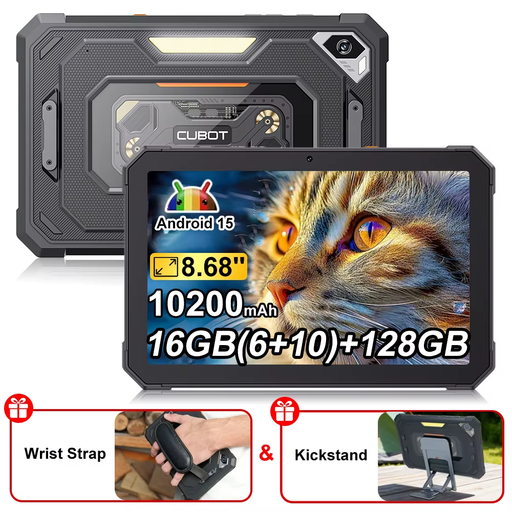 Image unavailable
The compact screen size suits anyone looking for a tablet they can hold while travelling.
The product title lists Android 15, 16 GB (6 + 10 GB), 128 GB storage, an 8.68-inch screen with a 90 Hz refresh rate and a 10,200 mAh battery.
 Image unavailable
The compact size could be a good fit if you mainly read continuous text and want to hold the tablet while travelling.
The product title lists Wi-Fi, 4 GB RAM and 128 GB storage.
 Image unavailable
This compact LTE version is an option if you want to use mobile data as well as read stories saved in advance. Check that your connection and data allowance are suitable.
The product title lists an 8.7-inch screen, 4 GB RAM and 64 GB storage.
 Image unavailable
A compact e-ink option to compare if you mainly read e-books or PDFs. Check that your own files and reading app are compatible.
The product title lists an 8.2-inch screen and a stylus. The protective case is part of the product version named in the title.
 Image unavailable
The larger screen could be a good choice if you want more room for photos or fixed page layouts. Bear in mind that a larger tablet may be less easy to handle in a cramped seat.
The product title lists LTE, 6 GB RAM and 128 GB storage.
Yes, as long as you make the specific content available locally in advance. Google Chrome Help explains how to download a web page on Android so you can open it offline later. Test that it works for your story before you set off. Simply adding a page to a reading list isn’t the same thing.
Not if you save the stories you need in advance. If you want to load new pages while travelling, check that you have the mobile data version and a suitable connection; a Wi-Fi version won’t automatically give you mobile access.
Make sure you have your charging cable and a suitable charger, and test your downloads without an internet connection. According to the Dutch government, the USB-C rule has applied to new devices on the Dutch market since 28 December 2024. This doesn’t in itself tell you whether a mains adapter is included with a particular offer.
When you buy a tablet online, you generally have a 14-day cooling-off period from delivery, according to ACM ConsuWijzer. You also have statutory rights if a product doesn’t do what you could reasonably expect; a commercial warranty doesn’t replace those rights.
Electronic devices offered for sale in the EU must meet the applicable CE marking requirements, according to the Dutch government. Slate tablets placed on the EU market from 20 June 2025 onwards are also subject to the applicable EU ecodesign and energy labelling rules, as set out by the European Commission. Check the product type and date before treating a missing label as a breach of the rules.