
Travellers who do a lot of typing
If you want to write longer journal entries in your hotel room, check the keyboard compatibility, layout and what’s included in the bundle before you buy.


For a travel journal, your choice of tablet should mainly depend on how you write: with a suitable keyboard for longer entries, a compatible pen for handwriting and sketches, or enough storage for photos and files. Then check the exact model, what’s included in the bundle and how you’ll back up your files. If you’ll be using hotel Wi-Fi, it’s also worth considering how you’ll connect.
If you want to write longer journal entries in your hotel room, check the keyboard compatibility, layout and what’s included in the bundle before you buy.
If you want to record memories or sketch by hand, it’s important to check which pen works with the exact tablet model and whether it’s included. Apple, Samsung and Lenovo list different pen options for the models and bundles mentioned here.
If you want to keep photos and text stored locally, compare the storage capacity, any memory card expansion options and your approach to backing up files.
Choose this if: you mainly want to write longer journal entries and prefer using physical keys.
Bear in mind: compatibility, keyboard layout and the extra space it’ll take up in your luggage.
Choose this if: handwriting or sketching is an important part of your journal.
Bear in mind: not every pen works with every tablet, and a pen isn’t always included.
Choose this if: you want your travel photos and journal files to be available even without an internet connection for syncing.
Bear in mind: extra storage isn’t the same as a backup that protects your files.
| What to consider | What should you check? | Who is it important for? |
|---|---|---|
| Typing longer entries | Check that the keyboard works with the exact tablet model, what layout it has and whether it’s included in your chosen bundle. | If I’m typing longer entries at a hotel desk in the evening, I want to know whether the keyboard and layout suit the way I use it. Around 33% of consumers put typing at the top of their list. |
| Handwriting and sketching | Check pen compatibility with the full model number and whether the pen is included. | If I’d rather write down memories or sketch by hand, I want a pen that works with my tablet. Around 25% of consumers prioritise handwriting. |
| Keeping photos stored locally | Compare the storage capacity of your chosen model, memory card expansion options and which files your backup actually saves. | If I want to keep photos and journal files with me without syncing straight away, I look at both storage and a separate backup. Around 25% of consumers prioritise local storage. |
| Syncing without hotel Wi-Fi | Decide whether working offline and syncing later is enough, or whether you need a hotspot or a mobile-connected tablet model. | If I don’t want to rely on hotel Wi-Fi, I want to know in advance how I’ll sync my journal. Around 17% of consumers put an independent connection option at the top of their list. |
Support applies to specific pen versions and doesn’t automatically mean a pen is included with every model. Apple lists the Apple Pencil versions supported by the iPad (A16); Samsung says the S Pen is included with the Galaxy Tab S10 Lite.
Before you buy, check both compatibility and what’s included with the exact model.
A compatible pen may be a separate accessory.
A memory card can provide extra local storage, but it isn’t the same as a separate backup of your journal and photos. Xiaomi says the card for the Redmi Pad 2 is sold separately.
Think of storage and backups as two separate decisions, and check which files your chosen backup method saves.
You may need to buy a separate memory card for extra storage.
The Joybuy listing for the Samsung Galaxy Tab S10 Lite gives a screen resolution that differs from the information on Samsung’s Dutch model page. It’s therefore worth checking the full model name and key specifications against each other.
Before you buy, compare the exact model and product details rather than relying on a similar-sounding title.
The iPad (A16) may suit you if you want to use specific Apple Pencil versions and are considering a compatible keyboard accessory.
The Galaxy Tab S10 Lite is worth considering if you want to write by hand and use the S Pen that Samsung says is included.
The Idea Tab is worth considering if you’re looking for a bundle that includes a pen and keyboard.
The Redmi Pad 2 is one option to compare if local storage for photos and files is important to you.
These product options are particularly suited to handwritten notes, local storage and using your tablet on the go. For each model, check which pen, accessories and connection options are included and whether they suit your needs.
 No image available
The listed 256 GB of internal storage and 4G connection may suit you if you want to store files locally and stay connected on the go.
The product description mentions dual-SIM support and expandable storage. The product title lists a 10.36-inch HD screen, a 22,000 mAh battery, 48 MP cameras and Android 13.
 No image available
This model may suit you if you want to combine handwritten notes with local storage; the product description says a Lenovo Pen is included.
The product information lists 8 GB RAM and 256 GB storage. The title specifies a 12.1-inch screen with 2.5K resolution.
 No image available
The Tab Pen is designed for notes and sketches; the listed 256 GB of storage may also be useful for journal files.
The product title lists an 11-inch tablet with Wi-Fi and Android 15. According to the product information, the charger isn’t included and must be bought separately.
 No image available
The product title mentions a stylus for writing and taking notes, as well as 256 GB of storage for files.
The title lists a 12.7-inch 2K screen and 20 GB RAM, specified as 8 GB + 12 GB virtual.
 No image available
The product title lists 5G and two SIM card slots, which may be useful if you want to use a mobile connection on the go. Check which storage option comes with your chosen model.
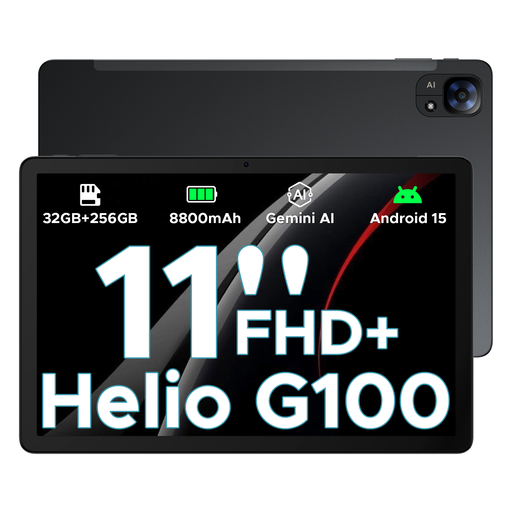
The title lists Android 15, an 11-inch FHD+ screen with 90 Hz and the specification 32 GB + 256 GB/2 TB.
Yes, if your chosen journal app supports offline working. Check this in advance and arrange a suitable backup too. Apple says an automatic iCloud backup requires, among other things, power, a locked iPad and Wi-Fi; Apple also describes backing up via a computer.
VeiligInternetten warns about the risks of public Wi-Fi, including in hotels, and suggests using a VPN or mobile data through a phone hotspot. A hotspot uses your data allowance, and a Wi-Fi-only tablet doesn’t automatically have its own mobile connection.
If a product is faulty, you have statutory rights against the seller. According to the Dutch Government, the Netherlands has no fixed statutory guarantee period; what you can reasonably expect in terms of a product’s lifespan depends on the product and the circumstances. A manufacturer’s guarantee or an extended warranty doesn’t replace those rights.
The European Union Aviation Safety Agency advises carrying portable electronic devices with lithium batteries in your hand luggage. If you do need to put one in checked baggage, additional conditions may apply, and airlines may prohibit it. So check your carrier’s rules too.