
Traveller who writes by hand
Wants to jot down experiences or sketch quickly, so compares pen compatibility and what’s in the box. Apple, Samsung and Lenovo list different pen options for the models or bundle reviewed.


If you mainly write by hand, check whether a compatible pen is included with the exact version you’re considering. For longer pieces, keyboard compatibility and screen space matter more. A larger screen gives you more room to work, but is less convenient to carry around. Also check whether your journalling app works offline and syncs changes later.
Wants to jot down experiences or sketch quickly, so compares pen compatibility and what’s in the box. Apple, Samsung and Lenovo list different pen options for the models or bundle reviewed.
Spends longer working on journal pages and compares screen space, storage and how comfortable it is to type. Also check whether the keyboard you want comes with the version you choose.
Takes their tablet along often and weighs up its size and weight against the available screen space. Which? notes that extra-large tablets are less convenient to carry around.
First decide whether you’ll mainly write, type or organise photos. Then consider how you’ll carry the tablet and whether your journalling app works without an internet connection.
| What to consider | What should you check? | Who should pay extra attention? |
|---|---|---|
| Pen and box contents | Check pen compatibility and whether a pen is included with the exact version. Apple lists Pencil support for the iPad (A16), but no Pencil among the box contents; the Lenovo Tab P12 bundle reviewed includes a pen and folio. | If I want to make handwritten notes, I want to know whether I can get started straight away with a compatible pen. Around 33% of consumers give handwriting top priority. |
| Portability and screen space | Compare the dimensions and weight of the exact version, including the case you plan to take with you. Which? says that extra-large tablets are less convenient to carry around. | If my tablet will often go in my bag, I weigh up a more compact size against having more room for text and photos. Around 27% of consumers prioritise portability. |
| Offline use and public Wi-Fi | Check in your journalling app whether you can write without an internet connection and how changes sync later. Veilig Internetten recommends using a VPN or a phone hotspot with mobile data on public Wi-Fi; ask which network is the right one while you’re there. | If I don’t want to rely on library Wi-Fi, I want to be able to update my journal without a connection. Around 20% of consumers give being able to work without public Wi-Fi top priority. |
| Photos and longer pieces | Check the storage capacity of the exact version and whether the keyboard you want is included. Apple, Samsung and Lenovo list different storage options for the models reviewed; compare them with your own photo collection. | If I store lots of photos and type longer pieces, I look for enough storage and a practical way to enter text. Around 20% of consumers put photos and long pieces at the top of their list. |
A tablet may work with certain pens without one being included in the box. For the iPad (A16), Apple lists compatible Apple Pencil models, but no Pencil among the box contents; the Lenovo Tab P12 bundle reviewed does include a pen.
Compare the full model name, pen compatibility and box contents for the version you want to buy.
With some versions, you may need to buy a compatible pen separately.
A large screen gives you more room to work, but Which? says extra-large tablets are less convenient to carry around.
Think about whether you’ll mainly write at a library table or often carry the tablet in your bag, and compare its size with the case you plan to use.
The Dutch Government distinguishes between statutory rights and an additional manufacturer’s warranty. If a product is faulty, the retailer is your point of contact.
Read about any extra rights offered by an additional warranty, and keep its terms separate from your statutory rights.
The iPad (A16) reviewed is an option of around 11 inches for anyone who wants to use iPadOS and compatible Apple Pencil models.
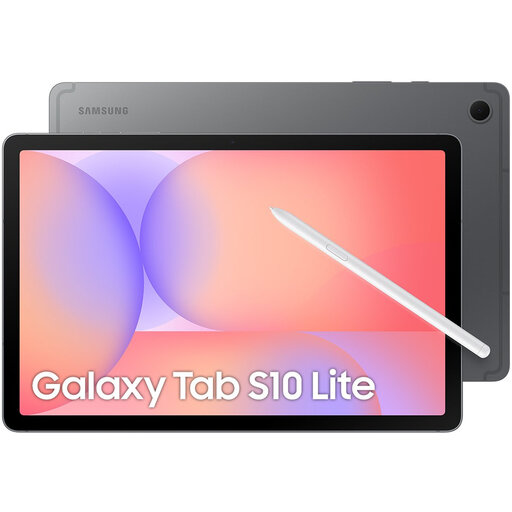
The Galaxy Tab S10 Lite reviewed is designed for note-taking with the S Pen and is available with different storage capacities.
The Lenovo Tab P12 bundle reviewed, ZACH0219SE, combines a 12.7-inch screen with a pen and folio.
These Joybuy tablets are suited to updating a travel journal with text and photos. Some product names mention a pen or keyboard; check which accessories are actually included with the version you choose.
 No image available
The Tab Pen Pro listed in the product name is suited to handwritten travel notes.
11.1-inch 3.2K touchscreen, 12GB LPDDR5X, 256GB UFS 4.0 and Luna Grey.
 No image available
If you’re considering this version for handwritten notes, check pen compatibility and the box contents for the specific product.
Wi-Fi version with 128GB storage.
 No image available
Compare this version with your journalling app and check whether the pen you want is included with the product.
MediaTek Dimensity 6300, 11-inch IPS screen, 90Hz and 128GB storage.
The charger must be purchased separately.
 No image available
The 10.1-inch size is worth comparing if you’re looking for a tablet for text and photos that you can also take with you.
The product name lists 128GB storage, 120Hz HD and a 6000mAh battery.
 No image available
The product name lists both a stylus and an English Bluetooth keyboard, for anyone who wants to switch between handwriting and typing.
10.1-inch screen and 64GB storage. The bundle listed also includes a case, mouse and tablet stand; check that the English keyboard layout suits you.
No, it depends on the exact version and what’s in the box. For the iPad (A16), Apple lists support for certain Apple Pencil models, but no Pencil among the box contents; the Lenovo Tab P12 bundle reviewed does include a pen. Pen support and an included pen aren’t the same thing.
Take care when using a public network and first check which Wi-Fi network belongs to the library. Veilig Internetten recommends using a VPN or a phone hotspot with mobile data. Also check in your own journalling app whether you can work offline and how changes sync later.
No. According to the Dutch Government, the Netherlands has no fixed statutory warranty period; you’re entitled to a product that works properly for as long as you can reasonably expect it to. The retailer is your point of contact if there’s a problem. A manufacturer’s warranty is separate from this.
The European Commission lists ecodesign requirements and energy labels for slate tablets placed on the EU market from 20 June 2025. Whether they apply depends on the product category and when the product was placed on the market. If a product listing doesn’t show a label, don’t assume without checking further that the specific product is prohibited.
The Dutch Government describes options including handing in your old device when buying a new, similar one, or taking it to a local authority collection point. The take-back scheme also applies to private online purchases.