For continuous text that you often read while holding your tablet, start by considering a compact model. If you mainly read fixed PDF pages, tables or notes, it’s worth comparing a larger screen. Download your guide in advance if you want to use it offline: NS says free Wi-Fi is available on almost all Intercity trains, but not every train. Choose LTE or 4G only if you regularly need new online content while travelling, and compare the screen, weight, storage and included accessories for each version.
Who is this guide for?
Reader with limited luggage space
If you mainly read continuous text and want a tablet that’s easy to hold and put away, check that your guide is comfortable to read on a compact screen. The Dutch Consumers’ Association says smaller tablets are handy for travelling.
Reader of PDFs and tables
If your language guide contains fixed-layout pages, images or exercises, being able to see more of each page may matter more than having the most compact device possible. Check how a page looks using one of your own files.
Reader who accesses online content while travelling
If you regularly need new content during your journey and don’t want to rely solely on pre-downloaded files or train Wi-Fi, check which connectivity options the model offers. NS says Wi-Fi is available on almost all Intercity trains, but not every train.
What should you consider when choosing?
Start with the layout of your guide: continuous text calls for different considerations from fixed-layout PDF pages or tables. Then decide whether downloading in advance is enough, or whether you’ll need new online content during your journey.
| What to consider |
What to look for |
Who should consider this most? |
| Portability |
Compare the weight of the exact model and try a page from your own guide on the screen. |
If I’ll often be holding the tablet or have limited space in my bag, I want to be able to read comfortably both while seated and when changing trains. Around 33% of consumers prioritise portability. |
| Reading fixed-layout pages |
Open a representative PDF page and check small text, zooming and page navigation. |
If my guide contains tables, images or exercises, I want to be able to view them without constantly adjusting the page. Around 25% of consumers prioritise readability on fixed-layout pages. |
| Access to your guide |
Test whether the guide opens offline in the app you use, then compare Wi-Fi, a hotspot and a cellular model. |
If I need new content while travelling, I want to know whether I can access it without train Wi-Fi. Around 25% of consumers prioritise access to content while travelling. |
| Accessories and long-term use |
Check what’s in the box, which accessories you’ll need and what information is available about long-term support. |
If, for example, I want to take notes or use the tablet for longer, I want to know in advance which accessories are included and what the model supports. Around 17% of consumers prioritise accessories and long-term use. |
Common mistakes
-
Assuming train Wi-Fi is always available
NS says Wi-Fi is available on almost all Intercity trains, but that doesn’t mean you can rely on it on every train.
Before you set off, open your guide without a network connection and check that images, exercises and any dictionary features work too.
-
Choosing a small screen for portability alone
A fixed-layout PDF page or table may need more zooming on a compact screen, while a larger screen can be less convenient to carry.
Look at the same example page on a compact and a larger screen before deciding.
-
Confusing Wi-Fi, LTE and accessories across models
Tablets with similar names can differ in connectivity and what’s included in the box. For example, stylus support doesn’t automatically mean a stylus is included.
Check the full model name, connectivity option and box contents of the version you want to buy.
Brands to compare
Lenovo
The Tab One is a compact Android option worth comparing if you mainly read your language guide while holding the tablet.
- For the Tab One version described, Lenovo Netherlands lists an 8.7-inch screen, a weight of around 320 g and 64 GB of storage.
- The version listed has Wi-Fi. Check whether text and fixed-layout pages from your own guide are comfortable to read at this size.
Samsung
The Galaxy Tab A11 is available as a compact Wi-Fi model and as a separately listed LTE model.
- For the 8.7-inch models reviewed, Samsung Netherlands lists a resolution of 1340 × 800 pixels and microSD expansion.
- LTE is available only on the LTE model. Samsung’s claims about readability in sunlight are manufacturer claims, not the result of an independent test on a train.
Apple
The 11-inch iPad (A16) is an iPadOS option worth comparing if you’re looking for more screen space or Apple Pencil support.
- Apple Netherlands lists 128 GB as the smallest storage option shown, and gives the weight as 477 g for Wi-Fi or 481 g for Wi-Fi with mobile data.
- Apple lists a USB-C cable in the box, but no Pencil. Also check whether your existing language guide works with each app.
Xiaomi
The Redmi Pad 2 is an 11-inch Android option. The separately listed Redmi Pad 2 4G is worth considering if you need mobile data.
- For the Wi-Fi model, Xiaomi Netherlands lists a resolution of 2560 × 1600 pixels, a reading mode and a weight of 510 g. For the 4G model, Xiaomi lists a weight of 519 g and dual 4G.
- These manufacturer specifications don’t prove that every language guide will be more comfortable to read or that you’ll have mobile coverage while travelling. Test your own files and check the network terms.
Tablets for language guides on Joybuy
This selection of Joybuy products includes compact tablets with mobile connectivity and larger models for viewing language guides with fixed-layout pages or notes.
 No image available
Samsung Galaxy Tab A11 X135 64 GB silver
Its compact size and LTE connectivity may suit you if you want to take the tablet with you and access new content while travelling.
Screen: 8.7 inches, 1340 × 800 pixels. Weight: 337 g. Storage: 64 GB, expandable. Connectivity: 4G LTE with nano-SIM slot.
You’ll need a compatible SIM card or service and network coverage to use mobile data.
Joybuy
 No image available
HONOR Pad X8b 128 GB Space Grey
The 11-inch screen is worth comparing if your guide contains fixed-layout pages.
Screen: 11 inches, 1920 × 1200 pixels. Storage: 128 GB. Weight: 499 g.
Try a representative page from your own guide to see whether the text and layout work for you.
Joybuy
 No image available
Lenovo Tab 4G Mediatek LTE 128 GB, 10.1 inches, 4 GB, Android 14, grey
The larger screen and LTE are worth comparing if you want to view fixed-layout pages and need new content while travelling.
Screen: 10.1 inches, 1920 × 1200 pixels. Weight: 425 g. Storage: 128 GB, expandable via microSD. Connectivity: 4G LTE.
Mobile data requires a compatible SIM card or service and network coverage.
Joybuy
 No image available
Lenovo Idea Tab Plus WiFi 12.1 inches 2.5K 8 GB RAM 256 GB with pen, Rose
The large screen and included pen may suit reading and note-taking. Check whether the Wi-Fi model meets your need for online content.
Screen: 12.1 inches, 2.5K. Memory: 8 GB RAM. Storage: 256 GB. The product information lists a Lenovo Pen as included.
According to the product information, the charger must be purchased separately. You’ll need Wi-Fi or a hotspot to access new online content while travelling.
Joybuy
 No image available
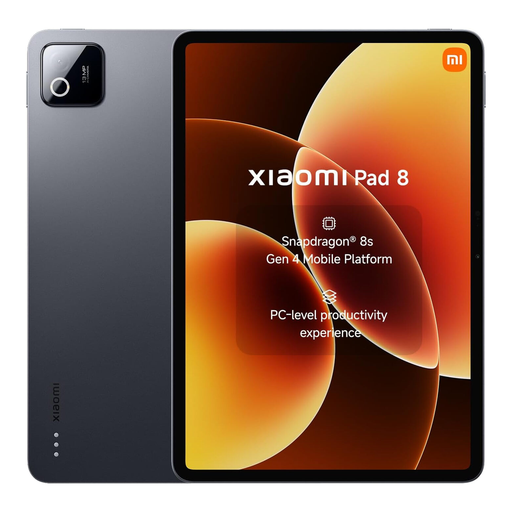
Xiaomi Pad 8 grey, 8 GB RAM, 256 GB ROM
Compare how the screen displays a representative page from your language guide before deciding whether this model suits the way you read.
The product name lists 8 GB RAM and 256 GB ROM.
Joybuy
Frequently asked questions
Should I buy a tablet with 4G or LTE for the train?
Not if you can download your language guide in advance and open it offline during your journey. If you need new online content while travelling, compare using a hotspot with a tablet model that explicitly lists LTE or 4G. NS says free Wi-Fi is available on almost all Intercity trains, but not every train.
How do I prepare my tablet for offline reading?
Download the specific guide before you set off, then open it once without a network connection. Also check whether images, exercises and any dictionary features are available offline in your app; the tablet specifications alone won’t tell you this.
Is a pen included if a tablet supports one?
No, stylus support doesn’t automatically mean a pen is included. Apple lists the iPad (A16) as supporting specific Apple Pencil models, but the box contents shown include only the iPad and a USB-C cable. Check what’s included with the specific offer.
What are the rules on cooling-off periods and guarantees in the Netherlands?
According to ACM ConsuWijzer, online product purchases generally come with a statutory cooling-off period of up to 14 days after delivery. Check which exceptions apply to your purchase. The statutory guarantee isn’t automatically limited to the manufacturer’s guarantee period: if a product becomes faulty too soon under normal use, the seller must resolve the issue in accordance with the applicable terms.
Does a tablet need an energy label in the Netherlands?
The European Commission says energy labelling rules have applied since 20 June 2025 to slate tablets placed on the EU market from that date. The rules don’t apply to every type of tablet computer or screen without distinction. Use a label for comparison only when it applies to the specific model.


