Who is this tablet guide for?

Looking at diagram details together

You lay a tidal landscape diagram on the table with others and want to follow the details without constantly zooming in and out. Compare the visible screen area with how easy you want the tablet to be to carry around. The Consumentenbond describes extra-large tablets as less convenient to carry.

Annotating diagrams by hand

You want to add notes, routes or questions directly alongside lines and legends. Check that the stylus is included with the exact model and that the app can open and annotate your PDF or image file. Samsung describes PDF annotation in Samsung Notes, while Apple describes marking up documents in supported apps.

Studying at the table and on the go

You move between the shared table and other study spaces. Balance the space you need for your diagram against the size and weight of the model you actually plan to carry.

What should you look for when choosing?

A larger screen for the table

Choose this if: several people want to look at one diagram at the same time. Samsung lists a 13.1-inch screen for the Galaxy Tab S10 FE+; Lenovo lists a 12.1-inch screen for the Idea Tab Plus model reviewed.

The trade-off: more screen space may make the tablet less practical to carry around. The screen size alone doesn’t prove that your legend or lines will be easy to read from every seat.

A more compact screen with stylus annotation

Choose this if: you also want to carry the tablet around regularly and write directly on files. Samsung describes S Pen support for the Galaxy Tab S10 FE; Apple describes PDF mark-up on iPad in supported apps.

The trade-off: a large diagram may not fit fully on screen. Apple sells the Pencil (USB-C) separately, so check what’s included in the box with the offer.

Weighing up screen aspect ratio and stylus support

Choose this if: the stated 3:2 aspect ratio suits your documents. Xiaomi lists an 11.2-inch screen for the Pad 7, with Focus Pen support.

The trade-off: Xiaomi’s stated Focus Pen latency applies only to its own apps. Check that it works with the app you use for diagrams, and confirm what’s included with the model.

What to consider What should you check? Who is this important for?
Reading a diagram together Compare screen size and resolution, then view one of your own diagrams at the intended scale and viewing distance. If I’m studying one chart with others, I want to be able to follow the legend and fine lines from different seats; around 36% of consumers prioritise readability when sharing a screen.
Annotating with a stylus Test your own PDF or image, and check stylus compatibility, what’s included in the box, and how to save and share in your chosen app. When I want to add questions directly alongside lines, the stylus and app matter more than screen size alone; around 29% of consumers prioritise direct stylus annotation.
Screen space and portability Compare the dimensions and weight of the exact model, including the case you plan to use. If I move between study spaces, I want enough room for diagrams without carrying a tablet that’s too large for my needs; around 21% of consumers put portability first.
Total cost and product lifespan Check what’s included in the offer, the software support available and, where applicable, the EU energy label for the exact model. If I want to use the tablet for longer, I look at accessories and support as well as the purchase price; around 14% of consumers prioritise total cost and product lifespan.

Common buying mistakes

  • Choosing based on screen size alone

    A larger screen gives you more space, but the diagonal measurement doesn’t tell you whether the legend on your diagram will be readable from the seats around the table.

    Open a representative file at the scale you want and view it from where the others will be sitting.

  • Assuming every tablet comes with a stylus

    Stylus support doesn’t mean a stylus is included in the box. Apple sells the Pencil (USB-C) model reviewed separately; what’s included can vary by model.

    Check the full model code and the contents of the box for the specific offer.

    Buying a compatible stylus separately will add to the total cost.

  • Assuming a stylus claim applies to every app

    Xiaomi’s stated Focus Pen latency applies only to its own apps, so the claim doesn’t automatically apply to third-party apps.

    Test the stylus in the app you actually plan to use to annotate your diagrams.

  • Confusing a commercial warranty period with your statutory rights

    According to the Dutch government, the Netherlands has no fixed statutory warranty period for a product that works properly. An additional warranty package is different from the rights you have if a product is faulty.

    Read what extra cover a package provides, and keep your purchase and product details.

    An additional package may cost extra, so consider what it actually adds.

Brands to compare

Samsung

The Galaxy Tab S10 FE is a more compact option, while Samsung says the S10 FE+ has a larger screen. Samsung describes using the S Pen and annotating PDFs in Samsung Notes.

  • Samsung describes importing PDFs and writing with the S Pen in Samsung Notes.
  • Screen sizes and features are manufacturer specifications, not independent readability tests. Services may vary by device, so check the exact model and software version.

Lenovo

According to Lenovo, the Dutch Idea Tab Plus model reviewed, ZAG70187SE, has a 12.1-inch screen and is listed as including a stylus.

  • Lenovo lists a resolution of 2560 × 1600 pixels for this model.
  • The stylus and bundle may vary by model, so don’t assume every Idea Tab Plus comes with the same accessories.

Apple

The iPad (A16) is an around 11-inch option for anyone who wants to use iPadOS and mark-up tools in supported apps.

  • Apple describes PDF annotation in supported apps and lists the Pencil (USB-C) as compatible with iPad (A16).
  • The Pencil is sold separately; compatibility doesn’t mean it’s included with every iPad offer.

Xiaomi

Xiaomi lists an 11.2-inch screen with a 3:2 aspect ratio for the Pad 7, along with Focus Pen support.

  • The stated screen aspect ratio can help you work out how your documents will fit on screen.
  • The screen and stylus details are manufacturer claims. Xiaomi’s stated stylus latency applies only to its own apps, so check how it works in your annotation app and what’s included in the bundle.

Joybuy tablets for diagrams

Here you’ll find Joybuy tablets suited to viewing diagrams around a table, with screen sizes ranging from 11.1 to 12.7 inches. Some model names specify that a stylus is included.

Lenovo Idea Tab Pro TB373FU, Luna Grey

Lenovo Idea Tab Pro TB373FU, 12.7-inch, Luna Grey

The 12.7-inch screen suits viewing diagrams together; also consider the size if you plan to carry the tablet around regularly.

The product name lists a 3K 144 Hz screen, 8GB RAM, 256GB storage and Wi-Fi 6E.

Joybuy

Lenovo Idea Tab Plus Wi-Fi, Rose

Lenovo Idea Tab Plus, 12.1-inch, Rose

This 12.1-inch model is an option for viewing a diagram together; check that the stylus and annotation app you want to use work with your files.

The product name lists a 2.5K screen, 8GB RAM, 256GB storage and a stylus.

Joybuy

TECLAST ArtPad Pro, 12.7-inch

TECLAST ArtPad Pro, 12.7-inch

The 12.7-inch size is suited to diagrams you want to view with others around the table; test for yourself whether your chart is easy to read at the scale you want.

The product name lists a 2K screen, 256GB storage and a stylus. The stated 20GB RAM consists of 8GB plus 12GB of virtual memory.

Joybuy
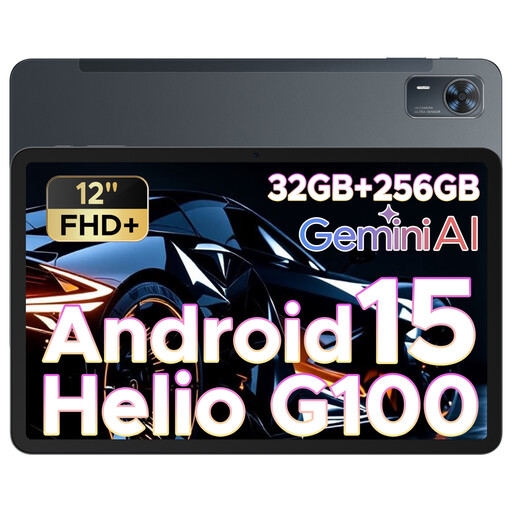
DOOGEE Tab E3+, 12-inch

DOOGEE Tab E3+, 12-inch

The 12-inch screen may suit diagrams you want to view around the table; check readability using your own file.

The product name lists an FHD+ screen and a 90 Hz refresh rate.

Joybuy

Lenovo Yoga Tab ZAG60028PL, Luna Grey

Lenovo Yoga Tab ZAG60028PL, 11.1-inch, Luna Grey

The 11.1-inch size is a more compact option if you carry your tablet between study spaces; compare the screen space with your diagrams.

The product name lists a 3.2K 144 Hz screen, 12GB RAM, 256GB storage, Wi-Fi 7 and a Tab Pen Pro.

Joybuy

Frequently asked questions

How can you check whether your tide chart is easy to read on a tablet?

Open a representative file at the scale you plan to use and view it from the seats around the table. Check that the legend, fine lines and colours are clear to the intended viewers; screen size alone can’t replace this test.

Can you write directly on a PDF?

You can in supported apps: Apple describes PDF mark-up on iPad, while Samsung describes importing PDFs and writing with the S Pen in Samsung Notes. Test whether you can open, annotate, save and share your file, and check which stylus comes with the exact model.

What should you check before setting up a tablet for studying?

First, open a sample diagram in the app you plan to use and save a test annotation. Before buying, check whether a stylus is included in the box; Apple sells the Pencil (USB-C), which is compatible with iPad (A16), separately.

Is an additional warranty package necessary in the Netherlands?

An additional package isn’t the same as your statutory rights if a product is faulty. According to the Dutch government, the Netherlands has no fixed statutory warranty period for a product that works properly. Check what a package actually adds, and contact the retailer if something goes wrong.
