
Writer working with active citations
You want to do more than edit text while travelling: you also want to work with dynamic Zotero citations in Word. Zotero documents its Word plug-in for the desktop workflow.


If you want to work on active citations in Word with the Zotero plug-in while travelling, a Windows tablet with the required desktop software is likely to be the best fit. For writing text, reading PDFs and annotating, iPadOS and Android may suit you, but plan to process active Zotero citations on a computer. Also check that the keyboard suits the model you choose and that your files are available offline before you set off.
You want to do more than edit text while travelling: you also want to work with dynamic Zotero citations in Word. Zotero documents its Word plug-in for the desktop workflow.
You want to write during longer journeys using a physical keyboard, and need a size that’s practical to use in your seat. The Consumers’ Association points out that larger tablets are less convenient to carry and often have an optional keyboard.
You mainly use your travel time to read articles and chapters and make notes, then update your thesis later on a computer. Zotero describes mobile PDF annotation on iPad and Android, with further work carried out on a computer.
Choose this option: if you want to edit active Zotero citations and bibliographies in Word while travelling.
Keep in mind: check that your university’s software works; a compatible keyboard may be sold separately.
Choose this option: if you mainly write draft text, read articles and annotate PDFs.
Keep in mind: Zotero recommends using a computer to process active citations in a word processor; a compatible keyboard may cost extra.
Choose this option: if you mainly want to type, read PDFs and make notes using apps you’ve tested in advance.
Keep in mind: Zotero recommends using a computer to process active citations; the keyboard and included accessories vary by model.
Start by choosing the software and citation workflow you’ll need while travelling. Then compare the keyboard setup, offline access, portability and the full combination of tablet, accessories and software.
| What to consider | What to look for when buying | Who is this important for? |
|---|---|---|
| Active citations and software | Test a copy of your own document to see whether you can add citations and update the bibliography. Zotero documents its Word plug-in for the desktop workflow. | If you want to update citations in your thesis on the train, you’ll want to know whether your software is up to the task. Around 28% of consumers prioritise compatibility with citation and thesis software. |
| Extended typing | Check keyboard compatibility, layout, what’s included in the box and whether you can use the setup in your seat. | If you want to make the most of your travel time with long writing sessions, a comfortable, practical keyboard setup matters. Around 22% of consumers give extended typing top priority. |
| Working offline | Open and download the files you need in advance; test editing offline and check that your changes have synced once your connection is restored. Microsoft says a cloud file must first be opened online before it can be used offline. | If you may not have a connection during your journey, you’ll want uninterrupted access to your documents. Around 22% of consumers prioritise offline access and keeping their changes. |
| Reading and annotating | Check how you save and find PDF notes in your research library, and whether a pen is included with the model you choose. | If you mainly read research and make notes to work on later, annotation features and readability matter. Around 17% of consumers give reading and annotating top priority. |
| Total setup | Compare the tablet with a compatible keyboard, any pen you need and the software licences required for your work. | If you’re looking for a complete writing setup, you’ll want to factor in the accessories and software you need. Around 11% of consumers prioritise the total purchase cost. |
Being able to edit text while travelling doesn’t necessarily mean you can manage active Zotero citations in your document in the same way.
Before you buy, test the full process using a copy of your document: open it, add a citation, update the bibliography and open the file again.
You may still need a computer or additional software for the citation workflow you want.
Depending on the model and configuration you choose, you may need to buy a keyboard, pen or software licence separately.
Check exactly what’s included in the box and compare the complete setup you need for your work.
A file that hasn’t been opened online in advance may not be ready to use offline. Microsoft says you need to open the file online at least once.
Open the files you need before you set off, then check that your changes have synced after your journey.
Surface Pro is a Windows 2-in-1 for anyone who needs a desktop thesis workflow while travelling.
iPad Air suits a mobile workflow for writing, reading and annotating that doesn’t rely on desktop plug-ins while you’re on the move.
Galaxy Tab S10 FE is an Android option for reading and annotating with a pen.
Idea Tab Pro is an Android option with extra screen space and a choice of tablet-only or keyboard bundle.
Pad 7 is an Android alternative with an 11.2-inch screen and a separately available keyboard.
These product picks are aimed at mobile thesis work: typing with a keyboard, reading and annotating. Check that the software and accessories suit your own workflow for each model.
 No image available
An option for anyone who wants to type on the move using the keyboard included in the bundle.
The product name lists 9GB* RAM (3GB + 6GB virtual expansion), 64GB of storage and a Bluetooth keyboard. It also mentions a case, mouse, stand, stylus and earphones.
 No image available
Suited to anyone who mainly wants to write, read and annotate while travelling; Zotero recommends using a computer to process active Zotero citations.
Apple lists the 11-inch iPad Air M4 Wi-Fi as weighing 464 grams. Check which keyboard suits your writing setup.
 No image available
An option for anyone looking for an 11-inch tablet to write or read on while travelling; check in advance that the apps you need suit your workflow.
The product name lists Wi-Fi + Cellular and 256GB of storage. For active Zotero citations in a word processor, Zotero recommends continuing your work on a computer.
 No image available
Suited to anyone who wants to read research and make notes while travelling; bear in mind that a larger tablet takes up more space in a train seat.
The product name lists 8GB RAM + 12GB virtual RAM, 256GB of storage and an included stylus. For active Zotero citations, Zotero recommends continuing your work on a computer.
 No image available
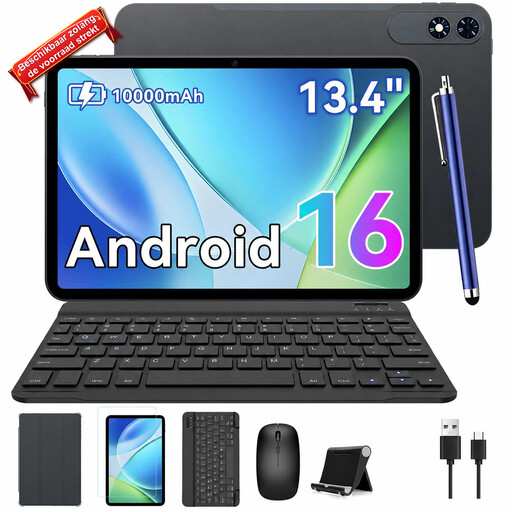
An option for anyone who wants a larger screen and a keyboard bundle; it takes up more space than a smaller tablet on a train seat.
The product name lists Android 16, 24GB (8GB + 16GB) RAM, 256GB of storage and an included keyboard.
Yes, as long as the file is available offline in advance. Microsoft says you need to open a cloud file online at least once; check that your changes have synced once your connection is restored.
Zotero describes features including library management and PDF annotation in its mobile apps, but recommends using a computer to process active citations in a word processor. Test your own document before choosing a mobile tablet as your only writing device.
It depends on your device and the features you need. Microsoft lists free core editing on iOS and Android devices with screens up to 10.1 inches, and says certain extra features require a suitable Microsoft 365 subscription. Check the terms for your device and thesis work.
Microsoft says this model works with the keyboard for the Surface Pro 12-inch (1st Edition), and that other Surface Pro keyboards listed are not compatible. Check both the edition and keyboard layout before buying.
Keep your tablet and accessories within your own seat and make sure your setup doesn’t take up another seat. NS’s house rules state that hand luggage must not occupy a seat that another passenger could use.