
Reader with short breaks between journeys
Wants to open a chapter quickly between appointments and prioritises portability and access to their own book.


First, choose a tablet that works with your textbook and preferred way of taking notes, including offline if you’ll need that. A compact tablet is easier to carry, while a larger screen gives you more room for PDFs and notes. A digital paper tablet is best suited to reading and handwriting.
Wants to open a chapter quickly between appointments and prioritises portability and access to their own book.
Wants to highlight passages or make notes with a pen, and considers screen space and how well the chosen pen and app work together.
Mostly reads documents and writes by hand. Check in advance that your book service works on the device.
Choose this if: you carry your tablet around often and portability matters more than having plenty of room for a PDF. Apple lists the iPad mini Wi-Fi as having an 8.3-inch screen and weighing 293 grams.
The trade-off: a smaller screen gives you less room to view a full-page PDF and make notes.
Choose this if: you want to annotate PDFs or have more room to read and write. Samsung describes how to annotate PDFs in Samsung Notes using an S Pen.
The trade-off: check that the pen and app you want work with each model, and whether the pen is included with that configuration.
Choose this if: you mainly read imported documents and take handwritten notes. reMarkable describes PDF and EPUB imports, as well as PDF annotation.
The trade-off: check that your book service and the features you want will work. The Paper Pure has a monochrome screen, while BOOX lists a colour screen and Android for the Note Air5 C.
| What to consider | What should you check? | Who is this important for? |
|---|---|---|
| Portability between appointments | Compare the dimensions and weight of the configuration, including the case you plan to carry. | If I often travel between appointments, I want a tablet that’s easy to take with me without the screen being too small; around 25% of consumers prioritise portability. |
| Taking notes | Check pen compatibility, the app you’ll use and how much space your chapter needs. | I want to be able to highlight passages and find my own summary again; around 25% of consumers give note-taking top priority. |
| Access to your own book | Check the format, permitted app, download options and the publisher’s or book service’s rules on making notes. | If my textbook is accessed through a specific service, I want to know that the exact edition will open while I’m out and about; around 20% of consumers start by checking access to the book. |
| What you’ll need | Check what’s included with the exact configuration and which features require a service or connection. | I want to know in advance what else I need to arrange, so my pen and preferred setup are ready to go; around 15% of consumers look at this first. |
| Distraction-free reading or versatility | Look at the screen display, available apps and the features you actually want to use. | If I mainly want to read in peace and write by hand, I want a setup that suits the way I work; around 15% of consumers prioritise undisturbed reading. |
Being able to annotate PDFs doesn’t automatically mean your book service provides the chapter as a PDF or allows you to download and annotate it.
Before choosing a tablet, check the file format, the permitted app and the offline-use terms for your edition.
What’s included in a bundle varies by configuration. Some reMarkable extras are linked to Connect.
Check exactly what’s in the box and decide which features you really need.
The reMarkable Paper Pure has a monochrome screen. A colour e-paper display or Android support doesn’t, by itself, mean your textbook app will work.
Look at a representative page from your chapter and check the book app on the exact device.
The iPad mini is for those who value portability; the 11-inch iPad Air is for those who want more screen space.
Galaxy Tab S models are standard Android tablets to consider if you want to annotate PDFs.
Idea Tab configurations offer an Android option with a screen around 11 inches.
Paper Pure is digital paper for those who mainly read documents and write by hand.
The Note Air5 C is a colour e-paper option to consider if you also want to explore a wider app environment.
The Joybuy options below are tablets for reading, studying and taking notes on the go. Check that the pen, connectivity and book app you want suit the way you work with each configuration.
 Image unavailable
The product description highlights learning and everyday use, making it suitable for reading while studying on the go.
The product name lists a 2.5K screen and MediaTek Dimensity 6300.
The product description lists a microSD card slot.
 Image unavailable
The product description mentions work and productivity; the product name lists 5G for those who want to use mobile internet on their tablet.
The product name lists 8 GB RAM and 256 GB storage.
 Image unavailable
The product description lists an included Tab Pen for writing and taking notes.
The product name lists an IPS screen, 90 Hz, 500 nits and Android 15.
According to the product description, a charger is not included as standard.
 Image unavailable
The product description mentions studying and taking notes with the included stylus.
The product name lists a 2K screen and 256 GB of storage.
The product name lists 20 GB RAM, made up of 8 GB plus 12 GB virtual RAM.
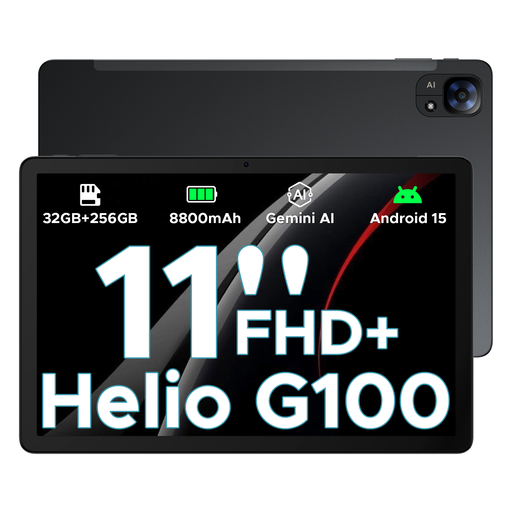 Image unavailable
The product name lists 5G and two SIM slots for those who want to use mobile internet directly on their tablet.
The product name lists Android 15 and an FHD+ screen.
The product name lists 32 GB and 256 GB/2 TB; check which RAM and storage configuration applies to the version you choose.
That depends on the specific edition and book service. Being able to annotate PDFs on a tablet doesn’t automatically mean the service allows downloads or offline note-taking. Check the terms and try it with your chapter.
Not if your chapter and note-taking tools are available to use in advance, or you have a connection elsewhere. To get mobile internet directly, you’ll need a suitable configuration and, according to the Consumers’ Association, a SIM with a contract or pay-as-you-go bundle.
No. A pen and PDF markup don’t, by themselves, automatically summarise an entire chapter. Samsung describes Note Assist as subject to feature and model requirements, and lists a minimum of 200 characters for summarising a note. That doesn’t guarantee it will work with any given textbook edition.
Consumer protection doesn’t automatically apply if the tablet is used mainly or exclusively for business. The Authority for Consumers & Markets points out that how the agreement is used is what matters. For a business purchase, check the applicable sales and warranty terms.
If you process customers’ personal data, you must protect it appropriately. The Dutch Data Protection Authority also notes that sector-specific rules may apply. If so, assess the security of the device and the services you use.