Your best choice is a tablet that lets you edit your existing minutes file in the app you want to use. If you’ll be typing a lot, consider a suitable keyboard; a stylus can be useful for quick annotations. Make the file available offline before you leave, then weigh up screen space, portability and connectivity. If your minutes contain personal data, your organisation will determine which security and sharing methods are appropriate.
Who is this choice relevant to?
The note-taker who types a lot
You record decisions and action points during the field trip and want to type comfortably in your existing document. The Consumers’ Association notes that a laptop may be more convenient for word processing and demanding software.
The note-taker without reliable coverage
You want to be able to edit an existing file if Wi-Fi or mobile internet drops out, then synchronise your changes carefully later. Microsoft Support explains that a cloud file must be opened online beforehand if you want to work on it offline later.
The note-taker handling confidential documents
Your minutes may contain personal data, so you need to choose a device and sharing method that meet your organisation’s security requirements. The Dutch Data Protection Authority stresses that appropriate security depends on the circumstances.
What matters when taking minutes on the move?
First, consider how you’ll enter text and access the file. Then check that the specification and accessories suit the way you plan to use the tablet.
| What to consider |
What should you check? |
Who should pay extra attention? |
| Typing longer passages |
Check keyboard compatibility, layout and what’s included in the bundle. Test that your document works properly in the app you’ve chosen. |
If I need to write up decisions and action points during the field trip, I want to type comfortably in my existing document. Around 29% of consumers give typing up longer minutes the highest priority. |
| Offline access |
Open or download the right file before you leave, try making a change without an internet connection, then check that it synchronises later. Microsoft Support explains that a cloud file must be opened online beforehand. |
When I’m out of range, I want to be able to open the right file offline and synchronise changes later. Around 24% of consumers prioritise access to existing minutes. |
| Portability |
Compare the size and weight of the complete kit you’ll be carrying. Decide whether you’ll mainly type or also make quick notes with a stylus. |
If I’m walking between locations or don’t have a table, a compact device matters more to me than extra room for documents. Around 18% of consumers give portability the highest priority. |
| Protecting personal data |
Ask which accounts, storage and sharing methods your organisation allows. The Dutch Data Protection Authority says that appropriate security depends on the risks and circumstances. |
When minutes contain personal data, I need to follow my organisation’s security and sharing requirements. Around 18% of consumers prioritise protecting personal data. |
| Complete input setup |
Check which stylus or keyboard comes with the specific configuration and whether the keyboard layout suits the way you work. |
Before I choose a configuration, I want to know exactly which input accessories are included. Around 12% of consumers give the contents of a complete working setup the highest priority. |
Common mistakes when choosing a tablet for taking minutes on the move
-
Choosing the tablet but forgetting the keyboard
A tablet doesn’t automatically come with the keyboard you need to type up longer minutes.
Before choosing, check what’s included in the bundle, compatibility and the keyboard layout for the exact configuration.
A suitable keyboard or stylus may not be included with your chosen configuration or bundle.
-
Assuming a cloud file will automatically be available offline
According to Microsoft Support, a cloud file must be opened online beforehand if you want to work on it offline later.
Before you leave, open the right file and test making a change without an internet connection. When you return, check that it has synchronised.
-
Assuming a 5G model means you don’t need to prepare for offline use
Mobile connectivity depends on the configuration and conditions while you’re out and about, so offline access still needs to be considered separately.
Check the full model name and make the file you need available offline in advance.
-
Sharing minutes through any personal cloud service
If personal data is involved, your organisation must assess the risks and appropriate security measures. A cloud service isn’t automatically unsuitable or automatically the right choice.
Use the storage, account and sharing methods approved by your organisation.
Brands to compare for taking minutes on the move
Apple
The iPad Air is an iPadOS option for editing documents on the move. It’s available in 11- and 13-inch sizes and supports Magic Keyboard and Apple Pencil.
- Apple lists the 11-inch iPad Air Wi‑Fi model as weighing 464 grams.
- Check that the document features you need work in your chosen app, and find out which accessories come with the configuration.
Samsung
The Galaxy Tab S10 FE range includes, among other models, a 10.9-inch 5G version that supports the S Pen.
- Samsung lists up to 800 nits in High Brightness Mode for the FE range.
- This is a manufacturer’s figure under specific conditions, not a guarantee of readability in every outdoor location. Also check the configuration and keyboard bundle.
Lenovo
The Idea Tab is an Android option that Lenovo also offers in a specific bundle with a folio keyboard.
- Lenovo lists 128 GB of storage for the 11-inch configuration reviewed.
- The keyboard bundle reviewed has a US International QWERTY layout. Check whether the stylus is included with the specific offer.
Microsoft
The Surface Pro 12 inch (1st Edition) is a Windows 2-in-1 for anyone looking for a laptop-like way to work.
- Microsoft offers a model-specific keyboard as an option for this device.
- Check the full configuration and whether it’s compatible with your own software; features of other Surface generations may not apply.
Joybuy products for taking notes and editing documents on the move
These Joybuy products are suited to taking notes and editing documents on the move. Check that each model’s document app and input method work for the way you take minutes.
 Image unavailable
Lenovo Idea Tab Plus WiFi 12.1 inch, 8 GB RAM, 256 GB, with pen, Rose
The product description mentions the pen for handwritten notes and document annotations.
The product name lists a 12.1-inch 2.5K display, 8 GB RAM and 256 GB storage.
View at Joybuy
 Image unavailable
Xiaomi Pad 8 Pro Gray, 12G RAM, 512G ROM
Check that the document app and input method you want to use for taking minutes are suitable for this configuration.
The product name lists 12G RAM and 512G ROM.
View at Joybuy
 Image unavailable
REDMI Pad 2 Pro 5G Graphite Gray, 8G RAM, 256G ROM
The product name lists a 5G model; check that its mobile connectivity suits the way you’ll use it on the move.
The product name lists 8G RAM and 256G ROM.
View at Joybuy
 Image unavailable
iFLYTEK AINOTE Air 2 8.2-inch E Ink tablet with stylus and protective case
The product description mentions voice transcription and converting handwritten notes to text. Check that the features described suit the way you work.
The product name lists an 8.2-inch E Ink display and stylus.
View at Joybuy
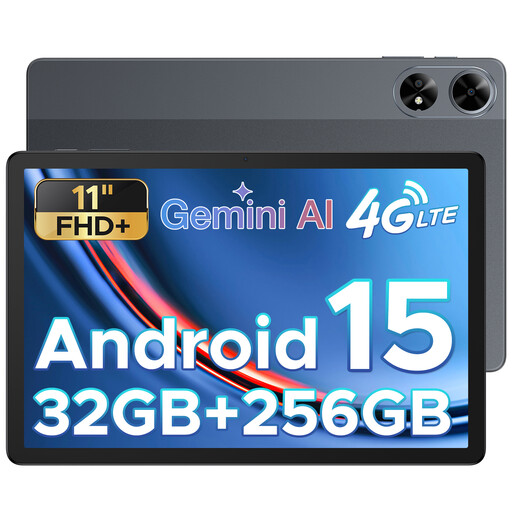 Image unavailable
DOOGEE Tab G6 Plus, Android 15, 11 inch
The product name lists a SIM card slot; check the mobile connectivity options of the configuration you choose.
The product name lists an 11-inch display, 32 GB RAM and 256 GB ROM.
View at Joybuy
Frequently asked questions
Can I edit an existing Word document without an internet connection?
Yes. According to Microsoft, Word for iPad and Android tablets can work offline if you’ve opened the cloud file online beforehand; you can also open Office files stored locally. When you return, check that your changes have synchronised.
Does a stylus or keyboard come as standard?
It depends on the configuration and bundle. Microsoft lists the Surface keyboard as an optional extra. For the Lenovo bundle reviewed, Lenovo mentions a pen in the bundle name, but also says the pen is optional and sold separately. So check what’s included in the specific offer.
What security do I need for minutes containing personal data?
If an organisation processes personal data, it must apply appropriate security measures, according to the Dutch Data Protection Authority. The right measures depend on the risks, so check that your storage and sharing methods meet your organisation’s security requirements.
What are my rights when buying a tablet online?
For online consumer purchases, ACM ConsuWijzer says you generally have up to 14 days after delivery to change your mind, subject to legal exceptions. The seller is responsible for the statutory guarantee if the product doesn’t meet what you could reasonably expect.


