Who is this tablet guide for?

Detail checker

You examine survey photos closely and want to zoom in on details. Consider how reflections and screen size work with your evening lighting, too; the Consumers' Association highlights screen quality and ease of use as important factors.

Reviewer who makes notes

You want to record observations alongside images, so compare pen support, screen space and the review app you use. Check the pen and what’s included in the box for the specific model; brands offer different combinations.

Reviewer with locally stored photos

You want to be able to open photos when you don’t have a reliable connection. Check the storage option and how to transfer files, and keep a separate backup; the Consumers' Association recommends making a backup.

What should you look for when reviewing photos?

Portable tablet around 11 inches

A good fit if: you often hold the tablet and mainly zoom in on photos one at a time.

The trade-off: you’ll have less room to view a photo and notes at the same time than on a larger screen.

Larger Android tablet

A good fit if: you often compare details with notes and mainly use the tablet on a table.

The trade-off: more screen space means less portability. Also check whether the pen is included with the exact model.

Tablet for a Windows workflow

A good fit if: your review work requires a Windows programme that can’t be replaced by the app available for the tablet you’re considering.

The trade-off: a keyboard and pen may be separate accessories. Check software compatibility and what you’ll need before buying.

What to consider What to check before buying Who this matters to
Viewing photos and details View one of your own sample photos, zoom in on a detail, and check reflections and brightness under your lighting. If I want to assess small details, I want to see how one of my own photos looks on the screen. Around 36% of consumers put image review first.
Annotating observations Check that your review app works, which pen it supports and whether the pen is included with the exact model. If I want to record comments alongside images, the app and a compatible pen are key. Around 29% of consumers prioritise annotation.
Locally stored photos Estimate the size of your photo folders and test whether you can transfer files and open them offline. Set up a backup, too. If I want to work without a reliable connection, I need to have my photos available in advance and keep them safe. Around 21% of consumers prioritise local files.
Existing software Check the operating system, the app you need and the file-handling features using a work file you use regularly. If my review work depends on an existing app or desktop workflow, I want to be able to keep using it. Around 14% of consumers prioritise software continuity.

Buying pitfalls to avoid

  • Choosing based only on screen size or resolution

    A larger screen may be less portable, and resolution alone won’t tell you how distracting reflections will be under your lighting.

    View one of your own review photos on a screen of a similar size, under suitable lighting.

  • Assuming pen support means a pen is included

    Pen support doesn’t mean a pen comes in the box. For example, Apple lists Pencil support for certain iPads, but the stated box contents don’t include a Pencil.

    Check the box contents and pen compatibility for the exact model you’re planning to buy.

  • Buying extra storage without checking your files and backup

    More storage doesn’t automatically give you a backup. Without a separate backup, a fault could leave your files inaccessible.

    Estimate the size of your own photo folders, test offline access and choose a separate backup method.

Brands to compare

Samsung

Samsung offers Android tablets in a range of screen sizes, including models for those looking for a more portable device or more workspace.

  • Samsung lists screen sizes of 10.9 inches for the Galaxy Tab S10 FE and 13.1 inches for the S10 FE+, with a 90 Hz refresh rate.
  • These are Samsung specifications, not an independent assessment of photo quality. Check pen support and what’s included in the box for the model you choose.

Apple

The 11-inch iPad (A16) is an iPadOS option if your review app is available for that operating system.

  • Apple lists storage options of 128, 256 and 512 GB, and support for certain Apple Pencils.
  • The listed box contents don’t include a Pencil. Check that your app is compatible and whether you’ll need an accessory.

Lenovo

The Idea Tab Plus may suit you if you’re looking for a larger Android screen and considering a bundle that includes a pen.

  • For model ZAG70187SE, Lenovo lists a 12.1-inch screen, 8 GB of memory, 256 GB of storage and a pen included in the package.
  • What’s included in a bundle may vary by model. Check the model number and packaging for the version you choose.

Xiaomi

The Pad 7 is an Android option to compare if screen ratio and viewing space are important to you.

  • Xiaomi lists a 3:2 screen ratio and 3.2K resolution for the Pad 7.
  • These specifications aren’t an independent assessment of how your photos will look. Check one of your own images and make sure your app is compatible.

Microsoft

The 12-inch Surface Pro is worth considering if your review work requires a Windows workflow.

  • Microsoft describes it as usable as a tablet or, with a keyboard attached, as a laptop.
  • Microsoft offers the keyboard and Slim Pen as optional accessories. Check that your programme and files work with the model you choose.

Joybuy tablets for photo review

This selection includes tablets around 11 inches and larger Android models for those looking for more screen space. Check that the storage, accessories and software support for each model suit your review work.
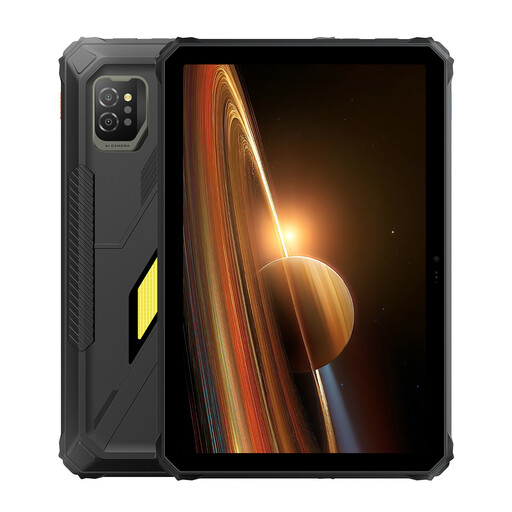
Blackview Active 7, 11 inches, 128 GB

Blackview Active 7, 24 GB (8 + 16 GB) + 128 GB, 11 inches

An option around 11 inches if you’re looking for a more portable tablet and want to keep photo files on the device.

The product name lists an 11-inch IPS screen, 128 GB of storage and Android 15.

Joybuy

Lenovo Tab K11 Gen 2, 11 inches, 2.5K

Lenovo Tab K11 Gen 2, 11 inches, 2.5K, ZAFS0069CZ

An 11-inch tablet to compare if you’re looking for a more portable size for viewing photos.

The product name lists an 11-inch 2.5K screen and MediaTek Dimensity 6300.

Joybuy

Apple 11-inch iPad Air (M4), Wi-Fi, 256 GB, Space Grey

Apple 11-Inch iPad Air (M4), Wi-Fi, 256GB, Space Grey (2026)

An 11-inch iPad option if your review app works with iPadOS and you’re looking for a model with local storage.

The product name lists Wi-Fi and 256 GB of storage. According to the product information, Apple Pencil Pro is sold separately.

Joybuy

TECLAST T65, 13.4 inches, 120 Hz, Android 16

TECLAST T65, 13.4 inches, 120Hz, Android 16, 20GB (6GB + 14GB virtual) RAM, 128GB

A larger Android tablet to consider if you want more screen space and mainly use the tablet on a table. A larger size may be less portable.

The product name lists a 13.4-inch screen, 120 Hz, Android 16 and 128 GB of storage.

Joybuy

Teclast T70, 14 inches, 2.2K, 128 GB, Android 15

Teclast T70, 14 inches, 2.2K (2240 × 1400), 128GB, Android 15

A larger screen may suit you if you’re looking for more viewing space and don’t often hold the tablet for long periods.

The product name lists a 14-inch 2.2K screen, a resolution of 2240 × 1400 and 128 GB of storage.

Joybuy

Frequently asked questions

Should I choose the highest stated screen brightness for evening work?

No. A stated peak brightness doesn’t tell you how comfortable your photos will be to view under evening lighting. Look at one of your own photos using the lighting and screen settings you normally use, and check for reflections too.

How can I stop review photos from being lost if my device fails?

Make a backup and check that you can restore it. For work files, choose a storage and backup method that meets your organisation’s requirements.

Should I allow for extra accessory costs or warranty cover?

Check whether a pen, keyboard or storage service you need is included with the model you choose. For consumer purchases in the Netherlands, the seller is responsible for the statutory guarantee. According to the Netherlands Authority for Consumers and Markets, it has no fixed duration, and your entitlement depends on what you could reasonably expect from the product.

Can I upload or share polder survey photos showing identifiable people on a cloud service without checking first?

Photos showing identifiable people contain personal data. According to the Dutch Data Protection Authority, an organisation must protect personal data appropriately. Whether a particular cloud service and way of sharing are permitted depends on the purpose and how the data is processed.

Does every computer sold as a tablet have the same EU energy label?

No. The European Commission distinguishes between slate tablets and tablet computers that generally use a desktop operating system. EU energy labelling rules have applied since 20 June 2025 to slate tablets placed on the EU market from that date; they don’t automatically apply to every tablet computer.
