
Illustrator with an existing tablet
You’re looking for a pen that works with your exact iPad or Galaxy Tab. Apple Support and Samsung list compatibility by device or pen version, so models aren’t necessarily interchangeable.


Start by checking your tablet’s exact model and making sure both the pen and your drawing app are compatible with it. Then choose a pen to suit the way you illustrate: pressure sensitivity matters for brush strokes that vary in thickness, while tilt may be enough for some sketches. Check how the pen charges, too: magnetic storage doesn’t necessarily mean magnetic charging.
You’re looking for a pen that works with your exact iPad or Galaxy Tab. Apple Support and Samsung list compatibility by device or pen version, so models aren’t necessarily interchangeable.
You create outlines or brush strokes that vary in thickness, and want to know whether both the pen and the app respond to pressure. STAEDTLER and Adonit explain that some features depend on the app.
You want to keep working at a quiet desk, so charging, storage and replaceable nibs matter to you. The available pen information isn’t enough to compare noise levels.
First, check that the pen is compatible with your tablet. Then compare the drawing features and how you charge and use the pen during a study session.
| What to consider | What should you check? | Who is this important for? |
|---|---|---|
| Compatibility | Check your tablet’s exact model, the software requirements and the compatibility list for the specific pen. | If you want to draw on your existing iPad or Galaxy Tab, the pen must be compatible with the exact version you own. Around 36% of consumers in this illustration scenario name compatibility as their top priority. |
| Line control | Check whether the pen supports pressure or tilt, and whether your chosen drawing app uses that input. | If you want to vary outlines or brush strokes using pen pressure, check that both the pen and the app support it. Around 29% of consumers prioritise line control through pen pressure. |
| Working for longer | Check how the pen charges, whether you can draw while it’s charging and whether the nib is replaceable. | If you’d rather not stop to charge during a long study session, the charging method will shape your routine. Around 21% of consumers prioritise uninterrupted working. |
| Replacement nibs | Check which nibs fit the pen and whether any spare nibs are included. | If you don’t want to replace the whole pen when the nib wears down, check in advance which replacement nibs are included and available. Around 14% of consumers name additional purchase and replacement costs as their top priority. |
Compatibility may depend on the exact tablet generation and pen version. A general product description doesn’t confirm that a pen will work with your device.
Before buying, compare your tablet’s full model name with the compatibility information for the specific pen, and check any software requirements. Apple Support and Samsung provide model-specific information.
Tilt and pen pressure are different ways of changing a line. According to Logitech, the Logitech Crayon with Lightning connector isn’t pressure-sensitive; app support can also limit other pen features.
Decide which movement you want to control your brush, then check that both your chosen pen and drawing app support that feature.
The Apple Pencil (USB-C) can be stored magnetically on an iPad, but according to Apple it pairs and charges using a USB-C cable.
Check how the exact version charges before relying on cable-free charging.
STAEDTLER states that Noris digital pens need a screen with a compatible EMR digitiser. A standard touchscreen isn’t enough.
Check that your specific tablet version supports EMR before choosing this pen.
Apple Pencil versions are designed for different iPad models and generations. Check the compatibility of your exact combination with Apple Support.
Samsung lists specific S Pen versions for supported Galaxy Tab models, including the Tab S9 FE range.
Noris digital pens have a pencil shape and are designed for devices with a compatible EMR digitiser.
The Logitech Crayon with Lightning connector reviewed here is an option for supported iPads if tilt-controlled drawing is all you need.
The Adonit Note⁺ 2 is an active pen for supported iPads, with features that also depend on the app you choose.
This selection includes pens for specific devices and a stylus for capacitive screens. Check each model’s compatibility details to make sure they match your tablet and drawing app.
 Image unavailable
A battery-free pen for drawing on compatible Wacom devices; check whether your model is supported.
The product information lists the MovinkPad 11 and Cintiq Pro 17, 22 and 27. The pen is described as battery-free and ready to use without any extra pairing.
 Image unavailable
For drawing on a capacitive screen; check that your tablet meets this requirement.
The product name mentions Android and iOS devices, fast charging, an LED indicator and a magnetic design.
 Image unavailable
For illustrations with pressure- and tilt-sensitive brush strokes on a compatible iPad.
The product information lists the iPad Pro 11-inch and 13-inch (M4), iPad Air 11-inch and 13-inch (M2), and iPad mini (A17 Pro). Apple Support states that Pencil Pro requires iPadOS 17.5 or later. Apple describes magnetic pairing and charging.
 Image unavailable
For sketching and tilt-controlled shading on a compatible iPad; check support for your model.
Apple lists tilt sensitivity. The pen can be stored magnetically, but pairing and charging are done using a USB-C cable.
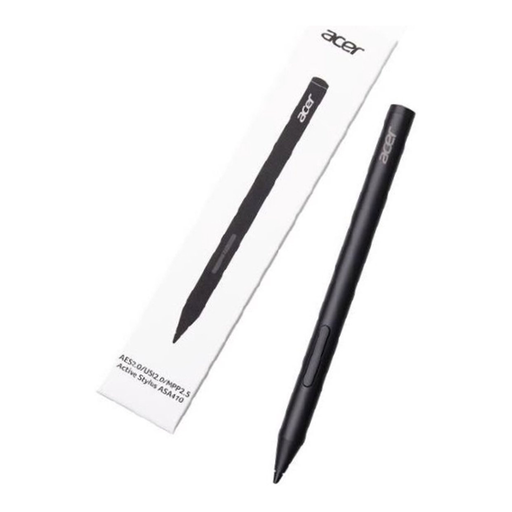 Image unavailable
For a device that supports one of the listed pen standards; check which standard your tablet uses.
The product name lists AES 2.0, USI 2.0 or MPP2.5 and a weight of 16,5 g. The AAAA battery isn’t included.
Not if you need a specific pressure or eraser feature. STAEDTLER says these features also depend on the app; for pressure sensitivity on the Note⁺ 2, Adonit requires pairing in supported apps. So check both your tablet and your drawing app.
No, it varies by model. Apple says the Pencil (USB-C) can be stored magnetically but charges using a USB-C cable; Apple describes magnetic pairing and charging for Pencil Pro on a compatible iPad.
Check whether replacement nibs are available for your exact pen. STAEDTLER lists five spare nibs in the Noris digital jumbo pack. Apple sells replacement nibs separately for the Pencil models it lists.
No. According to ACM ConsuWijzer, there’s no fixed period for the legal guarantee in the Netherlands: it depends on what you could reasonably expect from the product and whether you used it normally. If a product is faulty, the retailer is your point of contact.
For an online product purchase, ACM ConsuWijzer says you often have up to 14 days after delivery to change your mind, although there are exceptions. Check which rules apply to your purchase.