
Map illustrator with an existing tablet
You want to find out whether a new pen will work with the tablet already on your desk. Apple, Samsung, Huion and XPPen publish compatibility information for individual pens and devices.


Start by checking your exact tablet model, then choose a compatible pen. If you want a variety of brush strokes, supported pen features can make a difference, while ease of use and storage may matter more at a shared desk. Check that your drawing app supports those features too: just because a pen has a feature doesn’t mean the app will use it.
You want to find out whether a new pen will work with the tablet already on your desk. Apple, Samsung, Huion and XPPen publish compatibility information for individual pens and devices.
You draw outlines, symbols or brush strokes and want to know which pen features work with the tools in your drawing app. Adobe describes a range of drawing tools for Illustrator on iPad.
You want to pick up, put away and charge the pen easily without getting in the next person’s way. Apple and Logitech describe different ways to use and store their pens.
First check that the pen works with your tablet, then compare its drawing features and how easy it is to use at a shared desk.
| What to consider | What should you check? | Who should consider this? |
|---|---|---|
| Compatibility | Compare your exact tablet model and generation with the pen’s compatibility list. Apple Support Netherlands says Apple Pencil Pro requires iPadOS 17.5 or later. | If I’m drawing on a tablet that’s already on the desk, I want to be sure the pen works with that exact model. Around 42% of consumers put compatibility first. |
| Line control | Decide whether you mainly create vector paths or brush strokes, and check that your app supports the relevant pen features. Logitech says Crayon isn’t pressure-sensitive. | If I want to create fine outlines or varied strokes, I consider how the pen and app work together. Around 33% of consumers give line control top priority. |
| Shared use | Check how the pen connects and charges, and how you can store it after use. Apple says Apple Pencil (USB-C) charges via a USB-C cable. | If several people use the same pen, I want to be able to pick it up and put it back quickly. Around 25% of consumers put ease of use at a shared desk first. |
Apple publishes separate compatibility lists for Apple Pencil Pro and Apple Pencil (USB-C). So a pen that works with one iPad won’t necessarily work with another model.
Make a note of your tablet’s model and generation, then compare them with the list for the specific pen. Check the required software version too.
Apple says Apple Pencil (USB-C) attaches magnetically for storage; it charges via a USB-C cable. This is worth bearing in mind when several people share the pen.
Check how the exact pen variant charges and, if needed, agree a time to charge it when nobody needs to use it.
Logitech says Crayon isn’t pressure-sensitive. Huion says tilt doesn’t work with PW100 on H640P, HS64 and HS64 SE. The line control available to you depends on both the pen and the tablet.
Check which features your drawing app uses, as well as your tablet’s compatibility with the pen.
Apple Pencil models for iPad; check the compatibility list for the specific pen.
According to Logitech, Crayon (USB-C) is an iPad pen that works straight away, without a complicated Bluetooth pairing process.
S Pen models for specific Galaxy Tabs, including the Tab S9 FE family named by Samsung.
PW100 replacement pen for the graphics tablets Huion lists for this model.
Replacement pens for specific XPPen drawing tablets and pen displays.
Stylus pens for drawing on tablets; check each model’s compatibility with your tablet and drawing app.
 No image available
Check the listed compatibility with your iPad before choosing this pen.
The compatibility information lists iPad Pro 11-inch (M4), iPad Pro 13-inch (M4), iPad Air 11-inch (M2), iPad Air 13-inch (M2) and iPad mini (A17 Pro).
Squeeze, barrel roll and double-tap are listed as features; check that your drawing app supports them.
 No image available
Worth considering if you use a compatible iPad and want to charge your pen via USB-C.
It charges via the USB-C connector beneath the cap. Magnetic attachment is for storage.
Check that your iPad and drawing app work with this pen.
 No image available
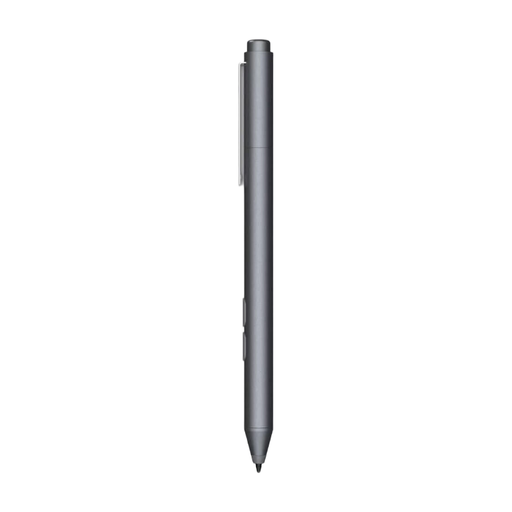
Only consider this pen if your tablet supports the Microsoft Pen Protocol listed.
The compatibility information lists MPP, HP laptops and selected Microsoft devices; check whether your exact device is included.
The product information lists an AAAA battery and a battery life of up to 18 months.
 No image available
Check the listed iPad models carefully before choosing this pen for drawing or sketching.
The compatibility information lists iPad Pro 12.9-inch (3rd, 4th, 5th and 6th generation), iPad Pro 11-inch, iPad Air (4th and 5th generation) and iPad mini (6th generation).
Replacement nibs are sold separately.
 No image available
The product name lists iOS, iPad, Android and Microsoft devices; check compatibility with your exact tablet and drawing app.
The instructions mention a companion app and Bluetooth pairing.
No, not every stylus works with every tablet model. Compare your exact device with the pen’s compatibility list; Apple, Huion and XPPen list different supported models.
Apple says it attaches magnetically for storage and charges via a USB-C charging cable. Remove the pen from the iPad and use the USB-C connector.
No, according to Logitech’s instructions. If you share a desk, charge it at a time when nobody needs to use the pen.
According to the Dutch government, when you make an online distance purchase from a business, you generally have a 14-day cooling-off period. Check whether your purchase is covered by the distance-selling rules.
According to the Dutch government, you should report a problem to the seller, who must resolve it under the legal guarantee. The Netherlands has no fixed statutory guarantee period; what you can expect from a product depends on the product and the circumstances.