
Artists with an existing iPad
You want a pen that works with your iPad model and gives you enough control to draw a character sheet. Apple publishes compatibility information for each Pencil model.


Start by checking your exact tablet model, then make sure your drawing app supports the pen features you want. If you need lines that respond to pen pressure, explicit pressure sensitivity matters more than magnetic storage. For sketching without that requirement, tilt recognition and charging method may be more important. Manufacturer information does not confirm any difference in audible pen noise in a quiet study.
You want a pen that works with your iPad model and gives you enough control to draw a character sheet. Apple publishes compatibility information for each Pencil model.
You’re looking for the right S Pen and want to avoid confusing compatibility or Bluetooth features with those of another variant. Samsung lists the differences for each S Pen.
You want to know how to pair, charge and store your pen. The way you create line variation, for example with pen pressure or tilt, may also affect your choice.
First, check compatibility with your tablet and app. Then decide what kind of line input you need and whether the charging and storage options suit your workspace.
| Key consideration | What should you check? | Which consumers is this for? |
|---|---|---|
| Tablet and app compatibility | Look up your exact tablet model in the compatibility list. Also check software requirements and app support. | If I want to keep using my current tablet, I want to be sure the pen is compatible before buying. Around 36% of consumers give compatibility top priority. |
| Line control | Check whether your brush needs to respond to pressure and whether both the pen and drawing app support this feature. Tilt recognition is a separate feature. | For varied outlines and shading, I want to know whether my brush responds to pen pressure. Around 29% of consumers prioritise this kind of line control. |
| Charging and storage | Check separately how the pen attaches, pairs and charges. Magnetic storage does not automatically mean magnetic charging. | If I draw at a shared study table, I want to be able to put my things away easily afterwards and get started quickly next time. Around 21% of consumers place most importance on this routine. |
| Purchase and maintenance | Check whether replacement tips are available and who to contact if something goes wrong. | I want to know in advance how to maintain the pen tip and what to do if the pen is faulty. Around 14% of consumers put purchase and maintenance first. |
Apple has different compatibility lists and software requirements for each Pencil model. The wrong combination may mean the pen won’t work with your tablet.
Before buying, compare your iPad’s full model name and the required iPadOS version with Apple’s compatibility information.
According to Logitech, the Logitech Crayon does not support pressure sensitivity. With the Adonit Note+, pressure sensitivity and shortcut buttons depend on pairing with a supported app.
Check what input your brush needs and whether both your pen and drawing app support that feature.
Apple describes magnetic pairing and charging for Pencil Pro with a compatible iPad. The Apple Pencil (USB-C) attaches magnetically for storage, but pairing and charging are done using a cable.
Consider attachment, pairing and charging as separate features before choosing a pen.
The Dutch government says that there is no fixed statutory guarantee period in the Netherlands. If a product is faulty, the retailer is your point of contact.
Keep your proof of purchase and contact the retailer if there’s a fault.
Apple Pencil Pro and Apple Pencil (USB-C) are designed for specific iPad models.
Samsung offers S Pen variants for Galaxy Tab models, including a pen for the Tab S11 series.
Logitech Crayon (USB-C) is designed for iPads supported by Logitech.
Adonit Note+ is designed for specific supported iPads; some features depend on the drawing app.
These Joybuy products are designed for drawing with compatible tablets. Before buying, check that your exact tablet and, where necessary, drawing app are supported.
 No image available
An option for drawing with a reMarkable 1, reMarkable 2 or Kindle Scribe. Check that your tablet is one of the exact models listed.
The product name lists 4096 pressure levels. This does not confirm compatibility with other tablets.
 No image available
An option for drawing with an iPad model supported by Apple Pencil Pro. Check the compatibility list and required iPadOS version.
The product description lists pressure and tilt sensitivity, as well as magnetic pairing and charging. The features available in your drawing app may vary from app to app.
 No image available
A good fit for sketching where tilt recognition is useful, as long as your iPad model is supported.
Apple lists tilt sensitivity. The pen attaches magnetically for storage and charges via USB-C; magnetic attachment does not mean magnetic charging.
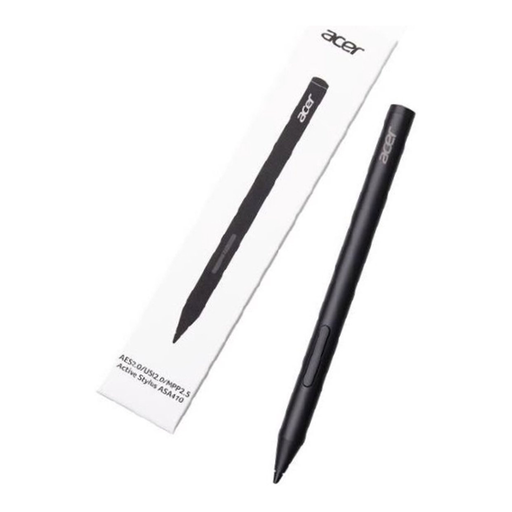 No image available
An option for drawing with a device that supports one of the active pen protocols listed. Check your tablet’s specifications before buying.
The product information lists AES 2.0, USI 2.0 and MPP 2.5, as well as 4096 pressure levels. AAAA batteries are not included.
 No image available
An option for drawing and sketching with a compatible iPad model. Compare your iPad’s model name with the compatibility information before choosing.
The product description lists, among others, iPad Pro 12.9-inch (3rd, 4th, 5th and 6th generation), iPad Pro 11-inch, iPad Air (4th and 5th generation) and iPad mini (6th generation).
No. Apple Pencil models have different compatibility lists and software requirements. First, look up your exact iPad model and check which Pencil variant is listed for it.
Yes. According to Adonit, pressure sensitivity and shortcut buttons require pairing with a supported app. Also check that your iPad model is supported.
Follow the instructions for your exact model. Samsung describes how to replace the tip on the S Pen for the Galaxy Tab S11 series. Logitech recommends replacing a damaged or worn Crayon tip to prevent damage to the screen.
No. The Dutch government says there is no fixed statutory guarantee period in the Netherlands. If a product is faulty, the retailer is your point of contact; what you could reasonably expect from the product also matters.
For many distance purchases from a business, the Dutch government says you have a 14-day cooling-off period. Check the terms and any exceptions; according to this guidance, an online purchase from a private seller is not covered by the same rules.
Not necessarily. According to the European Union, a CE marking is required if specific harmonised EU rules for the product say it is. For a particular stylus, you first need to establish which rules apply; a CE logo is not an EU certification mark.