
Collage-maker with an existing tablet
You want to know before you buy whether a stylus will work with your exact tablet model. Apple Support Netherlands, STAEDTLER and Samsung publish compatibility information for specific models or screens.


First, check your exact tablet model: a stylus that doesn’t work with the screen won’t solve your charging problem. If your screen is confirmed to support EMR, you could choose a pen that doesn’t need charging; for a compatible iPad, consider an Apple Pencil Pro, which pairs and charges magnetically. USB-C pens require a cable and time to charge. STAEDTLER and Apple Support Netherlands explain these compatibility and charging differences.
You want to know before you buy whether a stylus will work with your exact tablet model. Apple Support Netherlands, STAEDTLER and Samsung publish compatibility information for specific models or screens.
You don’t want to need an extra charging spot for your pen. Depending on your tablet, you could look for a compatible pen that doesn’t need charging, or a stylus that charges via the tablet. Apple and STAEDTLER explain the different charging methods.
You’re working on selections, edges and hand-drawn details, and want to know which pen features your collage app uses. Procreate, for example, describes its selection and layer tools; support for pressure input also depends on the app.
Choose this if: your tablet supports EMR and you don’t want to charge your pen separately.
The trade-off: STAEDTLER limits the Noris digital to EMR screens; your tablet still needs power.
Choose this if: you already have a supported Galaxy Tab FE and are looking for a compatible replacement pen.
The trade-off: Samsung distinguishes between pen versions and Tab models. For the FE models mentioned, don’t expect Bluetooth Air Actions or pen charging.
Choose this if: your iPad is on Apple’s compatibility list and you want magnetic pairing and charging.
The trade-off: Apple limits compatibility to specific models and requires iPadOS 17.5 or later; charging uses power from the iPad.
Choose this if: you mainly select, move or annotate collage elements, and charging via USB-C suits the way you work.
The trade-off: Apple Pencil (USB-C) and Logitech Crayon (USB-C) need to be charged using a cable; Logitech says it can be used without Bluetooth pairing.
| What to consider | What should you check? | Who is this most relevant to? |
|---|---|---|
| Compatibility | Check the full name of your tablet model against the pen manufacturer’s compatibility information. The screen must support EMR for the Noris digital. | If I want to keep using my existing tablet, the pen needs to match that exact model or screen. Around 31% of consumers say compatibility is their main concern when buying. |
| Charging without an extra power socket | Compare a pen that doesn’t need charging with magnetic charging on a compatible iPad or charging via USB-C. | If I don’t want to set aside a separate place to charge my pen, the charging method makes a difference to my collage work. Around 31% of consumers prioritise avoiding separate pen charging. |
| Cut-outs and drawn details | Check whether your collage app has selection and layer tools, and whether it supports the pen input you want to use. | If I want to edit edges precisely or draw details, I look at the features my app actually uses. Around 25% of consumers prioritise control over cut-outs and drawn details. |
| Care and accessories | Check which replacement nibs or cables come with the pen and which, if any, you already have. | If I want to know in advance what I’ll need to use and maintain the pen, I check the packaging and charging method. Around 13% of consumers say this is their main concern when buying. |
An incompatible pen may not work with your tablet at all. STAEDTLER limits the Noris digital to EMR screens, while Apple lists compatibility for each iPad and Pencil version.
Note down your tablet’s full model name and check it with the pen manufacturer before comparing charging methods or drawing features.
Apple Pencil (USB-C) can be stored magnetically, but it pairs and charges via a USB-C cable. So magnetic attachment doesn’t automatically mean the pen charges magnetically.
For your exact pen version, check separately how storage, pairing and charging work.
Samsung says that pen pairing, pen charging and Bluetooth features such as Air Actions aren’t available with the Galaxy Tab FE models mentioned. You can’t assume every S Pen or Tab has these features.
If you need these features, use Samsung’s information for your exact tablet and pen as your guide.
The Noris digital classic is designed for compatible EMR screens.
S Pen versions are model-specific, so check they’re compatible with your Galaxy Tab.
Apple Pencil Pro and Apple Pencil (USB-C) are designed for different, specified iPad combinations.
Logitech Crayon (USB-C) is designed for supported iPads and, according to Logitech, connects without Bluetooth pairing.
Below are styluses for specific Wacom, Surface, Acer and iPad devices. Before buying, check the full compatibility details and charging method for your tablet.
 No image available
An option for drawing on the Wacom devices listed for this pen; check whether your exact model is included.
Battery-free EMR stylus with adjustable weight, grip, balance point and buttons.
 No image available
Designed for the Surface models listed for this pen; check compatibility with your device.
The product information lists 4,096 pressure levels and haptic feedback.
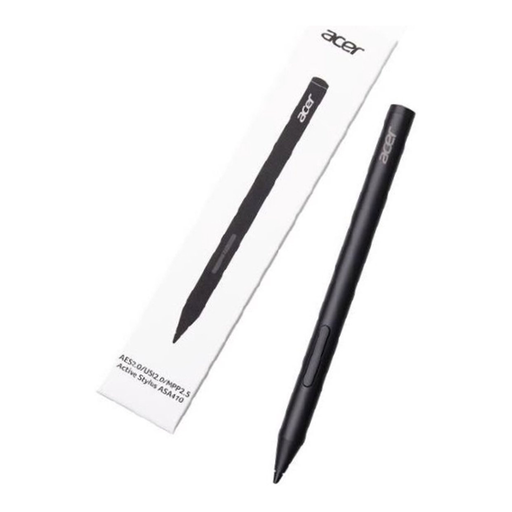 No image available
An option for an Acer device that supports one of the listed standards; check which standard your model uses.
The product information lists 4,096 pressure levels and AAAA batteries for power; batteries aren’t included.
 No image available
For drawing and taking notes on the selected iPad models listed for this stylus.
The product information lists tilt detection and palm rejection. It charges via USB-C; magnetic attachment is for storage and doesn’t support wireless charging.
 No image available
For drawing and sketching on a compatible iPad; check that your model works with this version.
The product information lists tilt sensitivity. It charges via the USB-C port beneath the cap.
No, it depends on the version. Apple describes magnetic pairing and charging for Pencil Pro, but Pencil (USB-C) charges via a USB-C cable. Check which model you have.
First, check that your stylus is compatible with your iPad model. In Procreate, you can copy or cut a layer or selection and paste it elsewhere on the canvas; these app features are separate from how the pen charges.
Not with the Tab S9 FE and Tab S10 FE models mentioned: Samsung says these don’t support certain pen pairing, charging and battery-level features. Don’t assume this applies to all Galaxy Tab models.
For online purchases from a business, you usually have a 14-day cooling-off period, according to the Dutch government. Products must also be of satisfactory quality, and the seller must offer a solution if a product is faulty; there is no set statutory guarantee period in the Netherlands.
The Dutch government lists local authority collection points, among other options, for unwanted electrical appliances. Check which collection route applies to your device and your local authority.