
Player with a favourite strategy game
Wants to know in advance whether a current or planned game, expansion and game mode will work on the tablet they choose.


Start with the strategy games you actually want to play: check that the exact tablet model, operating system and game mode you want are supported. Then choose a screen size that suits the way you play and travel, and check the storage, charging accessories you’ll need and your plan for hotel Wi-Fi. A manufacturer’s specifications alone don’t prove how a game will perform on that tablet.
Wants to know in advance whether a current or planned game, expansion and game mode will work on the tablet they choose.
Wants to view maps, text and menus on a larger screen, and is happy to take a bigger device along.
Wants a tablet that’s easy to fit in their luggage and takes changing connections on the move into account.
A good fit if: you want to play iPadOS games and find a screen around 11 inches easy to take with you. Apple lists the Wi-Fi model of the iPad (A16) at 477 grams.
Bear in mind: check that the game supports the exact model; the App Store listings consulted don’t specifically mention this newer iPad.
A good fit if: you’re looking for an Android version of your game and want a mid-sized screen. Xiaomi lists the Pad 8 as having an 11.2-inch screen.
Bear in mind: for Civilization VI on Android, publisher Aspyr specifies Android 9 or later, at least 4 GB of memory and Vulkan support; check the exact device too.
A good fit if: a larger playing area matters more to you than packing light. OnePlus lists the Pad 3 as having a 13.2-inch screen.
Bear in mind: its larger size and stated weight of 675 grams make this model less compact to take with you.
| What to consider | What to look for | Who this matters most to |
|---|---|---|
| Game compatibility | Check the exact model, operating system, expansion you want and game mode with the publisher or app store. For Civilization VI on Android, Aspyr specifies Android 9 or later, at least 4 GB of memory and Vulkan support, among other requirements. | If I want to keep playing a favourite game, I first check that my chosen version and game mode are supported. Around 31% of consumers put game compatibility first. |
| Screen space and portability | Compare the screen size and weight of the exact version. Apple lists the Wi-Fi model of the iPad (A16) at 477 grams; OnePlus lists the Pad 3 at 675 grams. | If I want to see maps and menus clearly, I weigh up a larger screen against the space the tablet will take up in my luggage. Around 25% of consumers prioritise screen space. |
| Playing with unreliable Wi-Fi | Install the game and any required content in advance, and check what works offline for each game and game mode. Aspyr says an internet connection is required to install Civilization VI on Android; VeiligInternetten advises using mobile data or a VPN on public Wi-Fi. | If I don’t want to rely on hotel Wi-Fi, I arrange downloads in advance and choose a suitable connection for features that need internet access. Around 25% of consumers put travel and connectivity at the top of their list. |
| Storage and included accessories | Check how much free space the game requires, what content comes with the platform version you’ve chosen and what’s in the box. Xiaomi says the Pad 8 doesn’t come with a power adapter. | If I want to install games and expansions, I check the storage required and make sure I already have the charging accessories I need. Around 19% of consumers focus on storage and what they need to play. |
A stated screen specification isn’t a test of a specific game. Xiaomi warns that the actual refresh rate can vary depending on the interface and the game’s picture quality.
Check compatibility first, and look for performance information about the same game and tablet version.
Aspyr says purchases of Civilization VI on iOS, PC or consoles can’t be transferred to the Android version.
Before choosing a tablet, check which game version and expansions are available on the platform you have in mind.
So you’ll need to check the game and any expansions separately for each platform.
Aspyr says the Android version of Civilization VI initially offers 60 free turns. Xiaomi also says the Pad 8 doesn’t come with a power adapter.
Check what content is included with your game and whether you’ll need a suitable adapter.
The iPad (A16) is an iPadOS option with an 11-inch screen.
The Galaxy Tab S11 is an Android tablet around 11 inches; the version listed is the Wi-Fi model SM-X730NZSREUB with 128 GB.
The Pad 8 is an Android tablet available in several storage configurations.
The Pad 3 is a larger Android option for playing at a hotel desk.
These Joybuy products are Android tablets with screens ranging from 11 to 14 inches, for anyone looking for a larger playing area in a hotel room. Before buying, check that the exact model supports the game you want, and what you’ll need for storage, internet access and charging.
 No image available
For anyone looking for a large screen at a hotel desk; first check that the exact model supports the game you want.
The product name lists a 13.4-inch screen, Android 16 and 128 GB of storage.
The stated memory comprises 6 GB RAM and 14 GB virtual RAM.
 No image available
For anyone who values screen space over packing light; check that your game supports this model.
The product name lists a 14-inch screen with 2.2K resolution (2240 × 1400), Android 15 and 128 GB of storage.
The stated memory comprises 8 GB RAM and 12 GB virtual RAM.
 No image available
For anyone looking for a mid-sized Android screen; check that the strategy game you want works on this version.
The product name lists an 11-inch IPS screen with 90 Hz, 8 GB RAM and 128 GB of storage.
The product description says that no charger is included.
 No image available
For anyone looking for a 12-inch screen at a hotel desk; check game compatibility for the exact version.
The product name lists an FHD+ screen, a Helio G100 processor and storage options of 256 GB or 2 TB.
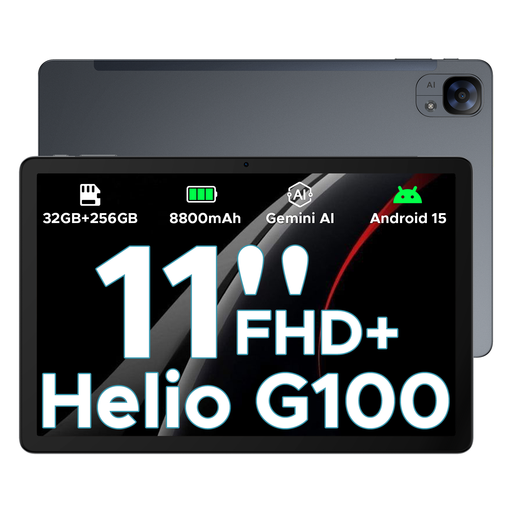 No image available
For anyone looking for an Android tablet around 11 inches; check that the exact model is on your game’s list of supported devices.
The product name lists an 11-inch FHD+ screen with 90 Hz, a Helio G100 processor and storage options of 256 GB or 2 TB.
No, don’t assume that. For Civilization VI on Android, Aspyr specifies Android 9 or later, at least 4 GB of memory and Vulkan support, among other requirements; also check that your exact tablet model is supported. The iOS device list consulted doesn’t mention all newer iPads.
That depends on the game and the game mode you choose. Install any required content in advance and check offline availability separately; Aspyr says an internet connection is required to install Civilization VI on Android. For public Wi-Fi, VeiligInternetten advises using mobile data or, if you do connect, a VPN.
Check the requirements for the exact game and leave room for downloads and expansions. The Dutch App Store listing for XCOM 2 specifies 8.5 GB of free space for installation and recommends at least 17 GB to avoid installation problems; first check that your tablet is supported.
Wireless equipment sold on the Dutch market must meet the relevant European requirements, and the required CE marking is important. Check the marking and product information for the exact version; a Dutch product page alone doesn’t confirm the marking on every individual item.
If a product is faulty, the seller is responsible for the statutory warranty; ACM ConsuWijzer says there is no fixed statutory time limit for this. Online purchases often come with a 14-day cancellation period after delivery, subject to statutory exceptions.