
For reviewing panels on the go
You want to be able to go through a storyboard at a small table without carrying an extra-large device. Consumentenbond points out that larger tablets are less easy to carry around.


When reviewing storyboard panels, a screen that suits both your layout and the limited space at a café table is a practical place to start. Consumentenbond notes that larger tablets are less easy to carry around. If you also want to draw or add comments, check pen compatibility for the exact tablet model and test whether your own app and files work offline. A larger screen or a separate pen may mean needing more space or extra accessories.
You want to be able to go through a storyboard at a small table without carrying an extra-large device. Consumentenbond points out that larger tablets are less easy to carry around.
You want to make changes directly on the storyboard. So, consider the tablet, a compatible pen and the app you use as a combination; Apple and Xiaomi, for example, name specific pen models for their tablets.
You want to save the right version in advance and be able to open it during your meeting. Google Drive Help explains how to save files for offline use on Android and iPad; also test your own app and syncing.
First decide whether you mainly want to view panels or draw as well. Then check that the screen suits your storyboard and the table, and prepare your files for offline use.
| Requirement | What should you look for? | Who is this important for? |
|---|---|---|
| Viewing panels | Open your own storyboard at the size you have in mind and look out for reflections where you plan to work. Manufacturer brightness figures aren't a real-world test in your café. | If I want to review panels but also carry my tablet around, the main trade-off for me is screen space versus size. Around 33% of consumers say viewing panels is their main concern. |
| Annotating with a pen | Check pen compatibility for the exact tablet model and what is included in the bundle you choose. Also test whether your app saves marks in the file format you need. | If I want to make changes directly on panels, I want to be sure that the pen and my app work together. Around 27% of consumers say pen input is their main concern. |
| Offline files | Save the right version for offline use in advance, open it without a network connection, and separately check that comments sync correctly later. | If I'm not sure about the Wi-Fi at my meeting, I want to be able to access my storyboard without a connection. Around 20% of consumers say offline access is their main concern. |
| Total cost and lifespan | Check what's included in the exact bundle and which accessories you still need. The European Commission says the relevant EU energy labelling requirements have applied since 20 June 2025 to slate tablets placed on the EU market under those rules; check whether the model is covered. | If I don't want to buy accessories twice and also want to consider how long I'll use the tablet, I look at the complete package. Around 20% of consumers say total cost is their main concern. |
Your storyboard layout, reflections and the space available at the table all affect how easily you can review your panels. A larger screen is also less easy to carry around.
Before choosing, open a representative storyboard page at the size you're considering.
Pen support and what's in the box aren't the same thing. A bundle may include a pen, but check this for the specific model.
Read the model and bundle details, and factor in the cost of a compatible pen if one isn't included.
A cloud file may not be available offline until you've saved it in advance in the app you're using.
Make the right version available offline and try opening it without a network connection before you leave.
The 11-inch iPad Air is a compact option to look into if your app runs on iPadOS.
Galaxy Tab S models are an Android option to explore if you want to use an S Pen.
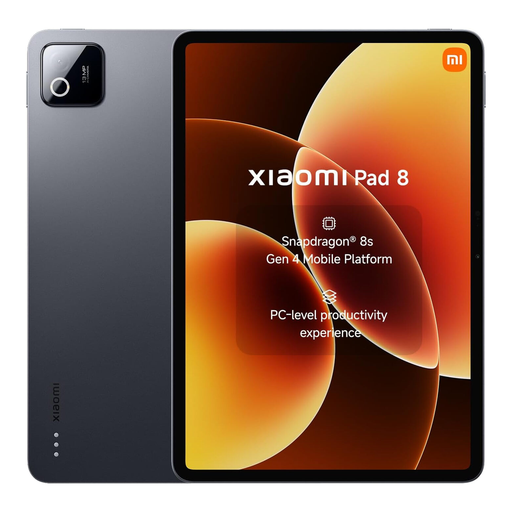
The Pad 8 is an Android option for anyone looking to use a compatible pen.
Some Idea Tab models are available in bundles that explicitly list a pen.
The Pad 3 is worth considering if screen space matters more to you than a compact size.
These Joybuy products are suited to reviewing storyboards at a café table, from 11-inch models to larger screens and models supplied with a pen. If you're annotating, check compatibility and exactly what the bundle includes.
 No image available
Suited to anyone who wants a larger screen and would also like to make notes; the product name lists a pen.
12.1-inch screen, 2.5K, 8 GB RAM and 256 GB storage. The product name lists the colour as Rose.
 No image available
Suited to anyone who wants to take an 11-inch iPad with them and may want to annotate with a compatible Apple Pencil.
The product name lists Wi-Fi and 256 GB. Apple lists support for Apple Pencil Pro and Apple Pencil (USB-C); check which pen and accessories come with the model you choose.
 No image available
Suited to anyone looking for an Android tablet with pen support; check the pen and bundle for the exact model.
The product name lists 8 GB RAM and 256 GB storage. Xiaomi lists an 11.2-inch screen and support for the Focus Pen Pro for the Pad 8.
 No image available
Suited to anyone looking for an 11-inch tablet with a stylus for reviews at a café table.
The product name lists 256 GB storage, Wi-Fi, Android 15 and a stylus. Check the pen and bundle for the specific model.
 No image available
Suited to anyone who wants a larger screen for panels and notes; bear in mind that it will take up more space at a small table.
The product name lists a 12.7-inch screen, 256 GB storage and compatibility with the T-Pen. Consumentenbond notes that extra-large tablets are less easy to carry around; check whether this size suits your café setup.
Make the file available offline in advance in the app you use, then try opening it without a network connection. Google Drive Help describes this step separately for Android and iPad; also check whether your own annotations are saved offline and sync correctly later.
No. Check compatibility for the exact tablet and pen. Apple lists specific Pencil models for the iPad Air, and Xiaomi lists the Focus Pen Pro for the Pad 8 series. Also check whether the pen is included in the bundle you choose.
According to ACM ConsuWijzer, online purchases generally come with a statutory cooling-off period of up to 14 days after delivery, with some exceptions. You are also covered by the statutory guarantee if a product does not perform as you could reasonably expect under normal use; the seller is responsible for this. A manufacturer's warranty does not replace that right.
No, the rules don't apply to every tablet without distinction. The European Commission says the requirements have applied since 20 June 2025 to slate tablets placed on the EU market under the applicable rules, and distinguishes these from certain tablet computers, such as Windows devices. Check whether the rules apply to the model you're considering.