
Engineers working without a signal
You need to be able to open the correct version of a manual when there’s no network connection. Save the files locally and check in advance that they open.


A standard tablet is suitable for site visits where you’ll mainly read in sheltered conditions and save the right PDFs locally in advance. Choose a rugged model if your work involves gloves, dust, rain or knocks. Test a representative manual on the screen you plan to use and in the light you expect to work in: a larger screen can help with diagrams, but is less convenient to carry. Mobile data is only useful where there’s coverage and a suitable plan, and it won’t replace a local file when you’re offline.
You need to be able to open the correct version of a manual when there’s no network connection. Save the files locally and check in advance that they open.
You need to view small text or detailed drawings, so you’ll want to weigh up the benefits of a larger screen against the size and weight you’re happy to carry.
You may use your tablet with gloves or in an environment with dust, rain or a risk of knocks. Check the protection and controls on the exact model.
First, decide whether you need to open manuals without a connection. Then compare readability, your working environment, portability and the specification you need.
| What to consider | What should you check? | Who should pay particular attention? |
|---|---|---|
| Opening manuals offline | Check the storage, PDF app and whether you can save the latest files locally. Test them with the connection switched off. | If I work out of range, I want to save the right manual in advance and open it without a network. Around 28% of consumers say offline access is their top priority. |
| Reading small text and diagrams | Open a representative document and try searching and zooming in the lighting conditions you expect to work in. | If you need to read small text or technical diagrams on site, check that they’re comfortable to view on your chosen screen. Around 22% of consumers put readability first. |
| Withstanding your working environment | Check the protection specifications, the case you’ll need and how the controls work with your own gloves. | If I work with gloves or in an environment with dust, rain or a risk of knocks, ease of use and protection are important factors in my choice. Around 22% of consumers give these factors top priority. |
| Portability and battery life | Compare the weight with the case and accessories included. Test the tablet during your own work; a video playback figure doesn’t tell you how long it will last when using PDFs. | For consumers who carry their tablet around a lot, portability and use throughout the planned working day matter. Around 17% put portability and battery life first. |
| Specification and accessories | Compare the complete specification and check whether you need mobile data, a stylus or a protective case, and what’s included. | If I only need manuals saved in advance, I don’t want to choose mobile connectivity without a good reason, and I do want to know which accessories my work requires. Around 11% of consumers start by considering the overall configuration and accessories they need. |
A data plan won’t help if there’s no usable coverage. Without a file saved locally, an online manual may be out of reach.
Download the relevant PDFs in advance and test them with the connection switched off. Choose Cellular only if you also need online access while travelling and coverage is available.
Apple Netherlands states that the Cellular model requires a data plan, so factor in this recurring cost when comparing options.
Samsung states that the Galaxy Tab Active5 can withstand a drop from up to 1.8 metres when used with the protective case supplied. This claim therefore depends on using the specified case.
Check the conditions for the exact model and use the recommended protection.
Stylus compatibility doesn’t automatically mean one is included in the pack you choose. This can vary by model or bundle.
Check what’s in the box and which accessories you need for your work.
A stylus or protective case may be a separate option or purchase; check the bundle before comparing configurations.
ACM ConsuWijzer distinguishes between purchases for private use and agreements used mainly for business purposes.
Check who is making the purchase and whether the contract will be used mainly for private or business purposes before assuming consumer protection applies.
The Galaxy Tab Active5 is worth considering for tougher fieldwork; the Galaxy Tab S10 FE is a separate, more conventional tablet. Features of one range don’t automatically apply to the other.
The TOUGHBOOK G2 is worth considering if your fieldwork also calls for Windows or configurable business connections.
The 11-inch iPad (A16) is an option for reading PDFs in mostly sheltered conditions; Wi‑Fi and Cellular are separate choices.
The Tab M11 is a conventional Android option; compare the Wi‑Fi or LTE model and bundle you’re considering.
This selection includes Android tablets in a range of screen sizes, including models described as rugged. Compare the storage, screen and specification with your manuals and working environment in mind.
 No image available
If you want to carry manuals saved locally, the product name lists 256 GB of storage.
The product name also lists a 10.36-inch HD screen, a 22,000 mAh battery and 4G. Check that the model suits your files and how you plan to use it.
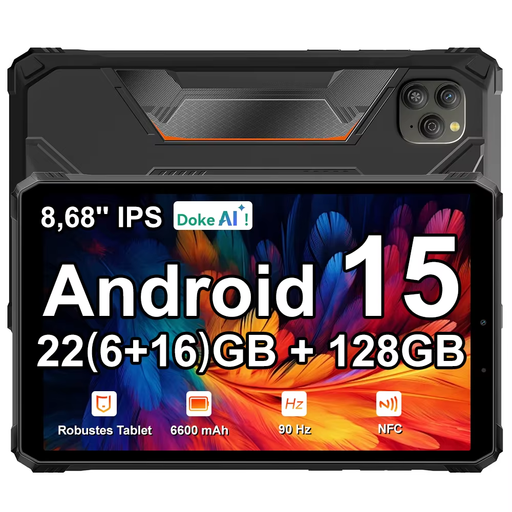 No image available
The 8.68-inch screen is a more compact size to consider if you carry your tablet around often.
The product name lists 128 GB of storage, a 90 Hz IPS screen, 22 GB of RAM (6 GB + 18 GB) and Android 15. Check the exact model before ordering.
 No image available
If you want to view technical drawings, the product name lists an 11-inch 2.5K screen.
The product name lists a MediaTek Dimensity 6300. The product description mentions a microSD card slot for cards up to 2 TB, a 90 Hz screen and brightness of up to 500 nits for this model.
 No image available
If you want to view manuals saved locally on a screen in the 11-inch class, this model lists 256 GB of storage.
The product name lists Wi‑Fi; check that this connectivity option suits how you use the tablet while travelling.
 No image available
If you want to view technical documents, the product name lists an 11-inch IPS screen and 128 GB of storage.
The product name also lists a 90 Hz screen, 4G LTE and an 8,000 mAh battery. Check which connectivity and storage options you need for your work.
Save the correct PDF locally and open it before you set off in the app you plan to use. Google Help explains how to open PDFs in Files by Google and copy files to a folder in your internal storage. Switch off your connection and check that the manual you need opens correctly.
Not if files saved in advance are enough. Mobile data can be useful for online documents, but you’ll need a suitable model, plan and coverage. Apple Netherlands says a data plan is required for the Cellular option. Check connectivity at the places where you work.
Open a representative manual and try searching and zooming in. Compare the screen in the lighting conditions you expect and test battery life with your own files, brightness settings and connection. A stated video playback time doesn’t measure use with PDFs.
For an online purchase made as a consumer, ACM ConsuWijzer says you have 14 days to change your mind after delivery. If a product is faulty, the seller must resolve the issue under the statutory guarantee. If you use the agreement mainly or exclusively for business, don’t automatically assume the same consumer protection applies: ACM ConsuWijzer distinguishes between purchases based on how they are used.