What should you look for?
iPadOS tablet
A good fit if: your team can use its existing recipe app and shared files on an iPad.
Consider: a compatible keyboard or stylus may be a separate accessory; also check that you have enough screen space.
Android tablet with stylus input
A good fit if: you regularly make notes or check recipes at the worktop as well as editing them with others.
Consider: check exactly what’s in the box and the terms of any moisture protection; an IP rating doesn’t mean you can rinse the tablet.
Android tablet for reading and quick edits
A good fit if: you mainly read recipes and only make occasional changes.
Consider: don’t rely on a stylus mention in the model name alone; confirm that the stylus is actually included in the bundle on sale.
Start with the app, files and permissions your team already uses. Then compare input accessories and screen space with where you plan to put the tablet.
| What to consider |
What should you check? |
Who should give this more weight? |
| Collaborating on recipes |
Open an existing recipe in the app you plan to use and check the file format, storage location and view, comment or edit permissions. |
If I work on the same recipe with colleagues, I want to know whether everyone can open and edit it. Around 33% of consumers prioritise collaborating on the same recipes. |
| Typing long passages |
Check that the keyboard and tablet are compatible, which keyboard layout it has and whether it’s included with the model. |
When rewriting lots of cooking instructions, a keyboard matters more to me than a stylus. Around 27% of consumers give extensive text input top priority. |
| Reading at the worktop |
Compare screen size and positioning; check the IP rating conditions for the exact model and keep liquids away from the ports. |
When I check recipes alongside the ingredients, I focus on screen space and where the tablet will sit. Around 20% of consumers prioritise using a tablet at the worktop. |
| Cost and battery life |
Only include accessories you need in your budget, and check the EU energy label if it applies to the tablet in question. |
When I mainly want to buy the essentials, I want to know what’s included with the model. Around 20% of consumers focus on the purchase and the accessories they need. |
Joybuy products
This selection includes Android tablets for checking recipes, models with keyboard bundles and an iPad option for shared documents. Before buying, check that the apps and files you use work on the device and exactly what’s included in your chosen bundle.
 No image available
TECLAST T65 Plus, 13.4-inch, 256 GB
The large screen could be useful for checking recipes; the product information warns against using the tablet in damp conditions.
The product name lists a 13.4-inch screen, 120 Hz, Android 15, 20 GB RAM and 256 GB of storage.
View at Joybuy
 No image available
TECLAST P50, 11-inch, 128 GB
This tablet could be suitable for reading and checking recipes; the product information warns against using it in damp conditions.
The product name lists an 11-inch screen, Android 16, 6 GB RAM plus 26 GB of virtual memory, 128 GB of storage and 8,000 mAh.
View at Joybuy
 No image available
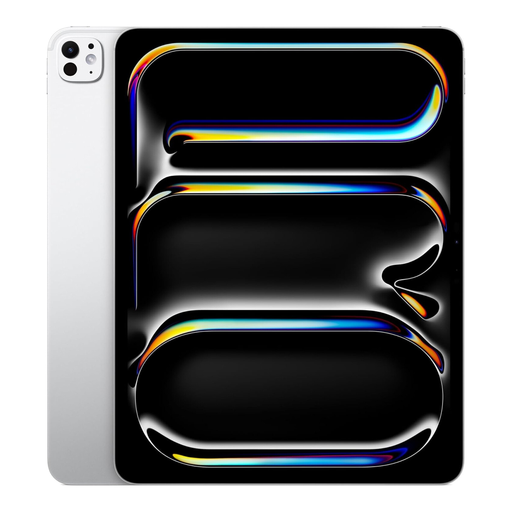
Apple 13-inch iPad Pro, Wi-Fi + Cellular, 1 TB
An iPad option for teams that want to edit shared recipes in a compatible app; Google explains how to share and edit documents in Google Docs on iPad.
The product name lists Wi-Fi + Cellular and 1 TB of storage. The product information says this iPad isn’t water-resistant and should be kept away from liquids.
View at Joybuy
 No image available
TECLAST P33 Case, 10.1-inch, 9 GB, 64 GB, keyboard bundle
The listed keyboard bundle could suit anyone who types a lot of recipe text; the product information warns against using the tablet in damp conditions.
The product name lists 3 GB RAM plus 6 GB of virtual memory and 64 GB of storage. The stated bundle includes, among other things, an English-language Bluetooth keyboard, mouse, stand and stylus.
View at Joybuy
 No image available
TECLAST P30TCase, 10.1-inch, 16 GB, 128 GB, keyboard bundle
The product name lists accessories for typing and making notes; the product information says the tablet isn’t waterproof and warns against water and high humidity.
The title lists 3 GB RAM plus 13 GB of virtual memory, 128 GB of storage, a keyboard, mouse and stylus, a 120 Hz screen and a 6,000 mAh battery.
View at Joybuy
Frequently asked questions
Does everyone need to use the same tablet to edit recipes together?
Not necessarily. First check that everyone’s app can open the existing file and that it’s stored in a shared location with editing permissions. Microsoft lists OneDrive or SharePoint among the options for collaborating on Office documents; Google explains how to share and edit documents in Google Docs on iPad.
What should you do if the Wi-Fi in your work area temporarily drops out?
Make the file you need available offline in advance, if your app supports this. The Google Docs apps for Android can make selected files available and editable offline; check that the right recipe is saved locally and let changes sync when you’re back online.
Are a keyboard and stylus included?
It depends on the exact model. Apple lists an iPad and USB-C cable as in the box with the iPad (A16), and sells the compatible Magic Keyboard Folio separately. The title of the Lenovo model reviewed includes ‘+ Pen’, while Lenovo’s product description says the pen is optional; ask the seller to confirm what’s in the bundle.
What warranty rights do you have in the Netherlands if a tablet is faulty?
When you buy as a consumer, you’re entitled to a product that meets the terms of the agreement; the Netherlands has no fixed statutory warranty period. According to the Dutch government, the seller is responsible for dealing with faulty products. A manufacturer’s warranty doesn’t replace your statutory rights.
Does a new tablet in the Netherlands need an EU energy label?
According to the European Commission, energy labelling rules have applied since 20 June 2025 to slate tablets covered by the regulations and placed on the EU market. The Commission distinguishes this category from certain tablet computers with a desktop-style operating system, so check whether the rules apply to the specific tablet and when it was placed on the market.


