
Players who want to see every detail
You mainly play hidden-object scenes with small items, so you compare screen size and resolution. The Consumers’ Association (Consumentenbond) highlights screen use as a factor to consider when choosing a tablet.


First, choose a game that’s available for the tablet’s operating system, then check before you leave that the levels you want to play work without an internet connection. Next, choose a screen that makes details easy to see, and weigh this against portability, storage and whether you’ll need mobile data.
You mainly play hidden-object scenes with small items, so you compare screen size and resolution. The Consumers’ Association (Consumentenbond) highlights screen use as a factor to consider when choosing a tablet.
You can’t rely on a stable Wi-Fi connection and want to check before you leave that your game and chosen levels work offline. Dutch App Store descriptions mention offline play for specific games.
You often take your tablet with you or hold it while playing. In that case, a more compact size may matter more than extra screen space.
First, check that your game works on the operating system you’ve chosen and test its offline features. Then weigh up screen space against portability and charging.
| What to consider | What should you look for? | Who is this most important to? |
|---|---|---|
| Seeing small items | Compare screen size and stated resolution, and try the zoom function in your game. The Dutch App Store description for Hidden Objects Nederlands mentions zooming in. | If I want to pick out small items in busy scenes, I consider both the screen and how my own game displays them. Around 27% of consumers prioritise seeing details clearly. |
| Playing without Wi-Fi | Check the app for the operating system you’ve chosen and test the levels you want to play offline in advance. App Store descriptions mention offline play for specific games, not every app or feature. | When I can’t rely on Wi-Fi on holiday, I want to know in advance whether my chosen levels work offline. Around 27% of consumers prioritise offline play. |
| Size for travelling | Compare the dimensions and try tapping and zooming to see if they feel comfortable. Samsung lists the Galaxy Tab A11 as 8.7 inches and the Galaxy Tab A11+ as 11 inches. | If I often take my tablet with me or hold it while playing, I’d rather choose a size that suits me than have extra screen space. Around 13% of consumers prioritise portability. |
| Gaming sessions and charging | Check the battery specifications and charging options, but only compare playing time using like-for-like tests. Samsung lists 7.040 mAh for the Tab A11+ and Xiaomi lists 9.000 mAh typical for the REDMI Pad 2; these aren’t comparable measurements of playing time. | For longer gaming sessions, I want to know how often I’ll need to charge the tablet with my kind of use. Around 20% of consumers prioritise longer sessions and fewer charging breaks. |
| Game requirements and charging essentials | Read the description of the specific game and check what’s included with the version on offer. Xiaomi says that contents may vary by region. | Before I leave, I want to know what features my game offers and whether I can bring the charging accessories I need. Around 13% of consumers focus mainly on game requirements and charging essentials. |
A mention of offline play doesn’t mean that downloads, every level and every feature will be available without an internet connection.
Download the game at home and test the exact levels and features you want to use on holiday.
Some additional features may still need an internet connection.
Battery capacity doesn’t measure playing time; how you use the tablet and your screen settings affect how often you’ll need to charge it.
Only compare playing time using tests carried out on a like-for-like basis, and consider the charging options at your destination.
What’s in the box may vary by version or region.
Before you leave, check what’s included and the charging specifications for the specific offer.
You may need to bring a suitable adapter yourself.
An app listing for iPadOS doesn’t confirm that the same app is available for Android.
Search for your main game in the app store for the operating system of the tablet you’re considering.
The Galaxy Tab A11 is a more compact option, while the A11+ has a larger screen.
The REDMI Pad 2 could suit you if screen resolution and games you can download in advance are priorities.
The iPad with the A16 chip is an iPadOS option if you can find a suitable game in the Dutch App Store.
The Idea Tab range includes an option with an 11-inch screen; check which version is available in the UK.
The Pad Go 2 is a larger option if you want more screen space.
This selection includes tablets with screens of 11 inches and above, for anyone who values screen space when playing search-and-find games; some product names also mention 5G. Before buying, check with the seller that the specific wireless version carries the required CE marking. The Dutch Authority for Digital Infrastructure says that wireless equipment placed on the market in the Netherlands must meet European requirements and carry a CE marking.
 Image unavailable
The 11.1-inch screen could suit you if you like a larger view of hidden-object scenes; try the controls in your chosen game.
According to the product title: 3200 × 2000 pixels, 12 GB LPDDR5X, 256 GB UFS 4.0, Wi-Fi 7 and Android 15. A Tab Pen Pro is included.
 Image unavailable
The 12.1-inch screen gives you room to view hidden-object scenes; check whether this size feels comfortable to carry around.
The product title lists a 12.1-inch 2.5K screen, 8 GB RAM, 256 GB storage and an included pen.
 Image unavailable
The product title mentions 5G; check that mobile data suits your destination and how you plan to use the tablet.
According to the product title: 8 GB RAM, 256 GB ROM and 5G.
 Image unavailable
An 11-inch model could suit you if you mainly play at the table or on the sofa and want plenty of screen space.
The product title lists a Wi-Fi version with 128 GB storage.
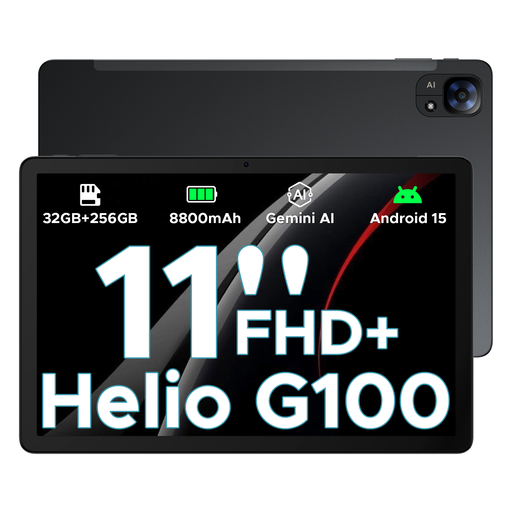 Image unavailable
The product title lists an 11-inch screen; check whether this size and the controls suit your game.
The title mentions FHD+, 90 Hz, Wi-Fi and 5G. Storage is listed as 32 GB + 256 GB/2 TB options; check which version is on offer.
Some games let you do this, but not necessarily with every feature. A Dutch App Store description for Hidden Objects Nederlands mentions playing without an internet connection. Install your game and test the levels you want before you leave. That listing doesn’t automatically confirm that the game works offline on Android.
Not necessarily: the Consumers’ Association (Consumentenbond) lists simple games as a typical use for tablets. Check that your specific game is available and try out whether the details are easy to see and the controls are comfortable.
An iPadOS listing doesn’t confirm that an Android version is available. Search for the game separately in the app store for the operating system of the tablet you’re considering.
Use tests carried out under similar conditions. Manufacturer specifications such as battery capacity don’t, on their own, give you a measured number of hours of play; screen settings and how you use the tablet also matter.
Check that the specific version carries the required CE marking. The Dutch Authority for Digital Infrastructure says that wireless equipment placed on the market in the Netherlands must meet European requirements and carry a CE marking.