If you mainly read continuous text and hold your tablet for long periods, a compact model may suit you better. For fixed-layout PDF pages with figures, tables and footnotes, a larger screen gives you more room. Try your own essays on the screen size you’re considering, check whether you need a stylus, and open your files offline before you set off. Battery capacity and claimed usage times don’t guarantee that a tablet will display PDFs for the whole flight.
Who is this choice for?
Reader of PDFs with figures
If you want to view tables, figures and footnotes together on a fixed-layout page, compare your own documents on a larger screen. The Consumentenbond describes smaller tablets as compact and convenient for travelling, but that convenience comes with less physical page space.
Reader with limited luggage space
If you mainly read continuous text and want a tablet that’s comfortable to hold, compare the weight and dimensions of the model you’re considering. Apple lists the Wi-Fi iPad mini (A17 Pro) as weighing 293 grams and having an 8.3-inch screen.
Reader who takes notes
If you want to highlight passages or make notes alongside figures, check which stylus works with the exact model and whether it’s included. Samsung says the Galaxy Tab S10 Lite comes with an S Pen; Apple lists support for specific Pencil models with the iPad mini.
What should you look for when buying?
| What to consider |
What should you check? |
Who is this most important for? |
| Readability of fixed-layout PDF pages |
Open one of your own essays and compare the page layout and how much you need to zoom in. |
If I want to see figures, tables and footnotes on one page at a glance, page space matters to me. Around 28% of consumers prioritise readability on fixed-layout PDF pages. |
| Portability in an aeroplane seat |
Compare the weight and dimensions of the exact model, ideally with a case, and try holding it. |
If I mainly want to read continuous text and hold the tablet for a long time, I pay particular attention to its weight and size. Around 22% of consumers prioritise ease of handling. |
| Offline files and battery reserve |
Download your files and open them without a network connection before setting off; charge the tablet and check its battery information. |
I want to be able to open my essays during the flight without an internet connection, and know in advance how I’ll manage my battery reserve. Around 22% of consumers also prioritise offline use with enough battery capacity in reserve. |
| Making notes on essays |
Check whether a stylus is compatible with the model or included, and try annotating one of your own documents in your reading app. |
If I want to highlight formulae or figures, I want to know which stylus and app I’ll need. Around 17% of consumers put annotation ahead of their other buying needs. |
| Purchase value and extras |
Compare the exact model and what’s in the box, such as a stylus or adapter. |
I want the features I need without paying for accessories I won’t use, so I compare the complete model. Around 11% of consumers prioritise suitable features and additional costs. |
Common buying mistakes
-
Choosing a small screen without trying your own PDF
You may need to zoom in and move around more often to view a fixed-layout page with figures and footnotes on a smaller screen.
Before you choose, try a representative essay on the screen size you’re considering.
-
Assuming manufacturers’ battery figures guarantee hours of PDF reading
Test conditions, screen brightness and usage differ from your situation during a flight. A figure in mAh is a measure of battery capacity, not a measured reading time.
Charge your tablet beforehand, test your own files and don’t rely on battery capacity as a promise that it will last the whole flight.
-
Confusing stylus compatibility with a stylus being included
Stylus support doesn’t automatically mean one comes in the box with your model. Annotation options also depend on your document and app.
Check what’s included with the exact model, then try annotating one of your own files in the reading app you plan to use.
Brands to consider
Apple
The iPad mini (A17 Pro) is a compact option, while the iPad (A16) has a larger screen. These details apply to the models mentioned, not the entire iPad range.
- Apple lists the iPad mini as having an 8.3-inch screen and weighing 293 grams for the Wi-Fi model. The mini supports specific Apple Pencil models.
- Try your own fixed-layout PDF pages on the smaller screen. Pencil support doesn’t mean the stylus is included; check the model and packaging you choose.
Samsung
The Galaxy Tab A11+ is an option with an 11-inch screen. According to Samsung, the Galaxy Tab S10 Lite comes with an S Pen.
- Samsung lists the Galaxy Tab A11+ as having a 7040 mAh battery and expandable storage. Samsung says the Galaxy Tab S10 Lite comes with an S Pen.
- Battery capacity isn’t the same as independently measured PDF reading time. If you want to take notes, check that your preferred app works with the exact model too.
Xiaomi
The Redmi Pad 2 is an option with an 11-inch screen and a claimed resolution of 2560 × 1600 pixels, according to Xiaomi.
- Xiaomi lists a 9000 mAh battery and expandable storage.
- Xiaomi bases its claimed usage times on its own laboratory tests. These figures don’t guarantee how long you can read PDFs during a flight.
Lenovo
The Idea Tab is an 11-inch Android option. Its screen, storage configuration and accessories may vary by model.
- Lenovo lists a resolution of 2560 × 1600 pixels and several memory configurations for the Idea Tab.
- Lenovo says adapter availability varies by country and battery life depends on usage and settings. Check the UK model and packaging before buying.
Tablets at Joybuy
The product selection below focuses on larger screens for essays and PDF pages, with models ranging from 11 to 13.4 inches. Before you set off, check the battery rating in Wh for the model you’ve chosen and your airline’s rules.
 No image available
Lenovo Tab K11 Gen 2, 11-inch, 2.5K (ZAFS0069CZ)
Suitable if you want a larger screen for viewing fixed-layout essay pages with figures.
The product description lists an 11-inch IPS screen with 2560 × 1600 pixels and a 7040 mAh battery; that capacity isn’t a measure of reading time.
Check the battery rating in Wh and your airline’s flight requirements.
Joybuy
 No image available
TECLAST P50, 11-inch, 128GB, 4G LTE
This 11-inch model could suit you if you want more screen space for essays than a compact model offers.
The product name lists 32GB RAM, made up of 6GB RAM and 26GB virtual RAM, 128GB storage, a 90Hz IPS screen, 8000 mAh and 4G LTE with Dual SIM. Battery capacity isn’t a measure of PDF reading time.
Check the battery rating in Wh and your airline’s flight requirements.
Joybuy
 No image available
Apple 11-inch iPad Pro, Wi-Fi + Cellular, 256GB, Space Black (2025)
This 11-inch model is an option if you’re looking for a larger screen for documents.
The product description lists an 11-inch OLED screen with a resolution of 2420 × 1668 pixels.
Check the battery rating in Wh and your airline’s flight requirements.
Joybuy
 No image available
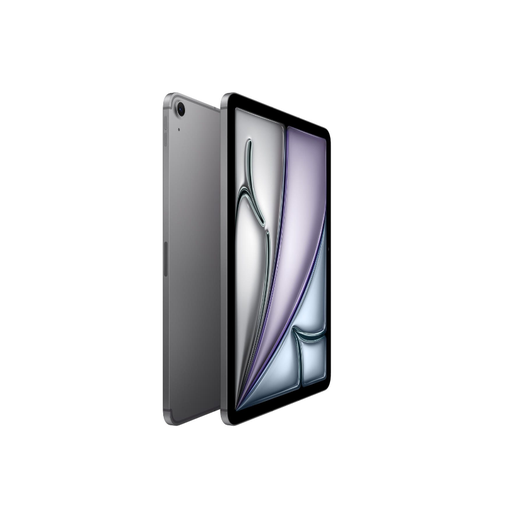
Apple 11-inch iPad Air (M3), Wi-Fi + Cellular, 512GB, Space Gray (2025)
This 11-inch model could suit you if you want to read essays on a larger screen.
The product description lists a screen resolution of 2360 × 1640 pixels and support for Apple Pencil Pro. Check whether the stylus you want is included with this model.
Check the battery rating in Wh and your airline’s flight requirements.
Joybuy
 No image available
TECLAST T65, 13.4-inch, 120Hz, Android 16, 128GB, with folio case
The 13.4-inch screen could suit you if extra page space matters more than the convenience of a compact device in an aeroplane seat.
The product name lists 20GB RAM, made up of 6GB RAM and 14GB virtual RAM, 128GB storage, Dual SIM 4G and a folio case.
Check the battery rating in Wh and your airline’s flight requirements.
Joybuy
Frequently asked questions
Is a compact tablet or an 11-inch screen better for scientific essays?
It depends on what matters more to you when reading: a tablet that’s easy to hold or more space for a fixed-layout PDF page. Compare your own essays on the screen sizes you’re considering; screen size alone doesn’t tell you how easy your documents will be to read.
How can I make sure I can read my essays offline?
Save the files to your device before you set off, then open a representative file with your connection switched off. Apple explains how to find downloaded files on an iPad and read and annotate PDFs in Books; try opening your document offline in the app you plan to use.
Does a 9000 mAh battery mean the Redmi Pad 2 will last for the whole flight?
No. 9000 mAh is the battery capacity stated by Xiaomi, not a measure of hours spent reading PDFs. Xiaomi says its usage figures are based on internal laboratory tests and may vary in practice. Charge your tablet beforehand and take your screen brightness and files into account.
Do I need to buy a stylus or charger separately?
It depends on the exact model and packaging. Samsung says the Galaxy Tab S10 Lite comes with an S Pen; Apple lists Pencil support for the iPad mini, but check the packaging for the model you choose. Lenovo says adapter availability may vary by country.
Can I take my tablet on board, and when do I need permission?
According to the Human Environment and Transport Inspectorate, you don’t need permission from the airline for lithium batteries up to and including 100 Wh. Permission is required for batteries between 100 and 160 Wh, and devices with batteries over 160 Wh are not allowed on board. Damaged, broken or recalled devices are not permitted. Check the Wh rating of your model and your airline’s rules.


