What should you look for when choosing?
First, decide what matters most on your train journey: being able to hold the tablet, playing your specific RPG, or having enough screen space and a reliable connection.
| What to consider |
What to look for |
Who is this important for? |
| Size and weight |
Compare the dimensions, weight and screen diagonal of the exact version. Apple lists the Wi-Fi iPad mini as 8.3 inches and 293 grams; Xiaomi lists the Pad 7 as 11.2 inches and 500 grams. |
If you often play without a table, you’ll want a tablet that’s easy to hold while still being able to read the text. Around 28% of consumers prioritise ease of handling. |
| Game compatibility |
Check that your RPG is available for the operating system and look at the official game requirements. A processor or screen specification alone won’t tell you how the game runs. |
If I want to play one specific RPG, I want to know before buying whether it works on the tablet and how smoothly it runs. Around 22% of consumers prioritise compatibility and performance for their own game. |
| Connection on the go |
Check whether your game works offline. If not, compare Wi-Fi, a phone hotspot and a tablet version with mobile data; bear in mind coverage and any subscription costs. |
For online RPG players, what matters most is whether the connection works on their route, not just which options the tablet offers. Around 22% of consumers prioritise connectivity. |
| Battery life during your journey |
Compare battery figures on a like-for-like basis and, if available, look for a test using your game. Stated battery life for video or browsing isn’t a measure of RPG playing time. |
If you want to finish a longer gaming session, consider both the battery and a test using the same game and settings. Around 17% of consumers make battery life their top priority. |
| Reading space and storage |
Check how your game’s interface looks on the screen size you’re considering and check the storage version. Don’t assume every model supports memory cards. |
If I want to view and store lots of dialogue, maps or multiple games, screen space and storage matter. Around 11% of consumers prioritise reading space and game storage. |
Joybuy products for RPGs on the go
These Joybuy products are suited to anyone looking for extra screen space for text and maps, or a mobile connection while travelling.
 Image unavailable
Lenovo Yoga Tab ZAG60028PL, 11.1 inch, 256GB, with Tab Pen Pro
Suited to anyone who wants more screen space for RPG text and maps; the product name lists Android 15.
11.1-inch touchscreen, 3.2K, 144Hz, Snapdragon 8 Gen 3, 12GB LPDDR5X, 256GB UFS 4.0 and Wi-Fi 7.
Includes Tab Pen Pro according to the product name. The listed specifications aren’t a test of a specific RPG.
Joybuy
 Image unavailable
Lenovo Idea Tab Pro TB373FU, 12.7 inch, 8GB RAM, 256GB
Suited to anyone who wants a larger screen for viewing game text and maps; the product name lists Android 14.
12.7-inch 3K screen, 144Hz, MDT 8300, 8GB RAM, 256GB and Wi-Fi 6E.
Gaming in the product description doesn’t prove how a specific RPG will run on this model.
Joybuy
 Image unavailable
TECLAST ArtPad Pro, 12.7 inch, 256GB, 4G LTE
Suited to anyone who wants to combine a large screen with mobile data on the go; check whether your RPG needs an online connection.
12.7-inch screen, 256GB storage, 4G LTE and Android 15 according to the product name.
The product name lists 8GB + 12GB virtual RAM; this isn’t a performance test for a specific game.
Joybuy
 Image unavailable
DOOGEE Tab E3+, 12 inch, SIM card slot
Suited to anyone looking into a mobile connection while travelling; check your game’s requirements and the mobile coverage you need.
12-inch FHD+ screen and SIM card slot according to the product name.
The product name lists Android 15. The gaming claim isn’t a test of your RPG.
Joybuy
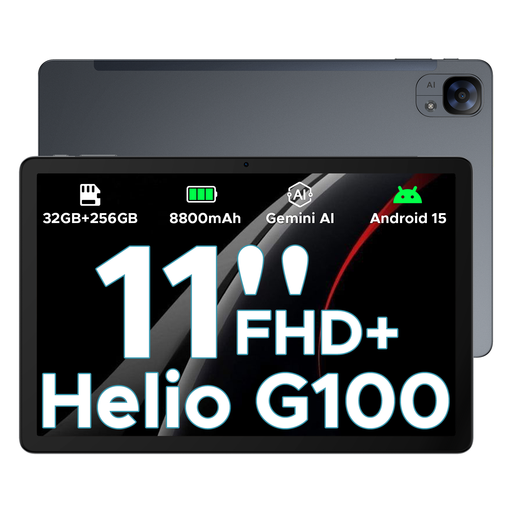 Image unavailable
DOOGEE Tab E3 Android 15 AI, 11 inch, 5G, dual SIM
Suited to anyone looking for a tablet with a mobile connection and a larger screen than compact models offer.
11-inch FHD+ screen, 90Hz, dual SIM slots and 5G according to the product name.
The product name mentions gaming, but that doesn’t prove how a specific RPG will run on this model.
Joybuy
Frequently asked questions
Do I need a 5G tablet on the train?
Not if your RPG can be played offline or you use a suitable phone hotspot. For a game that needs a constant internet connection, a version with mobile data may be a good option. NS says free Wi-Fi is available on almost all Intercity trains, but that doesn’t guarantee a connection or uninterrupted gameplay on every train.
Can I use the stated battery life as a guide to playing time?
No, not without a test using your game. For example, Apple gives battery life for browsing or video, not for a specific RPG. If possible, look for a test using the same game and settings, and charge your tablet before you leave.
How can I avoid disturbing other passengers while gaming?
Use audio in a way that doesn’t disturb others, for example by wearing headphones at a suitable volume. According to NS’s house rules, the Quiet Zone must be completely quiet; elsewhere on the train, you mustn’t disturb other passengers with loud noise either.
What are my rights when I buy a tablet online in the Netherlands?
According to ACM ConsuWijzer, when you buy a product online in the usual way, you generally have up to 14 days after delivery to change your mind, subject to legal exceptions. The seller must also resolve the issue, in accordance with the law, if a product doesn’t perform as you could reasonably expect under normal use. Don’t assume that every tablet has the same fixed warranty period.


