First, choose a tablet that supports your rhythm game, then test the touch controls and sound settings in the game itself: a high refresh rate doesn’t prove that input lag is low. For playing at a campsite, visibility, protection from moisture and dust, and a realistic charging plan matter too. If you can’t rely on the Wi-Fi, try the game offline before you go. A compact screen is easier to hold, while a larger one can give you more room for touch patterns.
Who is this choice for?
Playing outdoors at the camping table
You want to see the notes clearly and need to account for sun, dust and moisture. So check the stated brightness and the exact terms of any protection rating. For example, Samsung lists the test conditions for the Galaxy Tab S10 FE’s IP68 rating.
Playing fast touch patterns
You’ll want to consider screen size and handling, but above all, how your own rhythm game responds. The Consumers’ Association highlights a fast device, a good screen and a comfortable grip as factors to consider for gaming. Test the timing in the game itself.
Playing without a reliable power supply or Wi-Fi
You want to plan your sessions around charging and find out in advance whether your game and tracks will work without campsite Wi-Fi. The European Commission points out that actual battery life also depends on the app, screen brightness and network connection.
What should you look for when buying?
First, check that your game is available and responds well on the tablet. Then compare the factors that make a difference at your campsite: room to play, visibility, power and connectivity.
| Factor |
What to look for |
Who should pay extra attention? |
| Touch response and gameplay |
Test your game with a challenging track; try adjusting the timing settings if needed. A high refresh rate doesn’t prove that input lag is low. |
If I play fast patterns, I want to know whether the screen size and controls work for my hands. Around 26% of consumers put touch controls first. |
| Play time and charging |
Test it at home with your game and preferred brightness, and check which charging accessories are included. Battery capacity doesn’t predict a set number of hours of play. |
If I can’t always get to a power socket, I want to know in advance how to charge my tablet and how long my own gaming sessions last. Around 26% of consumers prioritise power supply. |
| Outdoor visibility and protection |
Compare brightness in similar conditions and read the terms of the IP rating for the exact version. |
If I play at a camping table, I want to be able to see the screen and take moisture and dust into account. Around 21% of consumers put outdoor visibility and protection first. |
| Playing without a reliable internet connection |
Download the game and the tracks you want in advance, then test them with the internet switched off. Also check for any account or synchronisation requirements. |
If the campsite connection drops, I want to know whether my particular game and tracks work offline. Around 16% of consumers make offline access their top buying priority. |
| Total cost and useful lifespan |
Check what’s in the box, any costs for the game and the applicable energy label. If you’re switching platforms, also check whether you can transfer apps you’ve already bought. |
If I’m choosing a tablet for more than one camping trip, I want to factor in accessories and existing app purchases. Around 11% of consumers prioritise purchase cost and useful lifespan. |
Common buying mistakes
-
Assuming a high refresh rate proves low input lag
A stated maximum doesn’t tell you how a specific rhythm game responds; actual performance can vary between apps.
Check that your game is available on the tablet, then test the touch controls, timing and sound settings for yourself.
-
Assuming IP68 protects against every wet or sandy situation
Samsung bases the Galaxy Tab S10 FE’s IP68 rating on a laboratory test in fresh water: submersion to a depth of up to 1.5 metres for a maximum of 30 minutes. Samsung doesn’t recommend using it at the beach or in a swimming pool.
Read the terms for the exact model, and don’t charge the device if the port or cable is wet or dirty.
-
Assuming battery capacity tells you how long you can play in the sun
According to the European Commission, actual battery life varies with factors including the app, brightness and network connection. The charging equipment included may also vary between versions.
Test your game in advance at the brightness you’ll need outdoors, and check that you have the right adapter and power source available.
Brands to compare
Samsung
The Galaxy Tab S10 FE is worth considering if you’re looking for a larger screen and stated protection for outdoor use.
- Samsung lists a 10.9-inch screen, a maximum refresh rate of 90 Hz and up to 800 nits in high-brightness mode for the S10 FE.
- Samsung bases the IP68 rating on specified fresh-water test conditions. This doesn’t prove protection in every camping situation or low input lag in a rhythm game.
Lenovo
The Legion Tab Gen 3 is a compact Android option for anyone who wants to hold an 8.8-inch tablet while playing.
- Lenovo lists a maximum refresh rate of 165 Hz and a Snapdragon 8 Gen 3.
- These manufacturer specifications don’t prove that your rhythm game will use that refresh rate or run without lag.
Xiaomi
The Pad 7 is a larger Android option if you’re looking for more screen space and a high stated refresh rate.
- Xiaomi lists an 11.2-inch screen, up to 144 Hz and a typical battery capacity of 8.850 mAh.
- According to Xiaomi, the actual refresh rate can vary between apps. The Dutch version doesn’t include a power adapter in the box.
Apple
The 11-inch iPad (A16) is an iPadOS option, provided your rhythm game is available on that platform.
- Apple lists a measured screen diagonal of 10.86 inches, 500 nits, USB-C and storage options starting at 128 GB.
- Compare the stated brightness with the light conditions you’ll be playing in. If you’re switching from Android, also check whether you can transfer your apps and purchases.
Tablets at Joybuy
This selection of Joybuy products includes tablets with screen sizes and specifications that may suit rhythm games. Check compatibility and responsiveness in your own game; the stated refresh rate doesn’t predict how it will perform.
 No image available
Lenovo Yoga Tab ZAG60028PL, 11.1-inch 3.2K 144Hz, 12GB LPDDR5X, 256GB UFS 4.0, Wi-Fi 7, Luna Grey, Includes Tab Pen Pro
The stated touchscreen and screen size may suit anyone looking for room for touch patterns; they don’t prove how your game will respond.
The product name lists an 11.1-inch 3.2K touchscreen, 144 Hz, Snapdragon 8 Gen 3, 12 GB LPDDR5X, 256 GB UFS 4.0, Wi-Fi 7 and Android 15.
The product name also lists Tab Pen Pro. Test the controls in your rhythm game separately.
View at Joybuy
 No image available
DOOGEE Tab E3+ Android 15 Tablet, 12-inch FHD+, 90Hz, 32GB+256GB/2TB, 8800mAh, Black
The 12-inch screen is worth comparing if you’d like more room for touch patterns; the stated 90 Hz doesn’t predict input lag in games.
The product name lists a 12-inch FHD+ screen, 90 Hz, Android 15, 32GB+256GB/2TB, 8800mAh and a SIM card slot.
Check that your rhythm game supports the version you’re considering and whether the SIM feature is useful for you.
View at Joybuy
 No image available
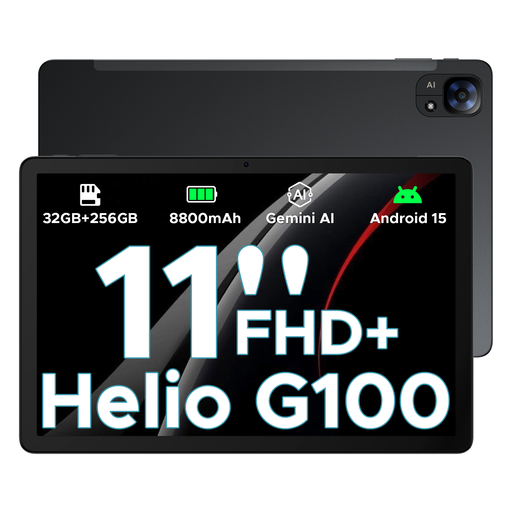
DOOGEE Tab E3 Android 15 AI Tablet, 11-inch FHD+, 90Hz, 32GB+256GB/2TB, 8800mAh, Dual SIM, Black
The 11-inch screen may suit anyone looking for room for touch patterns without going up to a larger size; test the timing in your own game.
The product name lists an 11-inch FHD+ screen, 90 Hz, Android 15, 32GB+256GB/2TB, an 8800mAh battery and Dual SIM.
Dual SIM and the stated refresh rate don’t, on their own, tell you anything about offline use or input lag in games.
View at Joybuy
 No image available
DOOGEE Tab G6 Plus Android 15 Tablet, 11-inch, 32GB RAM + 256GB ROM/2 TB, 8000mAh, Black
This tablet is worth comparing if you want an 11-inch screen and a SIM card slot. The product name mentions gaming, but no performance test for a specific game.
The product name lists Android 15, 11 inches, 32GB RAM + 256GB ROM/2 TB, 8000mAh and a 4G SIM card slot.
Battery capacity doesn’t guarantee a particular battery life; check in advance whether your game works offline.
View at Joybuy
 No image available
Lenovo Idea Tab Pro TB373FU, 12.7-inch 3K 144Hz, 8GB RAM, 256GB, Wi-Fi 6E, Luna Grey
The larger screen may suit anyone looking for room for wider touch patterns; check how the game itself performs and bear the moisture warning in mind.
The product name lists a 12.7-inch 3K screen, 144 Hz, MDT 8300, 8 GB RAM, 256 GB and Wi-Fi 6E.
The product information warns against exposing the device to water or excessive moisture.
View at Joybuy
Frequently asked questions
Can I play without Wi-Fi at the campsite?
That depends on your game, the tracks you’ve installed and any account features. Download everything in advance and test that exact combination with the internet switched off. Tablet specifications alone can’t guarantee that a game will work offline.
How can I charge and use a tablet safely by the tent?
Check which adapter and cable come with the version you’ve chosen. Samsung recommends using a clean, undamaged port and charging its devices on a hard surface where heat can escape. Gaming while charging can raise the temperature and slow down charging. Keep charging equipment away from moisture and follow the campsite’s rules too.
Does a new tablet in the Netherlands need USB-C and an energy label?
According to the Dutch government, USB-C has been required for new devices, including tablets, on the Dutch market since 28 December 2024. The European Commission has applied energy labelling rules since 20 June 2025 to slate tablets covered by the rules and placed on the EU market from that date. Earlier market launches and exempt device types need to be assessed separately.
What warranty do I have if my tablet develops a fault?
In the Netherlands, you’re entitled to a product that works as it should; there’s no fixed statutory warranty period for all products. Report a fault to the seller: a manufacturer’s warranty doesn’t replace your statutory rights. Damage caused by your own use isn’t automatically covered by free repairs.
Is CE marking relevant when buying a tablet?
Yes. The Dutch government states that electronic devices offered in the EU must meet the applicable safety requirements and carry a CE marking. Check the information for the specific version and seller; a Dutch-language online shop doesn’t, by itself, prove that the seller is based in the EU.


