Start with the games you want to play and check that they launch offline in the app you choose. Then decide between a compact tablet, extra storage or more powerful hardware. Size, storage and battery specifications can help you choose, but they don’t prove that a particular game will run smoothly or work without recharging. The Consumers’ Association also points out that switching operating systems may mean buying your paid apps again.
Who is this advice for?
Traveller with limited bag space
Wants a tablet that’s easy to take out and hold during a stopover, and weighs portability against screen space and a headphone socket. The Consumers’ Association notes that small tablets can be handy when you’re on the go.
Player with a local games collection
Wants to get games ready in advance, so checks that the apps they want work on the operating system and how much storage is available. Libretro describes different installation methods for Android and iOS.
Player with higher performance requirements
Wants to test their more demanding games and compare the hardware of the exact tablet configuration. A stated processor or screen specification alone doesn’t prove that a particular emulator or game will work well.
What should you consider when choosing?
Compact standard tablet
Choose this option: if you need a tablet that’s easy to take with you and you’re happy with a smaller screen. Apple lists the Wi-Fi iPad mini as having an 8.3-inch screen and weighing 293 g; Samsung lists the 64 GB Wi-Fi version of the Galaxy Tab A11 as having an 8.7-inch screen and a 3.5 mm socket.
Bear in mind: you’ll have less screen space than with a larger tablet. Check the storage capacity of the exact version you’re considering.
Larger tablet with expandable storage
Choose this option: if screen space and local storage matter more than having a small bag. Xiaomi lists the Redmi Pad 2 as having an 11-inch screen and expandable storage of up to 2 TB.
Bear in mind: Xiaomi lists this tablet as weighing 510 g; the memory card is sold separately. The stated battery capacity doesn’t tell you how many hours you can play for.
Compact gaming tablet
Choose this option: if you want to assess a compact Android tablet with higher hardware specifications for your own games. Lenovo lists a Snapdragon 8 Gen 3, 12 GB RAM and an 8.8-inch screen for version ZAEF0012SE.
Bear in mind: these manufacturer specifications don’t guarantee that a particular emulator will run smoothly; Lenovo doesn’t list a card reader for this version.
For a stop at the airport, the main things to consider are whether games launch offline, how easy the tablet is to carry, playing between charges, game compatibility and the total cost.
| Buying concern |
What to look for |
Who is this most important to? |
| Offline play |
Check that your chosen app and games launch offline; get games ready on local storage in advance. |
If I don’t want to rely on Wi-Fi while I wait, I want to be able to launch my game without a connection. Around 31% of consumers rank offline play as their main buying concern. |
| Portability |
Compare screen size and weight; check that your wired headphones can connect to the tablet. |
If I often take my tablet out of my bag, I want it to be easy to hold without carrying around more screen than I need. Around 25% of consumers give portability top priority. |
| Play time between charges |
Compare battery specifications only when they’re based on the same measurement method; don’t treat mAh as a number of hours of play time. |
If I don’t want to keep looking for a socket during a long wait, I want to know how much power my chosen games use. Around 19% of consumers put playing between charges at the top of their list. |
| Performance for my games |
Check the processor and RAM of the exact version, and try the emulator and games you want to use. |
If I want to play more demanding games, I want to assess the hardware against those specific titles rather than relying on one specification. Around 13% of consumers make performance their main buying concern. |
| Total cost |
Check the storage and included accessories; find out whether you’ll need to buy paid apps again if you switch. |
If I want to keep using my current apps or games collection, I want to know in advance what extra purchases I might need to make. Around 12% of consumers put total cost first. |
Common buying mistakes
-
Buying a tablet without checking your games
Installing an emulator doesn’t automatically mean you have games or that a particular game will launch offline. The Dutch government says that downloading from an illegal source is prohibited.
Before buying, check the app, the games you want, offline functionality and where the game files come from.
-
Assuming mAh or a high refresh rate guarantees play time
Battery capacity isn’t the same as measured play time. Lenovo says battery usage varies depending on factors such as use and screen brightness; specifications alone don’t prove how your game will run.
Test the games you want to play and compare battery specifications only when they’re based on the same measurement method. Don’t assume an untested play time.
-
Assuming storage specifications apply to a different version
Specifications can vary between versions. Samsung’s 64 GB Galaxy Tab A11 page also includes information about other versions; expanding the Redmi Pad 2’s storage requires a memory card, sold separately.
Check the storage and any expandability options for the exact model you want to buy.
Brands to consider
These brands are worth considering if you’re looking for a compact tablet, expandable storage or more powerful hardware. The features listed apply to the product lines and versions specified, not every model from each brand.
Apple
The iPad mini with A17 Pro is a compact iPad option. Check in advance that the iOS apps and games you want are suitable for how you plan to use it.
- Apple lists the Wi-Fi model as weighing 293 g, with an 8.3-inch screen and storage options of 128, 256 and 512 GB.
- These specifications don’t prove that every retro app or game will work. The Consumers’ Association says you may have to buy paid apps again if you switch.
Samsung
The Galaxy Tab A11 is a compact Android option. Check the exact storage version and the connection you need.
- Samsung lists the 64 GB Wi-Fi version as having an 8.7-inch screen and a 3.5 mm audio socket.
- Information about a maximum of 128 GB doesn’t automatically apply to the 64 GB version.
Xiaomi
The Redmi Pad 2 is a larger tablet option for anyone who values screen space and expandable local storage.
- For the Redmi Pad 2 sold in the Netherlands, Xiaomi lists an 11-inch screen and expandable storage of up to 2 TB.
- Xiaomi lists a weight of 510 g and says the memory card is sold separately. The 9000 mAh battery capacity isn’t a tested figure for retro gaming time.
Lenovo
The Legion Tab Gen 3 is a compact Android tablet for anyone who wants to assess higher hardware specifications against their own games.
- Lenovo lists a Snapdragon 8 Gen 3, 12 GB RAM and an 8.8-inch screen for version ZAEF0012SE.
- Lenovo doesn’t list a card reader for this version. The specifications don’t prove that a particular emulator will run smoothly.
Tablets at Joybuy
This Joybuy selection includes compact and larger tablets, with a range of storage and hardware configurations. Before buying, check that your chosen apps and games work on the exact version and launch offline.
 No image available
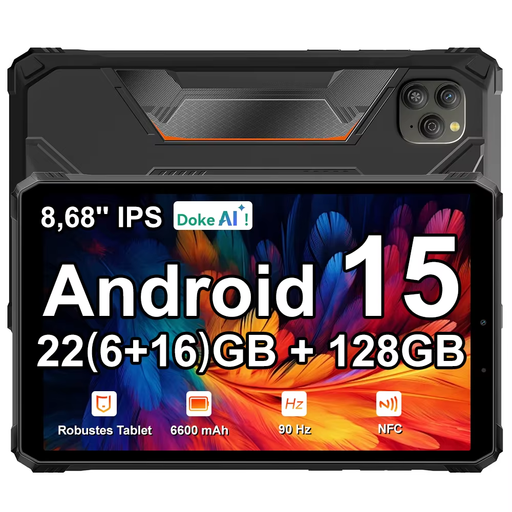
Blackview Active 5 rugged tablet, 22 GB RAM (6 + 18), 128 GB
An option to take with you if you’re considering an Android tablet; check in advance that your emulator and games work on this version.
The product name lists 128 GB storage, an 8.68-inch screen, a 90 Hz IPS display and Android 15.
View at Joybuy
 No image available
Lenovo Tab One 8.7-inch Wi-Fi, 4 GB RAM, 128 GB, Luna Grey (ZAF00221GR)
A compact version to consider if you want a smaller tablet to take with you; check that your chosen app and games work offline.
The product name lists Wi-Fi, 4 GB RAM, 128 GB storage and an 8.7-inch screen.
View at Joybuy
 No image available
Xiaomi Pad 8 Pro, 12 GB RAM, 512 GB storage, grey
The stated storage capacity may be useful if you want to get games ready locally; also check that the games you want work on this version.
The product name lists 12 GB RAM and 512 GB storage.
View at Joybuy
 No image available
Lenovo Yoga Tab ZAG60028PL, 11.1-inch, Snapdragon 8 Gen 3, 12 GB RAM, 256 GB
A larger tablet to consider if you want more screen space and would like to assess the stated hardware against your own games.
The product name lists an 11.1-inch screen, a Snapdragon 8 Gen 3, 12 GB RAM, 256 GB storage and Android 15.
View at Joybuy
 No image available
Apple 11-inch iPad Air (M4), Wi-Fi, 128 GB, blue (2026)
An iPad option if you want to use iOS apps; check in advance that your chosen apps and games work offline on this version.
The product name lists an M4 chip, Wi-Fi, 128 GB storage and an 11-inch screen.
View at Joybuy
Frequently asked questions
How do I get retro games ready to play offline at the airport?
Install your chosen app and legally obtained game files in advance, then test the games without an internet connection. Libretro describes different installation methods for Android and iOS; an app being available doesn’t prove that every game will launch offline.
Which tablet is right for playing retro games on the go?
A compact tablet suits anyone who prioritises portability; a larger tablet is better if you want more screen space or expandable storage; and a gaming model is worth considering if you want to assess higher hardware specifications against your own games. In every case, check the app, the specific games and offline functionality in advance.
Does battery capacity guarantee how long I can play?
No. Battery capacity in mAh doesn’t give you a guaranteed play time in hours. Usage, screen brightness and the games you choose all affect play time. Compare battery specifications only when they’re based on the same measurement method, and don’t assume an untested duration.
Can I simply download old games to use with an emulator?
No. Downloading from an illegal source is prohibited. The Dutch government says you may only make a backup copy of games and must not circumvent copy protection; using an emulator doesn’t change those rules.
How can I take a power bank with me when I fly?
EASA advises carrying spare batteries and power banks in your hand luggage. Schiphol allows a maximum of two power banks; check your airline’s rules too.


