What should you look for?
Start with the file type: adding comments to a PDF and editing the original Word text call for different workflows. NS says not all Sprinter trains have Wi-Fi, and Microsoft says offline access depends on opening or downloading a file in advance. So check that you can work offline before choosing a format.
| What to consider |
What should you check? |
Who is this important for? |
| PDF annotations |
Check the annotation app, pen compatibility and whether the pen is included with the specific version. |
If I want to highlight report pages and add handwritten comments, I need a compatible pen and a suitable app. Around 31% of consumers say annotation is their top purchasing priority. |
| Offline access |
Open the right file in the app you plan to use before you set off, then check after your journey that your changes have synced. |
If you want to open the right draft without train Wi-Fi and sync it later, offline access should be a priority. Around 25% of consumers rank it as their top priority. |
| Editing in Word |
Test your own document to see whether the app can handle the changes you need, as well as saving and syncing. Check whether a keyboard is included in the bundle, too. |
If I need to edit the original report text rather than just send back a PDF, my Word workflow needs to work for me. Around 25% of consumers choose text editing as their main purchasing priority. |
| Size and portability |
Compare the screen size and stated weight of the exact version, and remember to factor in a case and keyboard. |
If you want to hold the tablet comfortably in a confined space, you may prefer a smaller size, though you might need to zoom in more often. Around 19% of consumers prioritise portability. |
Joybuy tablets for reviewing reports
This selection includes tablets with a pen for reading and annotating report pages, as well as models with a keyboard bundle for typing.
 No image available
Lenovo Yoga Tab ZAG60028PL, 11.1-inch, 256 GB, with Tab Pen Pro
The pen listed gives you a starting point for adding handwritten comments as you review report pages.
The product title lists an 11.1-inch 3.2K touchscreen, 12 GB LPDDR5X memory, 256 GB of storage, Wi‑Fi 7 and Android 15.
Joybuy
 No image available
Lenovo Idea Tab Plus 12.1-inch, 8 GB, 256 GB, with pen, Rose
The larger screen and the listed pen are useful if you want to view and annotate report pages.
The product title lists a 12.1-inch 2.5K screen, 8 GB of RAM, 256 GB of storage and Wi-Fi.
Joybuy
 No image available
TECLAST ArtPad Pro, 12.7-inch, 256 GB
The title lists compatibility with the T pen for anyone who wants to make notes on report pages.
The product title lists a 12.7-inch screen, Helio G99, 20 GB of RAM (8 GB + 12 GB virtual) and 256 GB of storage.
Joybuy
 No image available
Lenovo Idea Tab, 11-inch, 256 GB, with stylus, grey
The stylus listed makes this model a useful option for viewing and annotating report pages.
The product title lists an 11-inch screen, Wi-Fi and Android 15. According to the product information, the charger must be purchased separately.
Joybuy
 No image available
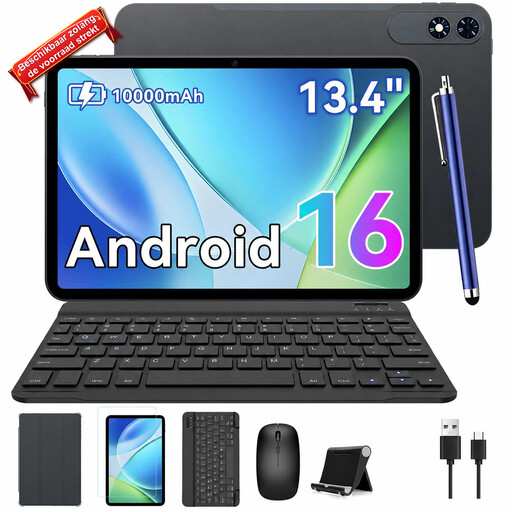
TABWEE T60Pro, 13.4-inch, with keyboard
The listed keyboard bundle may be useful if you want to type while travelling; check that the setup will fit in your workspace.
The product title lists a 13.4-inch screen, Android 16 and a keyboard included in the bundle.
Joybuy
Frequently asked questions
Can I edit a Word draft on the train without Wi-Fi?
Yes, as long as you’ve opened the file online beforehand or downloaded it to your device. Microsoft describes offline working in Word for iPad and Android tablets on that basis. Once you’re connected again, check that your changes have synced.
Do I need a 5G tablet to work on the train?
Not if you make the report available offline before you travel. NS says Wi-Fi isn’t available on all Sprinter trains. If you need to work online while travelling, check whether the tablet supports mobile data and what subscription you’ll need.
How can I stop confidential comments being saved in the wrong place?
Follow your organisation’s storage and security policies, and check where the app saves local and synced versions. The Dutch Data Protection Authority advises protecting sensitive documents properly and highlights the risk of losing data storage devices you take with you.
What are my rights when I buy a tablet online?
In the Netherlands, when you buy online from a business, you generally have 14 days to change your mind, according to the Dutch Government. Products must also be fit for purpose. The Dutch Government says there’s no fixed statutory guarantee period, and that the retailer is your point of contact if something is faulty. The exact rules that apply depend on the purchase.
Can I use a tablet to work on the train?
NS describes facilities and zones for working on the train. Choose a setup that suits the space available, and bear in mind the confidential nature of the information when reviewing a report.


