Start by choosing the floor plan or note-taking app you want to use, then check whether you can work offline with it on your tablet. If you want to sketch, a compatible stylus is important. Then weigh the screen space you need against a size you’re happy to carry, and factor in any accessories you may need.
Who is a tablet for planning a renovation on the train suitable for?
The renovator who likes to sketch
Wants to mark measurements, layouts and ideas on a floor plan with a stylus. Check in advance that the stylus and app you want to use work with the exact tablet model. For example, Samsung lists an S Pen as included with the Galaxy Tab S10 Lite.
The planner who wants to work offline
Wants to keep working on the train when the connection drops, then sync later. RoomSketcher says you can edit offline in its tablet app, with changes syncing once you’re back online.
The traveller short on space
Wants to read and edit a floor plan without carrying an awkwardly large device. The Consumers’ Association describes small tablets as compact and handy for travelling.
What should you look for when choosing a tablet for the train?
Android tablet with a stylus included
A good fit if: you mainly want to write down measurements and ideas by hand. Samsung lists an S Pen as included with the Galaxy Tab S10 Lite.
Bear in mind: an included stylus doesn’t guarantee that your app works offline or supports the exports you need.
iPad with a compatible Pencil
A good fit if: you want to use an iPad app for floor plans. RoomSketcher describes tablet use and offline editing.
Bear in mind: Apple lists two supported Pencil types for the iPad (A16). Check what’s in the box, as the specifications don’t list a Pencil as an included item.
Android tablet with a stylus bundle
A good fit if: you want to compare a larger workspace and a bundle that explicitly includes a stylus. Lenovo lists a Tab Plus bundle with a Tab Pen Plus and an 11.5-inch screen.
Bear in mind: a larger screen means weighing workspace against how easy the tablet is to carry on the train.
First compare the app and stylus that suit the way you work. Then decide how much screen space you need and which extra items you may have to buy.
| Consideration |
What should you look for? |
Who is this important for? |
| Drawing and annotating |
Check stylus compatibility with the exact model, what’s included and whether the app has the features you need. |
If I want to mark measurements and ideas directly on a floor plan, I check both the stylus and the app. Around 33% of consumers make drawing and annotating their top priority. |
| Working offline |
Check that the project is available in advance, which edits work offline and when changes will sync. |
If I want to keep working on my plan during the journey without a connection, I want to know what the app can do offline. Around 27% of consumers prioritise being able to work offline. |
| Workspace and portability |
Compare the screen size with your bag, and consider whether floor plans are easy to read at that size. |
If I want to view plans without carrying lots of luggage, I look for a practical balance between screen space and size. Around 20% of consumers prioritise this balance. |
| Total cost of your setup |
Check whether the stylus you want is included and whether important app features or exports are paid for. |
If I want to weigh up the tablet, stylus and app features I need together, I check in advance what I’ll actually need. Around 20% of consumers prioritise the total cost. |
Common buying mistakes when choosing a tablet for renovation planning
-
Choosing a tablet before you’ve chosen your floor plan app
A suitable screen or stylus doesn’t automatically mean you’ll be able to edit, sync or export the floor plan you want.
First decide what you want to do and which app you’ll use. Then check that it works with the tablet’s operating system and find out which features are available offline.
Floor Plan Creator lists cloud syncing and various export options as paid features. Check the terms for the app you want to use.
-
Relying on train Wi-Fi as your only way to keep working
NS offers Wi-Fi on almost all Intercity trains, but not every one. So you can’t count on having a connection for every journey.
Check in advance that your project is available, and test whether you can make the necessary edits without a connection.
-
Assuming every tablet comes with a stylus
Samsung lists an S Pen as included with the Galaxy Tab S10 Lite. Apple lists Pencil support for the iPad (A16), but doesn’t list a Pencil among the included items.
Check what’s in the box and whether the stylus is compatible with the exact tablet version.
If a compatible stylus isn’t included and you want to use one, you’ll need to buy it separately.
Brands to compare for renovation planning
Samsung
The Galaxy Tab S10 Lite is a 10.9-inch option for handwritten renovation notes. Samsung Netherlands lists an S Pen as included.
- The stylus mentioned is included with this model.
- Check separately whether your floor plan app offers the features and offline capabilities you need; product information isn’t an independent performance test.
Apple
The iPad (A16) has an 11-inch screen and may suit you if you want to use a compatible iPad app for floor plans.
- Apple lists support for Apple Pencil (USB-C) and Apple Pencil (1st generation).
- The specifications listed don’t include a Pencil among the included items. Compatibility applies to the iPad (A16), not automatically to other iPads.
Lenovo
Lenovo describes a Tab Plus Pen Bundle with an 11.5-inch Tab Plus and a Tab Pen Plus.
- The bundle contents list both the tablet and the stylus.
- Consider the larger size when deciding how easy it is to carry, and check the app features separately.
Tablets for renovation planning on Joybuy
These tablets are suited to viewing and editing renovation plans while you’re out and about. Screen sizes and details about included styluses vary by version.
 No image available
Lenovo Idea Tab, 256 GB
An option to compare if you want to view renovation plans on an 11-inch screen.
11 inches; 8 GB RAM; 256 GB storage; Wi-Fi 5 (802.11ac); Android 15; grey.
Joybuy
 No image available
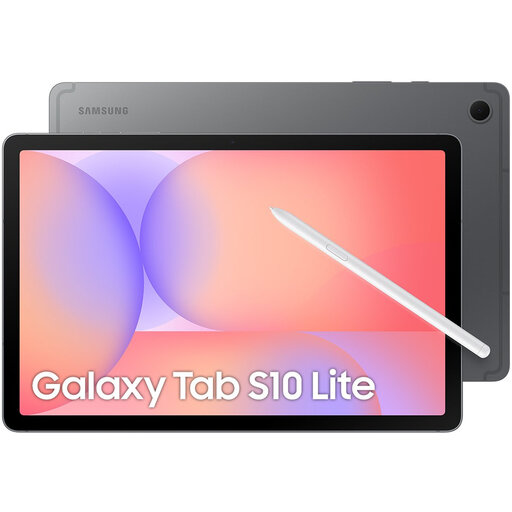
Samsung Galaxy Tab S10 Lite, 128 GB
An option to compare if you want to make handwritten renovation notes with the included S Pen.
Samsung Netherlands lists a 10.9-inch screen and an included S Pen for this model. This version lists Wi-Fi, 128 GB storage and grey.
Joybuy
 No image available
TECLAST P33 Case, 64 GB
An option to compare if you want an included stylus and a 10.1-inch screen suits your travel plans.
The product name lists a 10.1-inch screen, 64 GB storage and 9 GB RAM, made up of 3 GB plus 6 GB of virtual expansion. The listed bundle includes a stylus, case, Bluetooth keyboard, mouse and stand, among other items.
Joybuy
 No image available
Lenovo Idea Tab Plus, 256 GB
An option to compare if you want a larger workspace and a stylus listed for this version. Bear in mind that its size will take up more room in your bag.
12.1 inches; 2.5K; 8 GB RAM; 256 GB storage; with stylus; Wi-Fi; pink.
Joybuy
 No image available
TECLAST ArtPad Pro, 256 GB
An option to compare if you want more screen space for plans and are happy to carry a larger device.
12.7-inch 2K screen; 20 GB RAM (8 GB + 12 GB virtual expansion); 256 GB storage; with stylus.
Joybuy
Frequently asked questions about using a tablet to plan a renovation on the train
Can I edit a floor plan on the train without Wi-Fi?
It depends on the app. RoomSketcher says its tablet app works offline and syncs changes once you’re back online. Make your project available in advance and check which features your chosen app offers offline.
Will a stylus work with any tablet?
No. Check the compatibility of the specific tablet and stylus. For the iPad (A16), Apple lists support for Apple Pencil (USB-C) and Apple Pencil (1st generation). Samsung lists an S Pen as included with the Galaxy Tab S10 Lite.
What should I do with my renovation plan before setting off?
Check that the project is available on your tablet and try making the necessary edits without a connection. RoomSketcher describes offline editing with changes syncing later; sync your work when you’re back online.
Are all the features in a floor plan app free?
Not necessarily. Floor Plan Creator’s app listing describes cloud syncing and various exports as paid features. Check the current terms for the app you want to use.
What are my rights when I buy a tablet online in the Netherlands?
For online consumer purchases, you generally have a statutory 14-day cancellation period after delivery, subject to certain exceptions. ACM ConsuWijzer also says that if a product breaks sooner than you could reasonably expect under normal use, the seller must offer an appropriate solution.


