
Reader with a full train bag
You want to read travel stories in your hand while on the move, so the tablet’s size and weight matter. The Consumers’ Association describes small tablets as compact and convenient for travelling.


Choose a tablet that feels comfortable to hold and runs your reading app and essays well. Check that you can download your stories before you set off, too. A compact model is easier to carry, while a larger screen gives you more room for long pages and images but can be less convenient to hold. If you mainly read continuous text, consider comparing an e-reader as well.
You want to read travel stories in your hand while on the move, so the tablet’s size and weight matter. The Consumers’ Association describes small tablets as compact and convenient for travelling.
You also read photos, maps or formatted web pages, and weigh up extra screen space against ease of carrying. A larger screen may be a better fit for that than a compact model.
You want to keep reading during your journey without depending on a connection. Check whether your reading service lets you download essays and open them offline.
Start with how you read: extended reading in your hand, looking at illustrations and reading offline while travelling all call for different things. Then check the exact model and what you need to open your essays.
| What to consider | What to look for when buying | Who this matters to |
|---|---|---|
| Size and weight | Compare the dimensions and weight of the exact model, and factor in any case you might use. | If I want to hold the tablet for a long time, I look for a model that’s comfortable to carry. Around 28% of consumers say ease of handling is their main concern when buying. |
| Text and images | View your own essays on the screen and check the text size, page layout and reflections. | I want to view photos, maps and formatted pages without making the smallest size my only criterion. Around 22% of consumers prioritise how text and images appear on screen. |
| Offline access | Check whether your website, publisher or reading app actually lets you download essays and open them offline. | If I don’t want to rely on a connection during my journey, I want to have my stories ready in advance. Around 22% of consumers say offline access is their main concern when buying. |
| Battery and journey length | Compare battery figures only with the usage conditions they’re based on; don’t assume there’ll be a charging point on every train. | On a longer journey, I want to keep reading without estimating battery life based on another activity, such as streaming video. Around 17% of consumers prioritise battery life for their own journey length. |
| Model and essentials | Check what’s in the box and whether you need Wi-Fi or mobile internet for the way you read. | I want to know in advance which accessories or connection I’ll need for my reading journey, without choosing features I won’t use. Around 11% of consumers focus mainly on the model and the extras they need. |
NS says free Wi-Fi is available on almost all Intercity trains, but not on every train journey. Downloading an essay in advance is a practical option if you don’t want to rely on Wi-Fi.
NS says Wi-Fi is available on almost all Intercity trains, but not every train. An online essay may therefore be inaccessible while you’re travelling.
Check whether your reading service supports downloads, and open an essay offline once before setting off.
Lenovo bases the stated battery life of the Tab One on streaming YouTube. That doesn’t tell you how long the tablet will last with your reading app, brightness settings and connection.
Compare battery figures with the conditions they were tested under, and allow for your own usage.
Wi-Fi and 4G models have different connectivity options, so don’t assume they’re the same version without checking the model name.
Before buying, check the full model name, network version and what’s included in the box.
The iPad mini offers a compact iPadOS option for reading in your hand.
The Galaxy Tab A11 is a compact Android option; check the difference between Wi-Fi and mobile versions.
The Tab One is a compact option; the Tab M11 has a larger screen for those who want more page space.
The REDMI Pad SE 8.7 range includes compact Wi-Fi models and separate 4G versions.
This selection includes compact 8.7-inch tablets and larger 10.1- and 11-inch models. The versions also differ in Wi-Fi and mobile connectivity, so check which one suits the way you read.
 Image unavailable
A larger screen may suit travel essays with text and images if portability is less of a priority.
10.1 inch, 4 GB, 128 GB, Wi-Fi 5 (802.11ac) and Android 14. This Wi-Fi version doesn’t have mobile internet; the stated weight is 425 g.
Image unavailable
This larger version suits anyone who wants more screen space and needs mobile internet while travelling.
10.1 inch, 4 GB, 128 GB, Wi-Fi 5 (802.11ac), Android 14 and 4G LTE. A Nano-SIM is required for mobile internet; the stated weight is 425 g.
 Image unavailable
A compact version may suit you if you often read in your hand during the journey and need less screen space.
64 GB. The product information lists 4G; a Nano-SIM is required for mobile internet. The stated weight is 337 g.
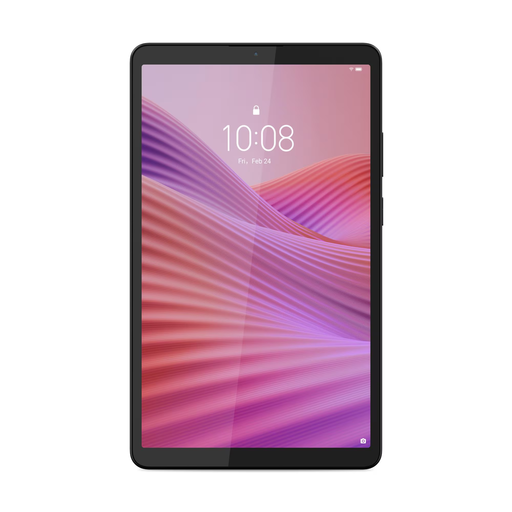 Image unavailable
The compact screen size suits anyone who wants a tablet to take along and read in their hand during the journey.
8.7 inch, 4 GB RAM, 128 GB storage and Wi-Fi only. This version is listed with a clear case; a USB power adapter is not included.
 Image unavailable
A larger screen may suit you if images and essay layouts matter more than a compact size.
11 inch, 128 GB and a stated weight of 499 g. Its larger size makes it less comfortable to hold for long periods than a compact tablet.
Not if your essays are available offline in your reading app or as files before you set off. According to its own information, NS offers free Wi-Fi on almost all Intercity trains, but it isn’t guaranteed on every journey. Check the download function before you leave; you’ll need a suitable connection to read new online stories while travelling.
Open the downloaded story once without a connection in the app you plan to use during your journey. This lets you check whether your particular reading service makes the essay available offline.
It depends on the version. Xiaomi says the REDMI Pad SE 8.7 4G doesn’t include a power adapter, so check what’s in the box for the exact model you choose.
For a standard online purchase from a business, the Dutch government says you generally have 14 days to change your mind. You’re also entitled to a product that works properly; there is no fixed statutory warranty period for products in the Netherlands. Check the terms of your specific purchase and contact the seller if the product is faulty.