Who is this relevant to?

Readers who hold their device

If you read long passages of a novel in bed, you may want to consider size, weight and grip when choosing between a compact tablet and an e-reader. The Consumers' Association describes e-readers as being particularly suited to reading books.

Evening readers

If you read just before going to sleep, look for adjustable lighting and reading display options. A night mode is no proof that a device prevents sleep problems.

Readers who use several sources for books

If you borrow books, use different apps or read editions with fixed layouts, check that each title is available on your chosen device. The Online Library lists the devices supported for each e-book.

What should you consider when choosing?

Compact tablet

Choose this option: if you want to use reading apps, websites or other visual content as well as reading novels.

Bear in mind: a tablet has a range of general-purpose features, but its illuminated screen can reflect light and it may be less easy to handle than an e-reader.

E Ink e-reader

Choose this option: if you mainly read continuous novel text and general tablet apps are less important to you.

Bear in mind: check that the book you want is available from your library; PDFs with fixed layouts or lots of images may be less suitable.

Larger tablet

Choose this option: if you often read PDFs with fixed layouts or need more screen space.

Bear in mind: a larger device can be harder to hold in one hand for long periods, so think about how you’ll support it while reading.

What to consider What should you check? Who is this important to?
Comfortable to hold Compare the weight, dimensions and grip of the exact model. If possible, hold it in the position you usually read in. If I read in bed for a long time, I want the device to be comfortable to hold. Around 29% of consumers with this reading need put ease of handling first.
Display in the evening Check the minimum brightness, reading display and any colour temperature settings. When I read in low ambient light, I want to be able to adjust the display to suit my preferences. Around 29% of consumers give evening display settings priority.
Access to books Search for the title and edition you want, then check whether it is available on a tablet, an e-reader or both. If I want to read books from different sources, I want to know in advance which titles and apps will work. Access to books is the first thing around 24% of consumers consider.
Running costs and lifespan Consider where you plan to get your books, check software support and work out which accessories you actually need. If I want to use the device for a long time, I also want to take costs beyond the device itself into account. Around 18% of consumers prioritise cost and useful lifespan.

Common mistakes

  • Assuming a bigger screen is automatically better for reading novels in bed

    Extra screen space can be useful for PDFs with fixed layouts, but ease of handling also matters when you’re holding a device for a long time.

    Choose a size to suit both the type of book and the way you read, rather than basing your decision on screen size alone.

    A larger or heavier device may need to be supported while you read.

  • Assuming night mode prevents sleep problems

    The RIVM reported a link between screen use shortly before bedtime and shorter, poorer-quality sleep, but did not establish that blue light was directly responsible.

    Adjust the reading display to suit your preferences, but don’t treat night mode as a guarantee of better sleep.

  • Choosing a device before checking that your books are available

    Library titles vary in availability depending on the title and device. PDFs with fixed layouts may also be less suitable for a small e-reader.

    Before you buy, check a specific title and edition, and make sure it can be read on your chosen device.

    A different edition, book source or way of reading may be better suited to the title.

Brands to compare

Apple

The iPad mini is a compact tablet option if you want to combine reading novels with using tablet apps.

  • Apple lists an 8.3-inch screen and a weight of 293 grams for the A17 Pro Wi-Fi model.
  • It’s a tablet with an illuminated screen, not an E Ink e-reader, so weigh the extra features against how you plan to read.

Samsung

The Galaxy Tab A11 series offers a compact Android tablet option. Check whether the Wi-Fi or LTE model best suits your needs.

  • Samsung lists an 8.7-inch screen, 64 GB of storage and a 3.5 mm jack for the Galaxy Tab A11 Wi-Fi model SM-X130NZAAEUB.
  • These specifications apply to that model; the A11+ and LTE models are different variants. A screen refresh rate alone doesn’t tell you whether novel text will be more comfortable to read.

Lenovo

The Tab One is a compact Android tablet option for combining book reading with other tablet features.

  • Lenovo lists an 8.7-inch screen, a weight of around 320 grams and Android 14 or later for the Tab One ZAF00255SE.
  • These are manufacturer specifications for that model, not an independent assessment of reading comfort.

Kobo

The Clara BW is an e-reader alternative if you mainly read continuous novel text.

  • Kobo lists a non-glare 6-inch E Ink screen, dark mode and adjustable ComfortLight PRO lighting.
  • An e-reader doesn’t offer the same general-purpose features as a tablet. Check that your preferred shop or library option works for each title.

PocketBook

The Verse Pro is an e-reader alternative if a compact screen and support for certain book file formats are important to you.

  • PocketBook lists a 6-inch E Ink screen, a weight of 186 grams, SMARTlight and support for EPUB and EPUB with DRM for the Verse Pro Azure.
  • Support for a file format doesn’t automatically mean every shop or library title will work without extra steps.

Tablets on Joybuy

This selection includes compact tablets and larger Lenovo tablets to compare for reading and other tablet uses.

Samsung Galaxy Tab A11 X135 64GB Silver

Samsung Galaxy Tab A11 X135 64GB Silver

An option to compare if you’re looking for a compact tablet. Check the exact model and whether it works with your preferred reading apps.

64 GB storage; Silver.

View at Joybuy
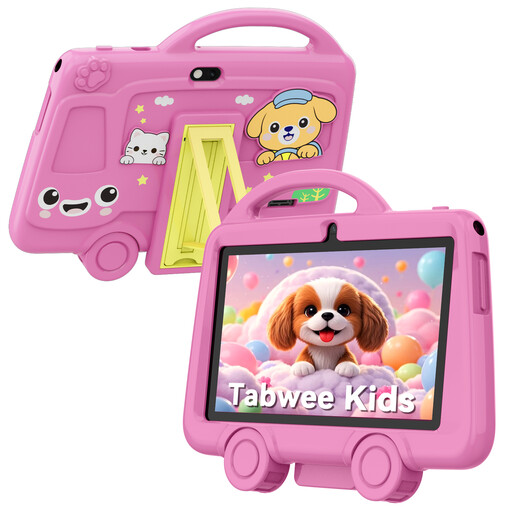
TABWEE K8 Kids' Tablet, 7-inch, 2 GB RAM + 32 GB storage, pink

TABWEE K8 Kids' Tablet, 7-inch, 2 GB RAM + 32 GB storage, pink

The 7-inch size may appeal if you’re looking for a small device that’s easy to hold. Also check whether a model designed for children suits the way you plan to read.

7-inch screen; 2 GB RAM and 32 GB storage; pink.

View at Joybuy

Lenovo Tab Mediatek, 10.1-inch, 4 GB RAM, 128 GB, Wi-Fi 5, Android 14, grey

Lenovo Tab Mediatek, 10.1-inch, 4 GB RAM, 128 GB, Wi-Fi 5, Android 14, grey

A larger tablet to consider if you’d like more screen space for other content as well as novels. It may be less easy to hold for long periods in bed.

10.1-inch screen; 4 GB RAM and 128 GB storage; Wi-Fi 5 (802.11ac); Android 14; grey.

View at Joybuy
Lenovo Tab 4G Mediatek LTE, 10.1-inch, 4 GB RAM, 128 GB, Android 14, grey

Lenovo Tab 4G Mediatek LTE, 10.1-inch, 4 GB RAM, 128 GB, Android 14, grey

A larger tablet to compare if you’re looking for more screen space and a mobile connection. Think about how you’ll support the device during longer reading sessions.

10.1-inch screen; 4 GB RAM and 128 GB storage; 4G LTE; Wi-Fi 5 (802.11ac); Android 14; grey.

View at Joybuy

Lenovo Idea Tab Plus WiFi, 12.1-inch, 2.5K, 8 GB RAM, 256 GB, with pen, Rose

Lenovo Idea Tab Plus WiFi, 12.1-inch, 2.5K, 8 GB RAM, 256 GB, with pen, Rose

This model offers a larger screen to compare if you want to view other tablet content as well as novels. Its size is worth considering if you read in bed for long periods.

12.1-inch screen; 2.5K; 8 GB RAM and 256 GB storage; WiFi; with pen; Rose.

View at Joybuy

Frequently asked questions

Can I read e-books from the Online Library on any tablet or e-reader?

No. Check which devices are supported for each title. To read on a tablet, the Online Library uses an app; according to the app information, you need at least Android 10 or iOS 16. Check the requirements again when you install the app.

Is a tablet or an e-reader better for reading novels in bed?

An e-reader is best suited to people who mainly read books; a tablet is worth considering if you also want to use apps, websites or other content. Compare the size and weight of the exact model, and check that the books you want are available on it.

Does night mode stop screen use from affecting my sleep?

Night mode is no proven guarantee of better sleep. The RIVM described a link between screen use shortly before bedtime and shorter, poorer-quality sleep, but did not establish that blue light was directly responsible. Choose a reading display that suits the ambient light, without assuming it will have a particular effect on your sleep.

How can I charge a device safely in bed?

Don’t charge it under a pillow or duvet, and don’t use damaged cables or counterfeit chargers, advises the Fire Service. This advice doesn’t mean that every reading session using a charger is dangerous.

Can I download a classic novel for free?

Not simply because a book is a classic. According to Auteursrecht.nl, copyright on a work generally expires 70 years after the creator’s death, calculated from 1 January of the following year. Don’t use an illegal download source or circumvent copy protection. For a specific edition, also check whether it contains any additional material.
