For gardening books with photos, fixed page layouts or PDFs, a colour tablet is generally more practical than a small e-reader, as these pages may need to be zoomed in on more often on a small screen. Then compare how easy a sample page is to read with the size and weight you’re happy to carry, and check that your app and book are available before you set off. If you’ll mainly be reading continuous text, an e-reader could also be a good fit.
Who is this choice relevant to?
Reader of illustrated gardening books
Wants to view photos, diagrams and fixed-layout pages clearly, and weighs up screen space against portability. The Consumers’ Association and the Online Library highlight points to consider with PDFs and books containing lots of images.
Traveller who wants to pack light
Reads on the go, sometimes without a table, and considers size, weight and reflections. Apple and Xiaomi publish weights for specific tablet configurations, so compare the version you’re considering.
Library reader on the train
Wants to read borrowed books in a compatible app and knows that train Wi-Fi isn’t available everywhere. The Online Library explains its app requirements; NS says Wi-Fi is available on almost all Intercity trains.
What should you consider when choosing?
Compact colour tablet
Best for: viewing photos and carrying a device you’ll often hold in your hand.
Trade-off: a smaller screen may mean more zooming in on fixed-layout pages.
Larger colour tablet
Best for: viewing PDFs, tables or detailed illustrations with more screen space, for example while sitting down.
Trade-off: a larger device is less convenient to hold while standing or carry in a small bag.
Colour e-reader
Best for: mainly reading continuous text and relying less on apps.
Trade-off: a colour screen doesn’t guarantee that every heavily illustrated book will be available.
| Consideration |
What to look for when buying |
Who is this important for? |
| Photos, illustrations and PDFs |
View a representative page from your own book on the screen. Check that details are clear and how much zooming is needed. |
If I read gardening books with lots of images or a fixed page layout, I want to be able to view pictures and text clearly. Around 31% of consumers prioritise illustrated books. |
| Portability during the journey |
Compare the dimensions and weight of the exact configuration, including the case you plan to use. Consider reflections in the light you’ll be travelling in. |
Size and weight matter a lot if you often take your tablet with you or read without a table. Around 25% of consumers prioritise a compact device that’s easy to carry. |
| Access to books and apps |
Check the latest app requirements and, before you set off, test whether your title opens in the app without an internet connection. |
I want access to my own titles during the journey, even when there’s no Wi-Fi. Around 19% of consumers consider access to books their main priority when choosing. |
| Battery life |
Only compare battery figures if the test conditions are the same, and try a typical reading session at home using your usual brightness setting. |
If you make long or back-to-back journeys, you’ll want to read without having to recharge along the way. Around 13% of consumers give battery life top priority. |
| Total cost of use |
Check which accessories are included and what you’ll need to access the books or app you want. |
If I also need books or accessories, I want to factor them into my choice. Around 12% of consumers prioritise the total cost of reading. |
Which buying mistakes can you avoid?
-
Assuming a colour screen means every gardening book will be easy to read
Fixed-layout PDF pages may need a lot of zooming on a small screen. What’s more, some heavily illustrated books from the Online Library are only available in the app or online.
Before buying, check that the specific title is available and view a sample page in the app or file format you’ll be using.
-
Assuming train Wi-Fi is always available
NS says free Wi-Fi is available on almost all Intercity trains, but not every train. So you can’t rely on an internet connection during your journey to access a book that isn’t ready to read offline.
Get your book ready before you set off, then switch off your connection and test whether that specific title opens in your reading app.
Brands to compare
Apple
The iPad mini (A17 Pro) is a compact colour tablet to compare if you’re looking for screen detail in a small device.
- Apple lists a resolution of 2266 × 1488 pixels and a weight of 293 grams for the Wi-Fi version.
- These are manufacturer specifications, not the result of an independent test of reading comfort. Also check the exact configuration and whether your reading app supports your books.
Samsung
The Galaxy Tab A11 range includes compact 8.7-inch versions; storage and connectivity vary by configuration.
- Samsung Netherlands lists a resolution of 1340 × 800 and a refresh rate of 90 Hz for the 64 GB Wi-Fi version.
- Don’t confuse the 64 GB version with the 128 GB version. Also check that the model supports the app you want.
Lenovo
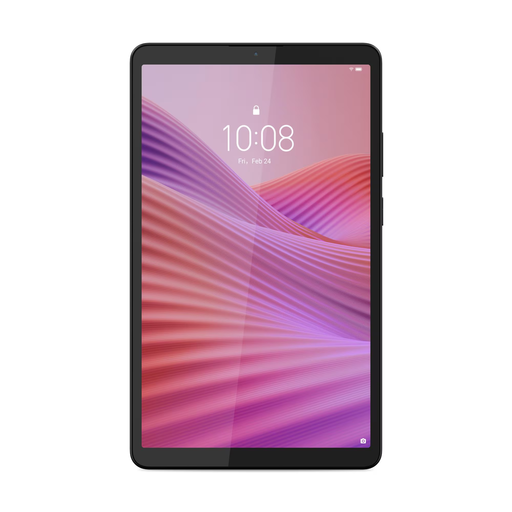
The Tab One is a compact Android tablet range with 64 GB and 128 GB versions.
- Lenovo lists an 8.7-inch screen, 1340 × 800 pixels and a microSD card slot for the Tab One.
- Configurations can vary by model or region, so check the version on offer and which accessories are included.
Xiaomi
The Redmi Pad SE 8.7 is a compact tablet to compare if screen brightness and expandable storage are important to you.
- For its Netherlands product page, Xiaomi lists a resolution of 1340 × 800 pixels, standard brightness of 500 nits and a weight of up to 373 grams.
- These are manufacturer specifications, not a test of readability on a train. Xiaomi says that a power adapter isn’t included; the configuration may vary by region.
Kobo
The Clara Colour and Libra Colour are colour e-readers to consider if reading is your main priority.
- Rakuten Kobo says these models display colour when a page has been designed for it.
- The Online Library says that some heavily illustrated e-books are only available in the app or online. So check that you can access the title you want to read.
Tablets on Joybuy for reading on the go
These Joybuy models include compact and larger tablets to compare for gardening books and reading on train journeys.
 No image available
Lenovo Tab One, 8.7 inch, 128 GB, with transparent case
A compact version to compare if you want to take a tablet with you on a train journey.
8.7-inch Wi-Fi tablet with 4 GB RAM, 128 GB storage and HD IPS touchscreen; the product name also lists a transparent case and the colour Luna Grey.
View on Joybuy
 No image available
Samsung Galaxy Tab A11 X135, 8.7 inch, LTE, 64 GB
A compact version to compare if you also need a mobile connection while travelling.
The product name lists an 8.7-inch screen, LTE, 4 GB RAM and 64 GB storage.
View on Joybuy
 No image available
Lenovo Yoga Tab ZAG60028PL, 11.1 inch, 256 GB
A larger model to compare if you’d like more screen space for fixed-layout pages.
The product name lists an 11.1-inch 3.2K touchscreen, 12 GB LPDDR5X, 256 GB storage, Android 15 and a Tab Pen Pro.
View on Joybuy
 No image available
Lenovo Idea Tab MediaTek Dimensity, 11 inch, 8 GB, 256 GB
An 11-inch model to compare if you want more screen space for book pages than a compact tablet offers.
The product name lists 8 GB memory, 256 GB storage, Wi-Fi 5 and Android 15. According to the product information, the charger must be purchased separately.
View on Joybuy
 No image available
Samsung Galaxy Tab A11 Plus, 11 inch, 128 GB, Wi-Fi
A larger Wi-Fi model to compare if you want to view book pages on a more spacious screen.
The product name lists an 11-inch screen, 128 GB storage and the colour grey.
View on Joybuy
Frequently asked questions
Is a colour e-reader enough for an illustrated gardening book?
It might be, but first check that the specific title is available on the device. Kobo says colour is only displayed on pages designed for it; the Online Library says that some books with lots of images can only be read in the app or online. For many PDFs, the Consumers’ Association points to the practical advantages of a tablet.
Can I rely on Wi-Fi on the train to read my books?
Not on every train: NS says free Wi-Fi is available on almost all Intercity trains. Get a book ready before you set off and test in your reading app whether the title opens without an internet connection; availability may vary by title.
What should I check before installing the Online Library app?
Check the latest app requirements and the tablet’s operating system version. The Online Library’s help page lists Android 10 or iOS 16 as the minimum; before buying, check that the current app requirements are still compatible with the version you choose.
What warranty do I have if my tablet breaks?
According to ACM ConsuWijzer, a product must meet the expectations you could reasonably have of it under normal use. This is your legal guarantee and is separate from any commercial warranty; what you can reasonably expect depends on factors including the product and the circumstances.


