
Contract reader on the go
You want to read pages clearly at a small table and carry your tablet around easily, so screen size and visibility matter. The Dutch Consumers’ Association discusses the choice between larger and smaller tablets.


For reading contracts and making the occasional note at a small café table, a compact tablet is usually more practical. Choose a larger screen if you want to see more text at once and have room for it in your bag and on the table. Also check that your document app supports the annotations you need, that the pen is included with your chosen model, and how to open confidential files securely.
You want to read pages clearly at a small table and carry your tablet around easily, so screen size and visibility matter. The Dutch Consumers’ Association discusses the choice between larger and smaller tablets.
You want to make notes or annotations as you read. Check that the tablet, pen and document app work well together; Apple Support describes the annotation tools for documents and PDFs on iPad.
You open documents that may contain sensitive information in a public place. Your network choice, the risk of someone looking over your shoulder and your organisation’s security policy all matter. Dutch online safety guidance and the Dutch Data Protection Authority offer practical advice on these points.
First decide whether you’ll mainly read, annotate passages or edit text as well. Then compare screen size, pen and app, and choose how you’ll access confidential documents while you’re out and about.
| What to consider | What should you check? | Who is this more important for? |
|---|---|---|
| Readability and size | View your own contract in similar lighting; look out for reflections and consider how much table space you have. | At a small café table, I want to read contract pages without constantly zooming in. Screen space matters, but so do reflections and the space on the table. Readability and size are the top buying concern for around 33% of consumers. |
| Annotations and notes | Try the PDF or contract app you intend to use with a document, and check whether the right pen is included. | If I want to annotate passages by hand, the pen needs to work with my tablet and app. Around 27% of consumers prioritise annotation and note-taking. |
| Confidentiality | Check the policy on work documents and network use, and consider where you’ll position your screen. | When handling sensitive documents, I want to prevent others from looking over my shoulder and follow the right procedures. Confidentiality is the top buying concern for around 27% of consumers. |
| Portability and connectivity | Compare dimensions and weight, offline access to your documents, and the cost of any data plan. | If I often carry my tablet around or need to get online while travelling, size and connectivity are key. Around 13% of consumers prioritise portability or access on the go. |
Pen support and what’s in the box aren’t the same thing. Apple lists Pencil support for the iPad reviewed; Samsung says the Galaxy Tab S10 Lite comes with an S Pen. Lenovo warns that accessories can vary by model.
Check the exact model number, what’s in the box and pen compatibility before you order.
Reflections and the amount of table space available can affect how comfortably you can read a contract. An anti-reflective screen option also isn’t necessarily available on every model.
View your own contract in similar lighting and check that the model you’ve chosen has the screen you want.
The 11-inch iPad (A16) reviewed is a compact option for reading and annotating PDFs in iPadOS.
The Galaxy Tab S10 Lite is an Android option with a 10.9-inch screen for anyone who wants to use a pen with the right model.
The Idea Tab Plus has a larger screen for anyone looking for more room to read.
This Joybuy selection includes compact tablets around 11 inches and larger models for anyone who wants more room to read, with various pen options. Check which accessories are included with each model.
 Image unavailable
A compact option if you want to read at a table and make handwritten notes.
The product name lists an 11.1-inch, 3.2K screen, Wi-Fi 7, 256 GB and an included Tab Pen Pro.
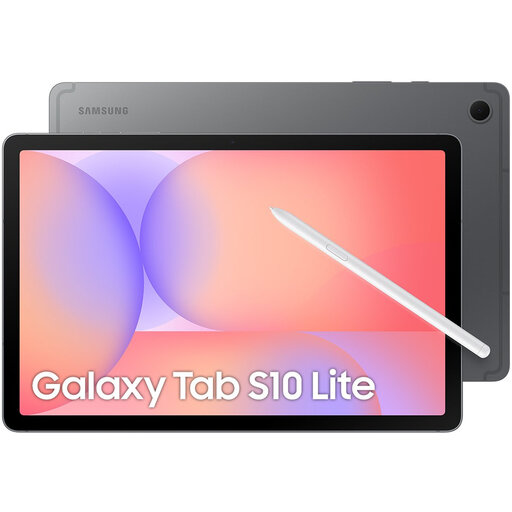 Image unavailable
An option for anyone who wants to read contracts on a compact screen and annotate passages with a pen.
The product listing specifies Wi-Fi and 128 GB. Samsung lists a 10.9-inch screen and an included S Pen for the Galaxy Tab S10 Lite; check the exact model and app compatibility.
 Image unavailable
This model could suit you if you’re looking for a tablet for documents and handwritten notes.
The product name lists 11 inch, 256 GB, Wi-Fi, Android 15 and a stylus. According to the product information, the charger is not included.
 Image unavailable
A larger screen for viewing contract pages if extra room to read matters more to you than a compact size.
The product name lists Wi-Fi, 12.1 inch, 2.5K, 8 GB RAM and 256 GB, with a pen. Check the exact screen specification and what’s included in the box.
 Image unavailable
A larger iPad model for anyone who wants more screen space when reading contracts.
The product name lists a 13-inch screen, Wi-Fi and 128 GB. Check which Apple Pencil is compatible with this model and whether it’s sold separately.
Yes. Apple describes Markup for documents and PDFs on iPad. Try it with your own file format and app to see how comments are saved and shared. Support for Apple Pencil doesn’t mean one is included with the tablet.
First, follow the policy of the organisation that manages the document. Dutch online safety guidance recommends using a VPN or phone hotspot on public Wi-Fi, and suggests a privacy filter to prevent people looking over your shoulder. The Dutch Data Protection Authority says organisations must properly protect personal data when processing it.
Not necessarily. If your phone and data plan allow it, you can use a hotspot. Apple says a compatible iPad with Cellular can access mobile internet directly with a suitable plan.
For eligible distance purchases by consumers in the Netherlands, you’ll generally have a 14-day cooling-off period, according to the Dutch government. You’re also covered by the legal guarantee: if there’s a problem with the product, contact the seller. Exactly how these rules apply may depend on the purchase and any exceptions.