What should you look for?
When reading in bed, your choice mainly depends on what’s on the pages of your journal and whether you’ll hold the tablet or use it to make notes as well.
Compact colour tablet
Best for: reading while holding your tablet most of the time, if the pages are easy to read on a smaller screen.
Bear in mind: densely laid-out PDFs may need more frequent zooming; remember to factor in the weight of a case too.
Larger tablet with stylus support
Best for: anyone who wants more room to view photos or fixed-layout pages, or regularly adds handwritten observations.
Bear in mind: try it in your usual reading position. A larger screen won’t necessarily be comfortable to hold above your face or in one hand for a long time.
E-reader
Best for: a journal that mainly contains running text, when all you want to do is read.
Bear in mind: according to the Consumers’ Association of the Netherlands (Consumentenbond), e-readers are less suited to PDFs and image-heavy content; a tablet offers colour and more features.
| What to consider |
What to look for |
Who is this important for? |
| Size and weight |
Compare the screen diagonal, the weight of the exact version you’re considering and the weight of any case. If possible, try it in your usual reading position. |
If I’m holding the tablet for a long time, I want its size to feel comfortable in my reading position. Around 40% of consumers prioritise ease of handling. |
| Photos and pages |
Open a sample page in the file format you use and check the text size, captions and colour reproduction. |
If my journal contains photos or fixed-layout pages, I want to view them clearly without constantly zooming in. Around 30% of consumers prioritise how easy images and pages are to read. |
| Reading in the evening |
Try a low brightness setting in your reading app, and white text on a black background if you like. Judge the result for yourself. |
If I read in a dark room, I want a display that’s comfortable for me to read. Around 20% of consumers prioritise evening settings; a blue-light filter has not been proven to protect against effects on sleep. |
| Handwritten notes |
Check which stylus works with the model, whether it’s included and whether your journal app saves handwriting or PDF annotations the way you want. |
If I want to add observations or sketches, I want to know whether the stylus and app are suitable. Around 10% of consumers make note-taking their top priority. |
Tablets on Joybuy for reading in bed
This selection includes compact models to hold and larger screens for viewing pages with more room. Compare the size with your reading position and the types of pages in your nature journal.
 No image available
Samsung Galaxy Tab A11 X135, 64GB, Silver
A compact option to compare if you’ll mainly hold the tablet while reading.
Screen: 8.7-inch TFT, 1340 × 800 pixels and 90 Hz. Listed weight: 337 g.
Joybuy
 No image available
OPPO Pad SE, 128GB, 6GB, LTE, Twilight Blue, OPD2420 EUN
The larger screen may suit you if your nature journal contains photos or fixed-layout pages.
Screen: 11-inch LCD, 1920 × 1200 pixels.
Joybuy
 No image available
Samsung Galaxy Tab A11 Plus, 11 inch, 128GB, Wi-Fi, Grey
A larger screen to compare if you want more room for pages and images.
Screen: 11-inch LCD, 1920 × 1200 pixels and 90 Hz.
Joybuy
 No image available
TECLAST P50, 11 inch, 32GB RAM (6GB + 26GB virtual), 128GB ROM, 4G LTE
The 11-inch screen is an option to compare if you want more room to view your journal pages.
Screen: 11-inch IPS, 90 Hz. The title lists Android 16, 4G LTE and dual SIM.
Joybuy
 No image available
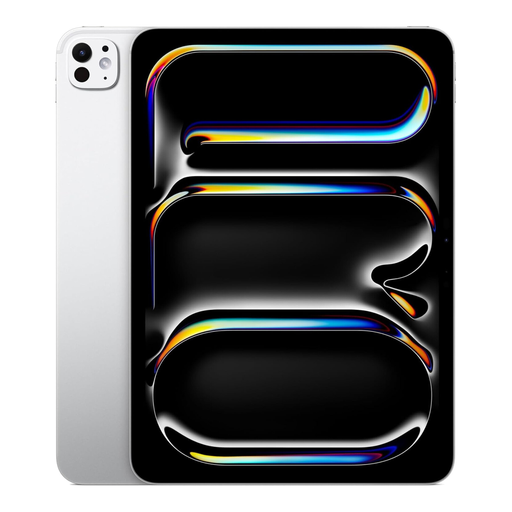
Apple iPad Pro M5 (2025), 11 inch, 1TB, Wi-Fi, Nano Texture, Silver
A larger screen to consider if you want plenty of room to view pages and use a stylus too.
Apple Pencil compatibility is listed. The screen is 11 inches; the description mentions an Ultra Retina XDR display with wide colour reproduction.
Joybuy
Frequently asked questions
Is an e-reader better if I only read the text in my nature journal?
An e-reader may suit you if your journal mainly contains running text and you only want to read. According to the Consumers’ Association of the Netherlands (Consumentenbond), e-readers are less suited to PDFs and image-heavy content, so check the layout of your own journal first.
How should I set up a tablet for reading in bed?
Open a sample page in your reading app and set the brightness to a level that’s comfortable for you; you could also try white text on a black background. The National Institute for Public Health and the Environment (RIVM) says more research is needed to establish whether built-in blue-light filters can reduce effects on sleep.
Can I add extra storage later?
It depends on the model and how you use it. Xiaomi says external storage on the Redmi Pad SE 8.7 can be used for media, but not for apps; check how your journal app stores files.
What are my rights if a tablet I bought online isn’t suitable or develops a fault?
When you buy online, the seller must tell you about things such as the cooling-off period, which is usually 14 days according to the Dutch government. You’re also entitled to a product that works properly; if there’s a problem, you can ask the seller to put it right.
Does the same EU energy label apply to every tablet?
No, the rules don’t automatically apply to every tablet. According to the European Commission, energy labelling rules apply from 20 June 2025 to the relevant slate tablets placed on the EU market from that date; the Commission also lists product types that are excluded. So check the product type and the date it was placed on the market.


