
Readers of maps and excavation plans
If your reports include large, fixed-layout pages, maps or images with small captions, seeing the whole page may matter more than keeping the weight down.


Extra screen space is useful for reports with large plans and small captions; a smaller, lighter model is more practical for reading for long periods on your lap or in your hand. Choose based on the PDFs you’ll be reading, and check before you leave that your files and notes are available offline. Pen support doesn’t always mean a pen is included, and the stated battery capacity won’t tell you how long your own PDF reading will last.
If your reports include large, fixed-layout pages, maps or images with small captions, seeing the whole page may matter more than keeping the weight down.
If you read reports on your lap or in your hand for long periods, and can zoom in on larger images, a more compact device may suit you better.
If you highlight passages or add comments, consider the pen, PDF app and note-saving process as a complete package.
| What to consider | What should you check? | Who is this important to? |
|---|---|---|
| Maps and fixed-layout PDF pages | Open a representative page and check how the text, map details and captions look on the screen size you’re considering. | If I want to view maps and small labels on one page, I prioritise screen space. Around 31% of consumers say map readability is their main consideration. |
| Ease of handling on the go | Compare the weight of the exact model and try its size with the case you intend to use while sitting down. | If I mainly read text and want to hold the tablet for a long time, ease of handling matters more to me than viewing a whole large page at once. Around 23% of consumers prioritise portability. |
| Making notes | Check whether a pen is included or needs to be bought separately, whether it works with the PDF app, and whether a test note is saved offline. | If I want to write comments in reports and find them later, I look at both the pen and how it works with my PDF app. Around 16% of consumers choose annotation as their top priority. |
| Offline access and storage | Download reports in advance and reopen them with your connection turned off; also check the storage capacity of the exact model. | If I want to access my reports without internet during the flight, local access is essential for me. Around 15% of consumers prioritise offline access and storage. |
| Screen for extended reading | View one of your own pages, with its colours, shading and small text, on the type of screen you’re considering. | If I’m reading for a long time, I want to decide for myself which screen is comfortable and how it displays the colours and details in my maps. Around 15% of consumers put screen comfort first. |
A larger screen gives you more room to view fixed-layout PDF pages, but the large Wi-Fi models listed here weigh more than their smaller counterparts. Consumentenbond also points out that extra-large tablets are less easy to carry around.
Open a page from one of your own reports on the size you’re considering, then weigh the benefit for maps against reading on your lap or in your hand.
Apple lists pen support for the iPad Air (M4), but no Pencil in the stated box contents. Samsung lists an S Pen in the box with the Galaxy Tab S10 FE series.
Check what’s included and try annotating a document in your PDF app. Close the file and reopen it to make sure the note has been saved.
You may need to buy a compatible Pencil separately to annotate on an iPad Air; check what’s included with the bundle you choose.
A PDF stored only in the cloud isn’t automatically available on your device. Power bank rules vary by airline; KLM says that power banks must not be used or charged on board.
Save your reports to your device in advance and check your airline’s rules for your entire itinerary.
The iPad Air (M4) comes in 11- and 13-inch models, letting you weigh up screen space against ease of handling.
According to Samsung, the Galaxy Tab S10 FE and FE+ have 10.9-inch and 13.1-inch screens respectively.
The Idea Tab Pro is an Android option with a 12.7-inch screen for anyone looking for room to view document pages.
According to OnePlus, the Pad 3 has a 13.2-inch LCD screen.
The Note Air5 C is a 10.3-inch colour e-ink tablet for readers who want to see how e-paper works with their own reports.
This selection features conventional tablets for reading and storing reports locally. Compare screen size and weight with how you plan to use the tablet during your flight.
 No image available
The listed 512 GB of storage could be useful if you want to keep report files on the device.
12 GB RAM and 512 GB storage.
 No image available
The 13-inch size gives you room to view large PDF pages; if you’ll be holding it for a long time, bear its weight in mind too.
13-inch display and 256 GB of storage. Apple lists a weight of 616 g for the Wi-Fi model and Apple Pencil support; check whether a Pencil is included with the bundle.
 No image available
The 12.7-inch screen and included stylus are a good fit for anyone who wants to view large report pages and make notes.
2K display, 256 GB of storage and 20 GB RAM (8 GB + 12 GB virtual), according to the product title.
No image available
The 11-inch size is a more compact option if you mainly read text and want to take your tablet with you.
256 GB of storage. Apple lists a weight of 464 g for the Wi-Fi model and Apple Pencil support; check whether a Pencil is included with the bundle.
 No image available
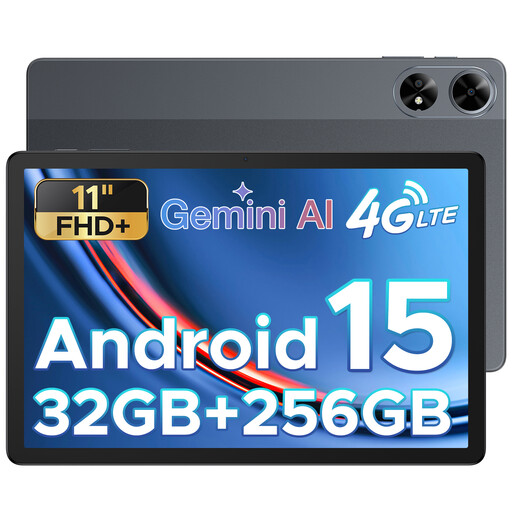
The 11-inch size is an option for reading text on a mid-sized screen.
The product title lists an FHD+ display, 32 GB RAM, 256 GB of storage and a SIM card slot.
Save the PDFs to your device before you leave, then reopen them with your connection turned off. Adobe says Acrobat for mobile can open files stored on your device and in cloud storage; also check that any notes you’ve made remain available offline.
No, not if you’re only reading; if you want to write or highlight, check that the pen works with your PDF app. Samsung says an S Pen is included with the Tab S10 FE series. Apple lists Pencil support for the iPad Air (M4), but no Pencil in the stated box contents.
Yes, the Dutch government lists tablets among the electronic devices permitted in hand luggage. Check any additional battery and usage rules with the airline operating your flight, and for your entire itinerary.
Not without checking your airline’s rules. KLM says you can take a maximum of two power banks, but must not use or charge a power bank on board; this policy doesn’t automatically apply to other airlines.
ACM ConsuWijzer says online purchases generally come with a 14-day statutory cooling-off period, starting from delivery, subject to applicable exceptions. You’re also entitled to a product that works as expected under normal use; this doesn’t automatically mean you get a fixed two-year warranty.