What should you look for when buying?
First decide whether viewing diagrams together, annotating them or working with your own files matters most. Then check the screen, compatibility and exactly what’s included.
| What to consider |
What to look for |
Who is this important for? |
| Viewing a diagram together |
Compare the screen size and aspect ratio, and, if possible, try viewing one of your own diagrams. The Consumers' Association notes that tablets measuring 12 to 14 inches are less convenient to carry around. |
If I want to look at details on the same screen with other people, having a clear view around the table matters most to me. Around 31% of consumers say viewing diagram details together is their main consideration. |
| Annotating with a pen |
Check which pen is compatible, whether it’s included with the model you’ve chosen and whether your document app can save annotations. Samsung, Lenovo and Apple describe different pen and bundle options. |
If I want to add arrows or comments to the drawing during a discussion, I want to know in advance which pen works and what else I’ll need. Around 25% of consumers put annotating first. |
| Using files and apps |
Check that your file formats and essential apps work with the operating system. If possible, try one of your own diagrams and see whether you can use your notes alongside it. |
If I want to combine diagrams with documents or study apps, the tablet needs to fit the way I already work. Around 19% of consumers say files and apps are their main consideration. |
| Carrying and charging |
Compare the size, weight and charging options for the exact model. A stated battery capacity alone doesn’t guarantee a particular battery life; the Consumers' Association describes large tablets as less practical when you’re out and about. |
If I often take my tablet with me or there’s no power socket at the table, I want to consider its size and charging options. Around 13% of consumers prioritise portability and battery use. |
| Total cost |
Check what’s in the box and only include accessories you actually need. Apple doesn’t include a Pencil with the iPad (A16), Lenovo describes a specific bundle with a pen, and Xiaomi doesn’t include a power adapter with the Pad 7. |
If I want to stay within my budget, I want to compare the tablet with the accessories I really need. Around 12% of consumers make the total purchase cost their top priority. |
Tablets on Joybuy for viewing and annotating together
These Joybuy tablets are suited to use around a shared table. Some models offer plenty of screen space and, where specified, include a pen for making notes.
 No image available
Lenovo Yoga Tab ZAG60028PL, 11.1-inch, 12 GB/256 GB, Luna Grey
The product description says a Lenovo Tab Pen Pro is included for anyone who wants to add notes or sketches.
11.1-inch touchscreen with 3.2K resolution and 144 Hz; Snapdragon 8 Gen 3, 12 GB LPDDR5X, 256 GB UFS 4.0, Wi-Fi 7 and Android 15.
Joybuy
 No image available
HONOR Pad X8b, 128 GB, Space Grey
The stated 11-inch screen size makes this an option to compare for viewing together around a table.
11-inch screen with a resolution of 1920 × 1200 pixels; Android with Google services.
Joybuy
 No image available
Lenovo Idea Tab, 11-inch, 8 GB/256 GB, Grey
The product description says a Lenovo Tab Pen is included for anyone who wants to annotate diagrams.
11-inch IPS screen with a resolution of 2560 × 1600 pixels and 90 Hz; Wi-Fi 5 and Android 15.
Joybuy
 No image available
Lenovo Idea Tab Plus, 12.1-inch, 8 GB/256 GB, Rose
The product title lists a pen with this model, as well as a larger screen to compare around the table.
12.1-inch 2.5K screen, 8 GB RAM, 256 GB storage and Wi-Fi.
Joybuy
 No image available
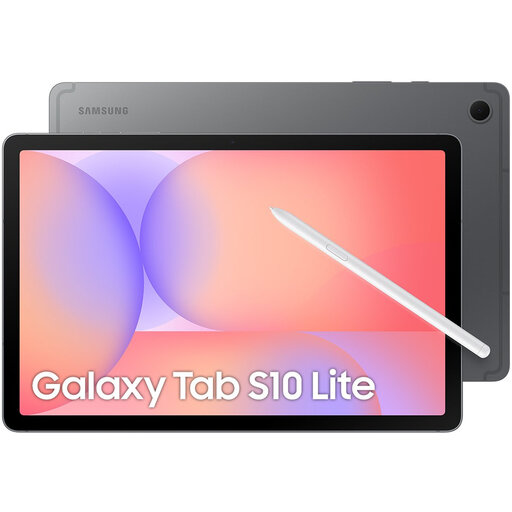
Samsung Galaxy Tab S10 Lite, Wi-Fi, 128 GB, Grey
Samsung says an S Pen is included with the Galaxy Tab S10 Lite, so you can make notes without choosing a pen separately.
10.9-inch screen and 128 GB storage. Check the package contents for the model you’ve chosen.
Joybuy
Frequently asked questions
Is a bigger screen always better for viewing a diagram around a table?
No, it depends on the table and whether you want to take the tablet with you. A larger screen can show more of a drawing, but the Consumers' Association describes tablets measuring 12 to 14 inches as less convenient to carry around. Try viewing one of your own diagrams on a screen size that will fit on the table.
How can I avoid buying the wrong pen?
First check the exact tablet model, then check which pen is compatible and what’s included in the box. Apple specifies support for certain Apple Pencil models with the iPad (A16); Samsung says an S Pen is included with the Galaxy Tab S10 Lite.
Should a new tablet come with a charger?
Not necessarily; the charging port and the contents of the box are two different things. The European Commission describes the common USB-C charging rules for tablets covered by the rules from 28 December 2024, but this doesn’t mean every tablet comes with an adapter. For example, Xiaomi doesn’t include a power adapter with the Pad 7, so check the box contents for the exact model.
What are my rights when I buy a tablet online in the Netherlands?
For a distance purchase from a business, the Dutch government says you’ll often have a 14-day cooling-off period; this doesn’t automatically apply to an online purchase from a private seller. You’re also entitled to a product that works as it should. The Dutch government states that there’s no fixed statutory warranty period in the Netherlands; contact the seller if something is faulty.


