For short waits, prioritise portability, a screen that’s comfortable to read and whether your puzzle games are available; you won’t necessarily need high-end gaming specs for simple games. If you want to play without an internet connection, install and test the exact games and modes you plan to use beforehand. A larger screen or extra storage is worthwhile only if the benefits suit the way you’ll use the tablet and justify its larger size or higher cost.
Who is this guide for?
Traveller with limited luggage space
You want to play puzzles during short waits without carrying a large tablet. Screen size and ease of handling are important considerations; the Dutch Consumers’ Association recommends choosing a size that suits how you’ll use it.
Puzzle player without a reliable connection
You want to keep playing if the terminal’s Wi-Fi isn’t available or usable. Whether that’s possible depends on the requirements of each game, so check beforehand on Google Play or with the game provider.
Puzzle player who wants to see every detail
You’d prefer a larger screen for text and small game elements, and are happy to carry a bigger device. The Dutch Consumers’ Association recommends choosing a size that suits how you’ll use it.
What should you look for?
First decide whether you want to play without Wi-Fi and which screen size feels comfortable. Then compare the exact model, storage and charging requirements.
| What to consider |
What should you look for? |
Who is this important for? |
| Portability |
Compare the screen size, weight and dimensions of the exact model. If possible, check that the text and controls feel comfortable to use. |
I want to play puzzles during a short wait without using up too much luggage space. Around 28% of consumers in this choice breakdown prioritise portability. |
| Playing without Wi-Fi |
Check the requirements for the specific game, install it beforehand and test the mode you want to use without a connection. If you’ll use mobile data, also check the model and your data allowance. |
I don’t want to rely on terminal Wi-Fi, and I want to know in advance whether my game works offline. Around 22% of consumers in this choice breakdown prioritise playing without a reliable connection. |
| Battery life while you wait |
Don’t treat manufacturer figures as a measure of gaming time: Lenovo’s streaming claim and Xiaomi’s battery capacity don’t tell you how long your puzzle game will run. Charge the tablet before you set off. |
I don’t want to have to recharge while waiting or travelling onwards. Around 22% of consumers in this choice breakdown prioritise battery life. |
| Readability |
Compare the screen size and resolution of the exact models, and if possible try your game on a similar screen. A specification alone doesn’t tell you how comfortable the game interface will be for you. |
I want to see small game elements clearly, and I may be happy to carry a larger device to do so. Around 17% of consumers in this choice breakdown prioritise seeing puzzle details clearly. |
| Total cost |
Check the storage, charging accessories included and any costs for your games with the model and app you choose. |
I don’t want to pay for screen space or storage I don’t need. Around 11% of consumers in this choice breakdown prioritise the total cost. |
Common pitfalls
-
Assuming a downloaded game works offline
A game may still need an internet connection while you’re using it, which could stop you playing it as planned while travelling.
Install your games and test the exact modes you want to use offline before you set off.
If a game needs the internet while you’re travelling, mobile data usage may matter. Check the game requirements and your data allowance beforehand.
-
Taking battery capacity or streaming hours as guaranteed gaming time
Lenovo states that the Tab One offers up to 12.5 hours of YouTube streaming; this isn’t a measure of how long it will run a puzzle game. Xiaomi lists battery capacity, but capacity alone can’t predict gaming time either.
Treat these figures as product specifications, not as directly comparable puzzle-game tests. Charge the tablet before you set off.
-
Assuming a larger screen is automatically the better choice
More screen space can make details easier to see, but a larger device also takes up more room when you’re travelling.
First check that your game is easy to read on your chosen screen size, then compare the model that best suits your trip.
Brands to consider
Samsung
The Galaxy Tab A11 reviewed here is a compact 8.7-inch Wi-Fi model. Check the exact storage and connectivity version when you buy.
- For the model reviewed, Samsung lists a resolution of 1340 × 800 pixels, a 90 Hz refresh rate and a 3.5mm headphone jack.
- These specifications aren’t the same as an independent gaming test. Features of other memory or storage versions don’t automatically apply to the 64GB model reviewed here.
Lenovo
The Lenovo Tab One reviewed here is a compact Android tablet with an 8.7-inch screen, 4 GB of RAM and 64 GB of storage.
- Lenovo lists a 5100 mAh battery and up to 12.5 hours of YouTube streaming for the Tab One.
- The streaming claim doesn’t tell you how long a specific puzzle game will run. Also check what’s included with your chosen model or bundle.
Xiaomi
The REDMI Pad SE 8.7 is a compact tablet; Xiaomi offers Wi-Fi and separate 4G versions.
- For the 8.7-inch version reviewed, Xiaomi lists a typical battery capacity of 6650 mAh and a refresh rate of up to 90 Hz in supported apps.
- These figures don’t prove longer gaming time or smoother performance in every puzzle game. Check whether the version on offer is Wi-Fi only or 4G.
Apple
The iPad (A16) is a larger iPadOS option if you value screen size more than a compact design.
- Apple lists an 11-inch screen, storage starting at 128 GB and a weight of 477 grams for the Wi-Fi model.
- Check that your games are available for iPadOS and whether they cost anything; these specifications don’t prove that every puzzle game will play better on it.
Tablets at Joybuy
This selection includes compact tablets for travelling and larger models if you’d like more screen space. For offline play, always check the requirements of the puzzle games you use.
 No image available
Samsung Galaxy Tab A11 X135, 64 GB, silver
Could suit you if you want a compact tablet to take with you and need mobile connectivity; check beforehand whether your games work offline.
The screen measures 8.7 inches and has a resolution of 1340 × 800 pixels. The product description lists 90 Hz, 64 GB of storage, 4G LTE and a weight of 337 g.
View product
 No image available
Xiaomi Pad 8 Pro, 12 GB RAM, 512 GB storage, grey
Could suit you if you’re looking for a tablet that the product description also recommends for gaming. Check your puzzle game’s compatibility and offline requirements.
The product name lists 12 GB RAM and 512 GB of storage.
View product
 No image available
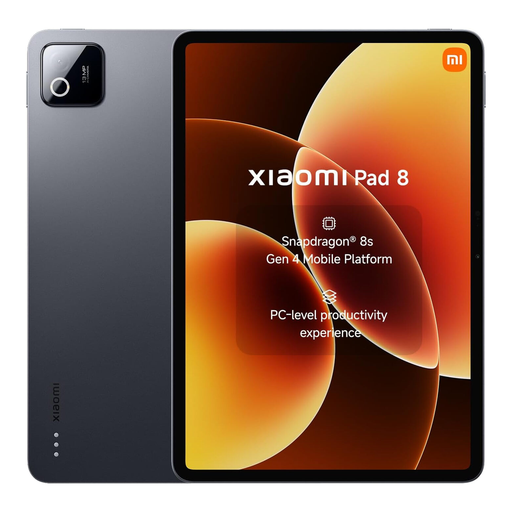
Xiaomi Pad 8, 8 GB RAM, 256 GB storage, grey
Could suit you if you’re looking for a tablet to play games on too. Check that your puzzle game is available and works without an internet connection.
The product name lists 8 GB RAM and 256 GB of storage.
View product
 No image available
HONOR Pad X8b, 128 GB, space grey
Could suit you if you want more screen space for puzzle details and are happy to carry a larger device.
The screen measures 11 inches, with a resolution of 1920 × 1200 pixels and a refresh rate of up to 90 Hz according to the product description. The product name lists 128 GB of storage.
View product
 No image available
Lenovo Idea Tab MediaTek Dimensity, 11 inches, 8 GB RAM, 256 GB, Wi-Fi 5, Android 15, grey
Could suit you if you want more room to see game elements and don’t need mobile data on your tablet.
The product description lists an 11-inch IPS screen with a resolution of 2560 × 1600 pixels and 90 Hz, 256 GB of storage and a weight of 480 g. This model is Wi-Fi only.
View product
Frequently asked questions
Can I play any downloaded puzzle game at the terminal without Wi-Fi?
No. Installing a game doesn’t necessarily mean it works offline. Check the requirements for the specific game, download it beforehand and test the mode you want to play without a connection.
How can I avoid problems when installing games just before setting off?
Install and update your games while you have a stable connection. Google Play Help lists both your internet connection and available storage as possible causes of download problems, so check them before you set off.
How can I keep a shared travel tablet secure?
Set a passcode, keep the tablet and apps up to date, and check what data each game is allowed to use. The Dutch Data Protection Authority recommends these steps to help secure a tablet.
What are my rights if a tablet bought in the Netherlands doesn’t work properly?
You’re entitled to a product that works properly; if it’s faulty, the seller must provide a solution. The Dutch government says there’s no fixed statutory warranty period that applies to all products in the Netherlands. For distance purchases, you’ll often have 14 days to change your mind; check the terms and any exceptions that apply to your purchase.


