What should you look for when choosing?
First, decide whether you’d prefer a size that’s comfortable to hold or a larger puzzle area. Then check offline functionality and the exact model configuration.
| Consideration |
What should you check? |
Who is this important to? |
| Ease of handling on the bus |
Compare the screen diagonal and weight of the exact model; consider whether you’ll hold the tablet or set it down. |
If I’ll mostly be playing with the tablet in my hand during the journey, I want a size that suits me. Around 33% of consumers prioritise ease of handling. |
| Playing without internet access |
Check the requirements for your game and try playing it without a connection after installing it. Only then decide between Wi-Fi and a mobile model. |
If you want to access your games while travelling, first check whether they work offline or need data. Around 25% of consumers are most concerned about being able to access games on the go. |
| Clarity and readability |
Compare the screen size and resolution of the exact model; check how text and controls appear in your game. |
If I’d prefer more room to see puzzle pieces and text, I may be happy to accept a larger device. Around 25% of consumers prioritise a clear view of the screen. |
| Overall cost and long-term use |
Check which accessories are included with the model you’ve chosen and whether you’ll need to buy paid games again if you switch devices. |
If you want to avoid unnecessary features, missing accessories or paying for apps twice, compare the complete model configuration and operating system. Around 17% of consumers are most concerned about overall cost and long-term usability. |
Joybuy products
These Joybuy products include compact tablets and models with a larger screen or mobile connectivity for playing puzzle games on the go.
 Image unavailable
Samsung Galaxy Tab A11 X135, 8.7-inch, LTE, 4 GB RAM, 64 GB
This compact model is a good fit if you hold your tablet while travelling and want the option of using mobile data. LTE is only relevant if the game you choose needs a connection.
The product name lists an 8.7-inch screen, LTE, 4 GB RAM and 64 GB storage.
View at Joybuy
 Image unavailable
REDMI Pad 2 Pro 5G, Graphite Gray, 8 GB RAM, 256 GB storage
This model is worth considering if you want mobile connectivity while travelling. Check whether your game needs internet access before factoring in 5G.
The product name lists 5G, 8 GB RAM and 256 GB storage.
View at Joybuy
 Image unavailable
Samsung Galaxy Tab A11 Plus, 11-inch, Wi-Fi, 128 GB
A larger screen may suit you if you want more room for puzzle text and the playing area. Bear in mind that a larger device takes up more space on the bus.
The product details list an 11-inch screen, 90 Hz, 6 GB RAM and 128 GB storage. microSD expansion is also listed.
View at Joybuy
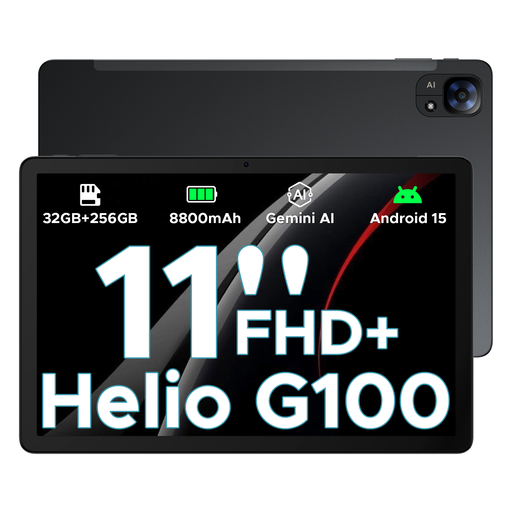 Image unavailable
DOOGEE Tab E3, 11-inch, FHD+, 90 Hz
This tablet is worth comparing if you’d like a larger screen for puzzles; also consider whether its size will be comfortable in your bus seat.
The product name lists an 11-inch FHD+ screen, 90 Hz, Wi-Fi and 5G. Several storage configurations are mentioned, so check which version you’re choosing.
View at Joybuy
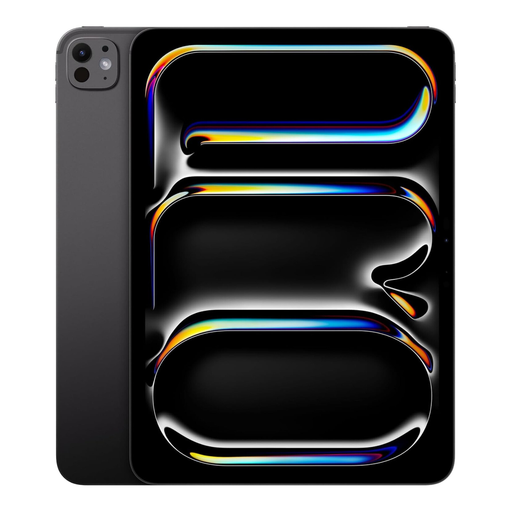 Image unavailable
Apple 13-inch iPad Pro, Wi-Fi + Cellular, 2 TB, Space Black
This model is a good fit if you want to compare a larger screen and an iPad; check whether its dimensions will be comfortable to use on the bus.
The product name lists 13 inches, Wi-Fi + Cellular and 2 TB of storage.
View at Joybuy
Frequently asked questions
Do I need a tablet with mobile connectivity for puzzle games on the bus?
Only if the games you want to play while travelling need internet access and you don’t have another way to connect. Check each game individually; the Galaxy Tab A11 is available in Wi-Fi and LTE versions. The tablet specifications don’t confirm whether your game works offline.
How should I prepare my tablet for a bus journey?
Install and open your chosen game in advance, then try it without a connection if you want to play offline. Also check how much storage space is available and charge your tablet. A quoted battery capacity or video playback time doesn’t guarantee a particular playing time for your game.
What extra costs might come with puzzle games?
Possible costs include in-game purchases, mobile data or buying a paid app again if you switch from iPadOS to Android. ACM ConsuWijzer states that before you make a purchase in an online game, it should be clear what it costs and what you’ll get for your money, and that permission is required.
What are my rights when buying a tablet online in the Netherlands?
According to ACM ConsuWijzer, consumers buying online have up to 14 days to change their mind after the product is delivered, although exceptions depend on the purchase. The Dutch government states that there’s no fixed statutory warranty period in the Netherlands; if something is faulty, contact the seller.


