
The frequent train typist
You write large parts of a proposal on the go, so you want your keyboard, document software and working position to work well together.


Start by considering the document software you need, then choose a tablet set-up that’s comfortable to type on. A compact model is easier to carry, while a larger screen or Windows 2-in-1 can give you more room for documents — although the complete set takes up more space. Don’t assume that every train will have Wi-Fi or a charging point.
You write large parts of a proposal on the go, so you want your keyboard, document software and working position to work well together.
You may have little table space or change trains often, so you’re weighing a handy size against having enough room for text and reference materials.
You want to be able to open and save documents when Wi-Fi isn’t available on the way.
A good fit if: you mainly write text, often move around and your document app works on iPadOS.
The trade-off: a smaller screen gives you less room to view a proposal alongside reference material. Also check which keyboard is included in the offer.
A good fit if: you want to type a proposal and make handwritten notes too, provided the Android app meets your needs.
The trade-off: check the contents of the bundle, keyboard layout and dimensions of the complete set for each version.
A good fit if: your proposal depends on a particular Windows workflow or software.
The trade-off: check that the software you need works with the configuration you choose. For the Surface Pro, the keyboard and pen are sold separately.
| What to consider | What should you check? | Who is it for? |
|---|---|---|
| Typing and document apps | Test the required document app with a sample file of your own, and check the keyboard, layout and bundle contents. | If I want to write long documents and make frequent revisions, I want an app and keyboard combination that suits the way I work. Around 33% of consumers prioritise comfortable typing and document work. |
| Size and workspace | Compare the dimensions of the tablet and keyboard, and consider whether the complete set will fit in your usual train seat workspace. | If I change trains often or have little table space, I weigh portability against having room to view text and reference materials. Around 27% of consumers prioritise a handy, portable size. |
| Working offline | Test whether you can open, edit and save documents offline; also check how you’ll charge the tablet on the way. | If my connection or access to power might drop out, I still want to be able to open and save my proposal. Around 20% of consumers prioritise being able to work without interruption when Wi-Fi or a charging point isn’t available. |
| Software you need | Test the required template, sign-in method and tasks you need to complete on the operating system you’re considering. | If my work requires a particular app or document workflow, I choose a device that supports it first. Around 20% of consumers make the software they need for work their top priority. |
For a long proposal, the whole typing set-up matters. Microsoft states that the keyboard and Slim Pen for the Surface Pro mentioned are sold separately.
Check what’s included with the exact version you’re considering and whether the keyboard you want is compatible.
NS offers free Wi-Fi on almost all Intercity trains; charging points depend on the type of train. Check what’s available for your planned journey.
Charge your tablet before you leave, and test whether you can open, edit and save your documents without a network connection.
Microsoft gives the battery life of the 12-inch Surface Pro (2nd Edition) for local video playback. That’s different from writing with accessories and several apps open.
Compare battery-life claims using the stated test conditions, and bear in mind how you use your device.
Apple says the 11- and 13-inch iPad Air models offer different trade-offs between portability and screen space.
The Galaxy Tab S10 FE and FE+ are Android options with different screen sizes.
Lenovo lists an Idea Tab Pro Gen 2 bundle with a 13-inch screen, pen and keyboard.
Surface Pro is a Windows 2-in-1 option for anyone who needs a Windows workflow.
The selection below includes a Windows 2-in-1 and Android tablets to compare for typing and document work on the go.
 Image unavailable
Could suit you if you’re looking for a Windows 2-in-1 with a touchscreen for document work. Check that the software you need works with the configuration you choose.
The Joybuy product title lists an Intel Core 5 120U, 8 GB RAM, 512 GB SSD, a 14-inch 2K touchscreen and Windows 11 Home. The product information says that a USB-C charger and stylus pen aren’t included.
 Image unavailable
Could suit you if you want more screen space while writing; also consider how much room the complete set will take up in your train workspace.
The Joybuy product title lists a 12.7-inch 3K screen with 144 Hz, MDT 8300, 8 GB RAM, 256 GB storage and Wi-Fi 6E.
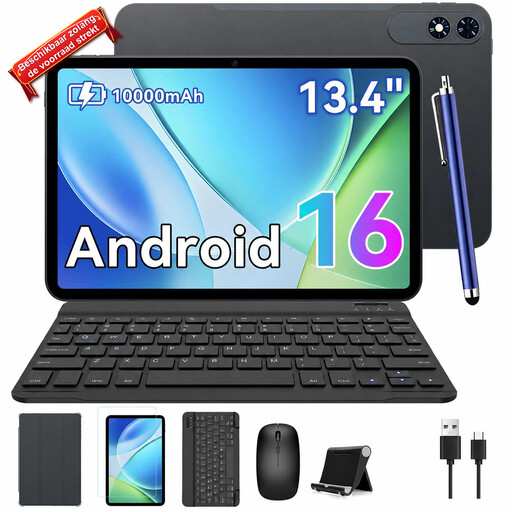 Image unavailable
Could suit you if you’re looking for a tablet with a keyboard set and extra screen space; check that the size will fit your available workspace.
The Joybuy product title lists Android 16, a 13.4-inch 2K FHD+ screen, 24 GB (8+16 GB) RAM and 256 GB ROM. The title also mentions a case, mouse and keyboard.
 Image unavailable
Could suit you if you’re looking for a compact tablet bundle with a keyboard; bear in mind that the keyboard has an English-language layout.
The Joybuy product title lists 9 GB* RAM (3 GB + 6 GB virtual expansion), 64 GB storage, a case, an English-language Bluetooth keyboard, a mouse, a stand and a stylus pen.
 Image unavailable
Could suit you if you’re looking for a compact tablet with a keyboard set; check that the English-language keyboard layout works for you.
The Joybuy product title lists Android 16, 16 GB (3+13 GB virtual expansion) RAM, 128 GB storage, T610 and a 120Hz HD screen. The title also mentions a keyboard, mouse, stylus and case.
Yes, if the app and file you choose are available offline. Before you leave, test whether you can open, edit and save the proposal without a connection. NS offers free Wi-Fi on almost all Intercity trains, but check the facilities available for your planned journey.
It depends on the exact version and offer. Microsoft says the keyboard and Slim Pen for the Surface Pro mentioned are sold separately; Lenovo lists an Idea Tab Pro Gen 2 bundle with a pen and keyboard. Check what’s included with the version you choose.
Save your file regularly and, after working offline, check that you have the right version. Microsoft distinguishes between AutoRecover and actually saving a file. For files in OneDrive or SharePoint, Microsoft also describes version history.
When you buy at a distance, the seller must provide you with information about the product and the cooling-off period, among other things. According to the Dutch government, a 14-day cooling-off period applies in many cases, with some exceptions. You’re also entitled to a product that’s fit for purpose; if there’s a problem, the seller is your point of contact for a solution. This information applies to purchases by consumers. Check the terms separately if you’re buying as a business.