Choose a capacity based on how long you want to use your tablet without access to a socket, and select the output power and charging protocol to match what your tablet supports. Multiple ports or a built-in cable can be handy at a desk. If you’re charging devices at the same time, check how much power is available and charge the power bank somewhere with good airflow.
Who is this guide for?
Tablet user without a spare socket
You want backup power for your tablet during a longer work session and are weighing capacity against portability. The Dutch Consumers’ Association highlights both performance and portability as factors to consider when choosing a power bank.
Tablet user who wants a quick top-up
You have short windows to charge and want to match the charging protocol and power output to your tablet. Check what’s supported by both the tablet and the output you’re using.
User with several devices at their desk
You want to connect your tablet and another device, or simply have fewer separate cables on your desk. Check the available connections and the power output when charging devices at the same time.
What should you look for?
For a tablet at your home-working desk, focus on the battery life you need, fast-charging support and connections that suit your devices and setup.
| What to consider |
What to look for |
Who is this important for? |
| Backup power |
Compare the capacity with how you use your tablet; the mAh figure doesn’t guarantee a set number of full charges. Also check the weight and dimensions if you’ll be carrying the power bank with you. |
If I’m working for a long time without a socket, I want enough backup power without carrying more than I need. Around 36% of consumers prioritise battery life. |
| Suitable charging speed |
Check which charging protocol and power output your tablet supports, and whether the maximum output is still available when a second device is connected. |
When I only have a short time to charge, I want to know whether my tablet can make use of the available power. Around 29% of consumers prioritise charging speed. |
| Connections and cable convenience |
Check that a built-in cable will work with your tablet and desk setup, and find out how much total power is available when charging devices at the same time. |
If I’m connecting another device as well as my tablet, or want fewer separate cables, the ports and cable reach matter. Around 21% of consumers prioritise connections and cable convenience. |
| Portability |
Compare the weight and dimensions with the capacity and the backup power you need for your tablet. |
If I regularly take my power bank to another workspace, I want to weigh up its size against the backup power I need. Around 14% of consumers say portability is their top consideration. |
Common mistakes when choosing
-
Assuming the mAh figure guarantees a certain number of tablet charges
The stated capacity alone doesn’t tell you how much usable energy your tablet will receive. The Dutch Consumers’ Association considers the energy delivered when assessing power banks; the number of charges also depends on the connected device.
Compare the capacity with your tablet’s battery and how you expect to use it. Don’t use the mAh figure to calculate a guaranteed number of full charges.
-
Comparing only the highest wattage
The power your tablet receives depends on the output used, the charging protocol it supports and the number of connected devices. Samsung states that the Galaxy Battery Pack EB-P4520XUEGEU provides up to 45 W only when one device is connected.
Check your tablet’s charging support and the specifications for the port you want to use, including when charging devices at the same time.
-
Choosing a built-in cable without checking your setup
A built-in cable is less flexible than a separate one if its connector or reach doesn’t suit your tablet and desk.
Before you choose, check that the cable connects to your tablet and reaches the spot you want on your desk.
If the built-in cable isn’t suitable, you may still need another cable that works with your setup.
-
Covering a power bank or continuing to use a damaged cable
According to the Netherlands Fire Service, heat must be able to escape from charging equipment, and damaged cables should not be used.
Charge your devices in an open space, don’t use damaged cables and follow the instructions for use.
Brands to compare
Belkin
Belkin describes the BoostCharge BPB024hq as a 20,000 mAh power bank with a built-in USB-C cable and up to 30 W Power Delivery.
- Belkin says the model can charge up to three devices and supports pass-through charging.
- Check that the built-in cable suits your tablet and desk setup; these specifications apply to the BPB024hq.
Xtorm
Xtorm lists the Fuel Series 5 FS5200 as having a capacity of 20,000 mAh and up to 35 W USB-C Power Delivery.
- According to Xtorm, the model has two USB-C ports and one USB-A port.
- The stated maximum charging speed doesn’t guarantee the same speed with every tablet or when charging devices at the same time.
Fresh 'n Rebel
Fresh 'n Rebel lists the Powerbank 18000 mAh Silky Sand as having a capacity of 18,000 mAh and 20 W Power Delivery.
- The manufacturer lists charging tablets as one of its uses.
- Compare the capacity and power output with your own needs; the stated number of possible charges won’t necessarily apply to every tablet.
Samsung
Samsung lists the Galaxy Battery Pack EB-P4520XUEGEU as having a capacity of 20,000 mAh, USB-C, Power Delivery 3.0 and up to 45 W.
- The specifications give you clear points to compare with your tablet’s charging support.
- Samsung states that 45 W is available only when one device is connected; this applies to the model specified above.
Anker
Anker describes the Zolo A1689 as a 20,000 mAh power bank with a built-in USB-C cable and up to 30 W.
- The built-in cable could suit a desk where you want to use fewer separate cables.
- Check the exact model and its specifications; don’t confuse the A1689 with a Zolo model that has different specifications.
Power banks at Joybuy
These power banks offer options for backup power, wired charging and connections that could be useful at a home-working desk. Always check that the charging protocol and connection are compatible with your tablet.
 No image available
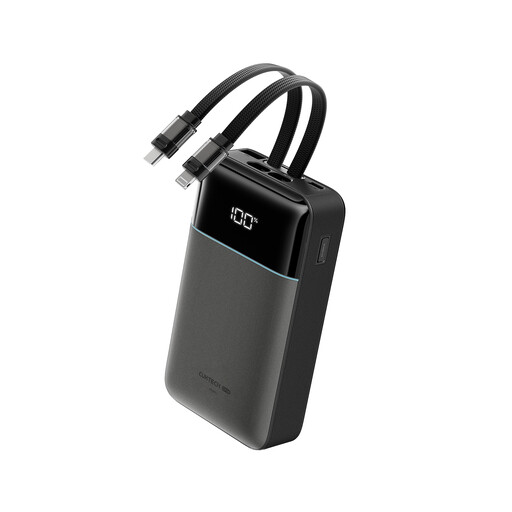
CUKTECH power bank, 20,000 mAh, 40 W, with built-in Lightning and Type-C cables
The built-in cables could suit a desk where you want to use fewer separate cables; check that the connector is compatible with your tablet.
The product name lists 20,000 mAh and up to 40 W.
Joybuy
 No image available
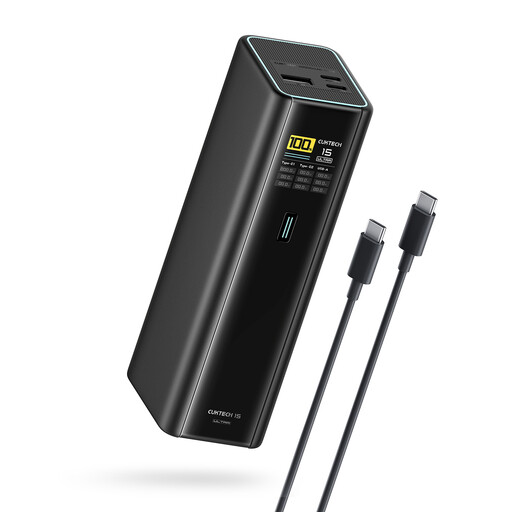
CUKTECH 15 Ultra Power Bank, 20,000 mAh, 140 W, PD3.1, 3-port USB-C
This could suit you if you need several USB-C connections; check that the charging protocol and power output are suitable for your tablet.
The product name lists 20,000 mAh, PD3.1, up to 140 W and three USB-C ports.
Joybuy
 No image available
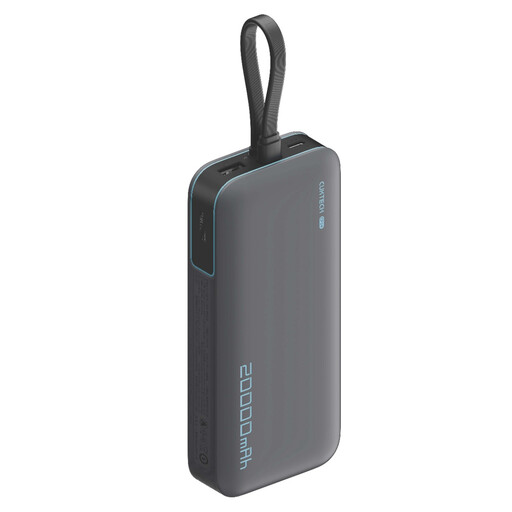
CUKTECH CP24 power bank with 3C LPB200N bundle, 20,000 mAh, 40 W
The stated capacity could be useful if you’re looking for backup power for your tablet; the number of charges depends on your tablet and how you use it.
The product name lists 20,000 mAh and up to 40 W.
Joybuy
 No image available
Samsung Power Bank Fast Charge, 20,000 mAh, 45 W, three USB-C ports
The three USB-C ports listed could suit a desk with several devices; check how much power is available when charging devices at the same time.
The product name lists 20,000 mAh and up to 45 W. According to the product description, 45 W is available only when one device is connected.
Joybuy
 No image available
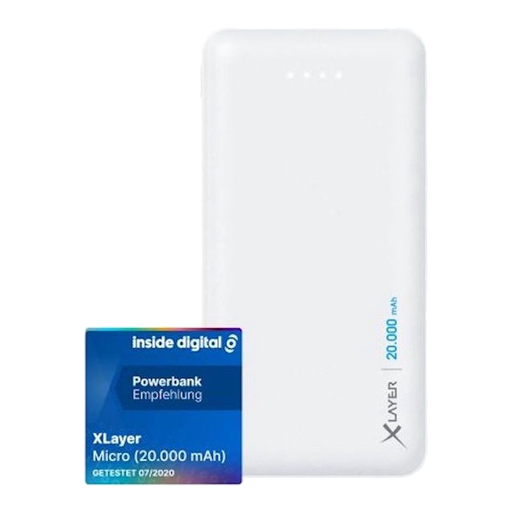
Xlayer Power Bank Micro White, 20,000 mAh, two USB-A outputs
The USB-A outputs listed could be useful if your tablet can charge using the appropriate cable; check your tablet’s connection.
The product name lists 20,000 mAh, two USB outputs and one USB-C input. The USB-A outputs described are 5 V/2,1 A and 5 V/1,0 A; USB-C is an input, not an output.
Joybuy
Frequently asked questions
Is 20,000 mAh enough for your tablet?
It depends on your tablet and how long you want to use it. Compare your tablet’s battery and how you expect to use it with the power bank; the stated mAh figure doesn’t guarantee a set number of full charges.
Can you charge your tablet and phone at the same time?
Yes, if you have a model with suitable outputs that can be used at the same time. Belkin describes this feature for the BPB024hq, for example; also check how much total power is available when both devices are charging.
How can you use a power bank safely at your home-working desk?
Follow the instructions for use and the advice of the Netherlands Fire Service: leave charging equipment uncovered so heat can escape, and don’t use damaged cables.
Where can you recycle an old power bank?
The Dutch government provides information about recycling old and used devices that need electricity or batteries. Use this information to find the right collection point for your power bank.


